Sc llr forms 2026

Get Form
sc llr Preview on Page 1

Here's how it works

01. Edit your sc llr online
Type text, add images, blackout confidential details, add comments, highlights and more.
02. Sign it in a few clicks
Draw your signature, type it, upload its image, or use your mobile device as a signature pad.
03. Share your form with others
Send sc llr forms via email, link, or fax. You can also download it, export it or print it out.

How to use or fill out sc llr forms with our platform

Form edit decoration
9.5
Ease of Setup
DocHub User Ratings on G2
9.0
Ease of Use
DocHub User Ratings on G2
  1. Click ‘Get Form’ to open the sc llr form in the editor.
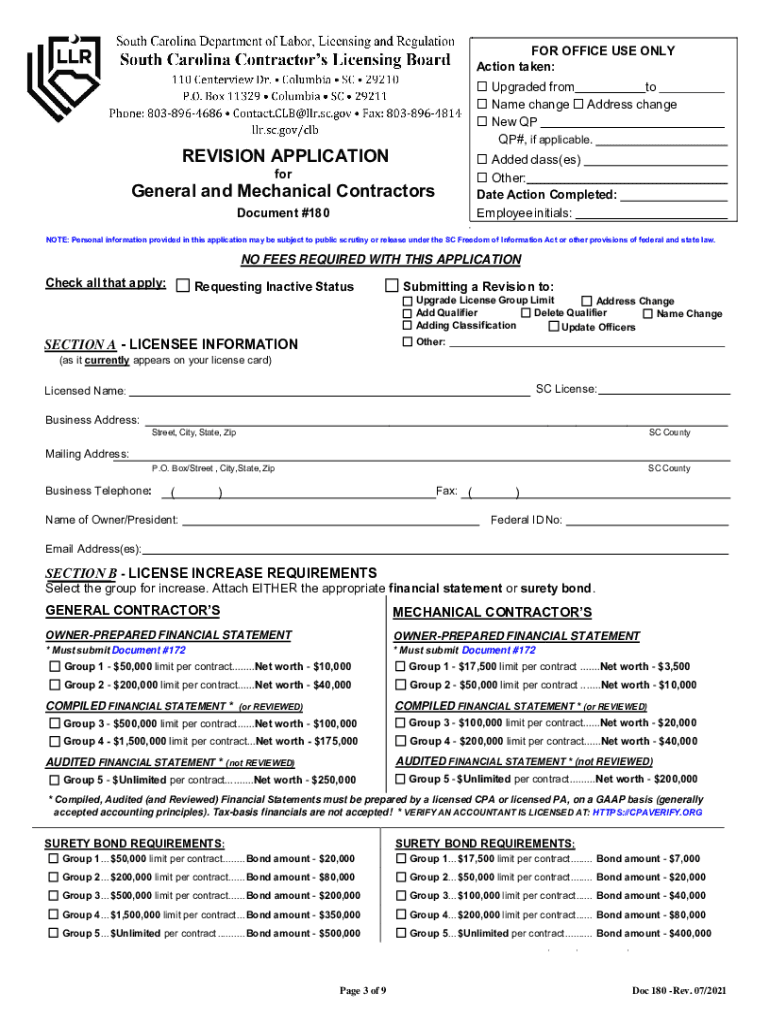
  2. Begin by completing Section A, which includes your licensee information. Ensure all fields are filled accurately, including your SC License number and business address.
  3. Proceed to Section B for license increase requirements. Select the appropriate group for your increase and attach either a financial statement or surety bond as required.
  4. If adding a qualifying party (QP), complete Sections A, D(1), E, and include necessary identification documents such as a social security card and picture ID.
  5. For name or address changes, fill out Sections A and C. If changing corporate officers, complete Sections A, E, and F.
  6. Review all sections for completeness before submitting. Use our platform’s tools to ensure clarity and accuracy in your entries.

Start using our platform today to streamline your sc llr forms completion for free!

See more sc llr forms versions

We've got more versions of the sc llr forms form. Select the right sc llr forms version from the list and start editing it straight away!
Versions Form popularity Fillable & printable
2021 4.8 Satisfied (197 Votes)
2021 4.3 Satisfied (70 Votes)
2019 4.4 Satisfied (211 Votes)
2015 4 Satisfied (28 Votes)
be ready to get more

Complete this form in 5 minutes or less

Get form

Got questions?

We have answers to the most popular questions from our customers. If you can't find an answer to your question, please contact us.
Contact us

eSignatures are a perfect alternative to traditional signing, as they save time, effort, and money people spend on printing, scanning, and paper delivery. You can electronically sign your sc llr license lookup using a reliable and powerful online document processing services like DocHub. It complies with primary eSignature standards (ESIGN and UETA), so all documents approved there are legally binding and have the same validity as physically signed ones.

With DocHub, you have several convenient methods to edit your scllr online. You can drag and drop the form and edit it straight at the DocHub website or use our browser extension to fill out your form immediately. Additionally, you can edit your PDF on your phone, as DocHub is compatible with all the available mobile platforms.

To be eligible for licensure, applicants must pass a technical exam (when required), a business management/law exam and be able to document two (2) years of experience within the last 5 years for the classification(s) of work in which you are applying.
Inactive Status/Disassociation of licensees: A licensee can request to be placed on inactive status by completing document #200.
Your license is expired if not renewed by the due date. You will incur penalties of $15 per month in addition to the regular fee if you do not bring your license up to date. If you do not renew within six months of license expiration, you will have your license canceled.

Security and compliance

At DocHub, your data security is our priority. We follow HIPAA, SOC2, GDPR, and other standards, so you can work on your documents with confidence.

Learn more
ccpa2
pci-dss
gdpr-compliance
hipaa
soc-compliance
be ready to get more

Complete this form in 5 minutes or less

Get form

People also ask

South Carolina requires that most contractors obtain a license when performing work in the state. Three different kinds of licensesgeneral contractor (for work valued over $5,000), residential home builders, and residential specialty contractorsare available depending on the type of work youll be performing.
In all cases of revocation, you are required to wait one full year before requesting reinstatement. Here are the general steps in the process: Fill out the Petition Application Form and Checklist. Pay the petition application fee of $800.
RMO License One of the most common ways that individuals with no experience can have access to a contractor license is through an RMO or RME. RMO stands for Responsible Managing Officer.
Together with your application submission, you need to cover the relevant license and registration fees: General and mechanical contractor license $350 for a full licensing period or $175 if there are less than 12 months left from it.
To be eligible for licensure, applicants must pass a technical exam (when required), a business management/law exam and be able to document two (2) years of experience within the last 5 years for the classification(s) of work in which you are applying.

scllr rec background check