



Here's how it works



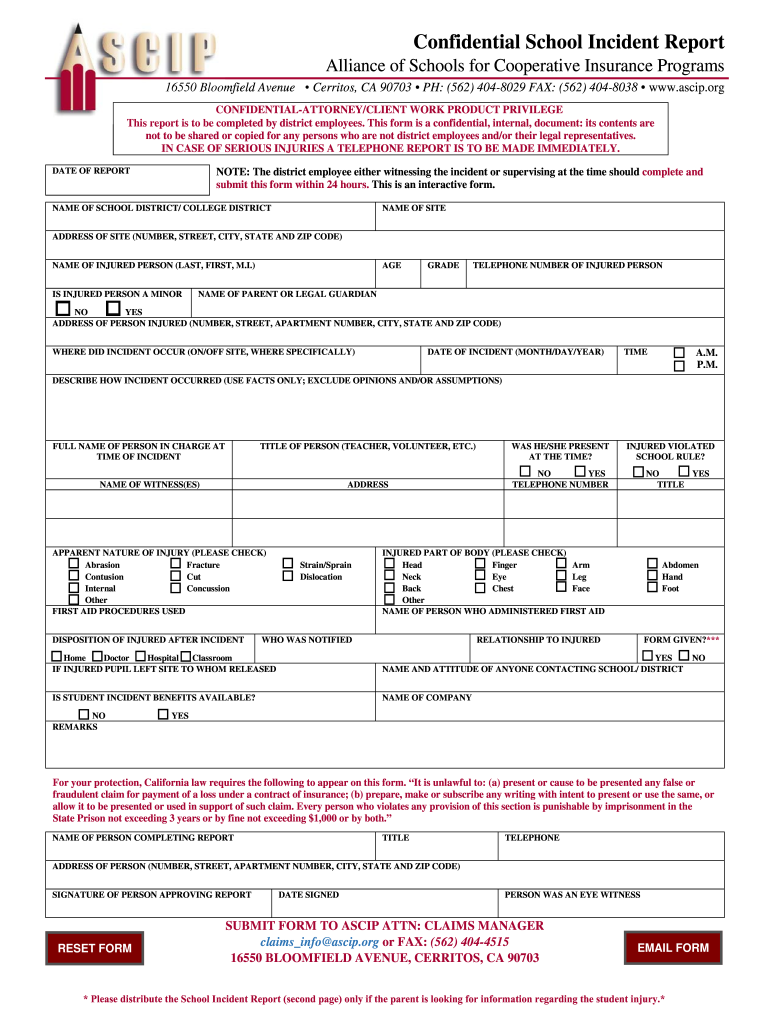
How to use or fill out 2019 ca ascip confidential incident form with our platform

- Click ‘Get Form’ to open the 2019 ca ascip confidential incident form in the editor.
- Begin by entering the 'Date of Report' at the top of the form. This is crucial for tracking the timeline of the incident.
- Fill in the 'Name of School District/College District' and 'Name of Site' fields to identify where the incident occurred.
- Provide details about the injured person, including their name, age, grade, and contact information. Indicate if they are a minor.
- Describe how the incident occurred in detail, focusing on factual information without opinions. This section is vital for clarity.
- Complete sections regarding first aid administered and any witnesses present during the incident. Ensure all relevant parties are documented.
- Finally, sign and date the report at the bottom before submitting it to ensure compliance with district policies.
Start using our platform today to easily fill out your forms online for free!
It's free
See more 2019 ca ascip confidential incident form versions
Got questions?
How can I eSign my 2019 ca ascip confidential incident form from Gmail?
With DocHub, it’s pretty simple. The service offers users an add-on called DocHub for Gmail, which you can find in the Google Workspace Marketplace free of charge. Set it up and give it access to your Google account. Open your email with your 2019 ca ascip confidential incident form attached and click on the add-on button in the right-side panel. Log in to your DocHub account, and upload the file to our editor, where you can complete it and sign.
How do you get 2019 ca ascip confidential incident form?
You can find the latest and most relevant version of the 2019 ca ascip confidential incident form in our DocHub forms library. Search it by categories or utilize the search field to get the exact template that suits your situation. You may open this form for editing once you find it.
Security and compliance
At DocHub, your data security is our priority. We follow HIPAA, SOC2, GDPR, and other standards, so you can work on your documents with confidence.
Learn more