Bluebonnet invoice 2026

Get Form
bluebonnet invoice Preview on Page 1

Here's how it works

01. Edit your form online
Type text, add images, blackout confidential details, add comments, highlights and more.

02. Sign it in a few clicks
Draw your signature, type it, upload its image, or use your mobile device as a signature pad.

03. Share your form with others
Send it via email, link, or fax. You can also download it, export it or print it out.

How to use or fill out bluebonnet invoice with our platform

Form edit decoration
9.5
Ease of Setup
DocHub User Ratings on G2
9.0
Ease of Use
DocHub User Ratings on G2
  1. Click ‘Get Form’ to open the bluebonnet invoice in the editor.
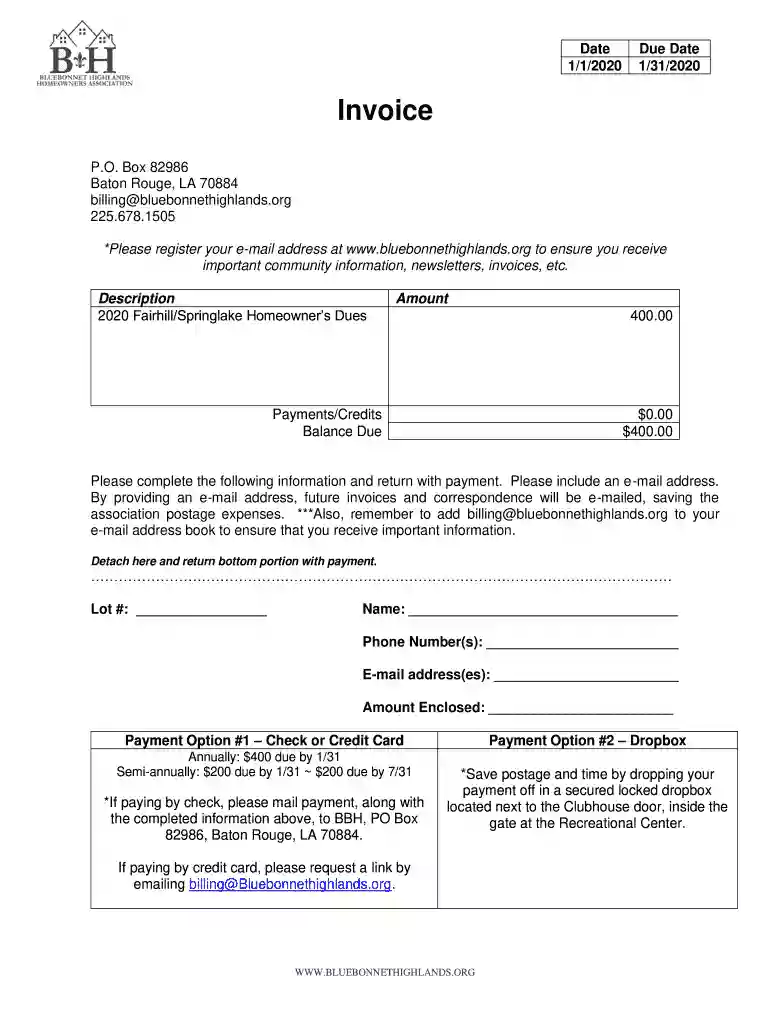
  2. Begin by entering the date and due date at the top of the form. Ensure these dates are accurate for timely processing.
  3. In the 'Description' section, confirm that '2020 Fairhill/Springlake Homeowner’s Dues' is correctly listed.
  4. Fill in your personal information in the designated fields: Lot number, Name, Phone Number(s), and E-mail address(es). Providing an email will facilitate future correspondence.
  5. Indicate the 'Amount Enclosed' based on your chosen payment option. Review the payment options provided for clarity on amounts due.
  6. If paying by check, ensure you follow instructions to mail it along with this completed form. If using a credit card, request a payment link via email as instructed.

Start filling out your bluebonnet invoice today for free and streamline your payment process!

See more bluebonnet invoice versions

We've got more versions of the bluebonnet invoice form. Select the right bluebonnet invoice version from the list and start editing it straight away!
Versions Form popularity Fillable & printable
2020 4.9 Satisfied (46 Votes)
2019 4.4 Satisfied (117 Votes)
be ready to get more

Complete this form in 5 minutes or less

Get form

Got questions?

We have answers to the most popular questions from our customers. If you can't find an answer to your question, please contact us.
Contact us
You must pay the delinquent amount in full at any Member Service Center, by calling 800-842-7708 to speak to a member service representative or by using the automated voice system, through your online MyBluebonnet account, or via our mobile app.
4 Simple Ways To Make A Bill Payment Pay Online. Click on My Account and enter your username and password to access your account and make a payment. Or, login here. Pay By Phone. Call our dedicated, toll-free line at tel:1-844-227-2648 to make payments by phone. Pay By Mail* Send your payment to:
The average electricity rate for Bluebonnet Electric Coop, Inc customers is 11.14 cents/kWh.
Save electricity and save money with a few simple suggestions from Bluebonnet Electric Cooperative. LOWER YOUR WATER HEATER TEMPERATURE. TURN DOWN THE THERMOSTAT. SWITCH THE DIRECTION CEILING FANS TURN. UPGRADE YOUR FIREPLACE. LET THE SUN IN. USE SPACE HEATERS SELECTIVELY. WEAR WARM CLOTHES. LIMIT THE USE OF EXHAUST FANS.
Providing safe, reliable, affordable power to our members in 14 Central Texas counties since 1939.

Security and compliance

At DocHub, your data security is our priority. We follow HIPAA, SOC2, GDPR, and other standards, so you can work on your documents with confidence.

Learn more
ccpa2
pci-dss
gdpr-compliance
hipaa
soc-compliance
be ready to get more

Complete this form in 5 minutes or less

Get form

People also ask

Contact your bank or credit union for help. You can pay in person at authorized third-party payment locations and Consumers Energy payment offices. Accepted payment methods and fees vary by location. Be sure to bring your energy bill or account number to the approved third-party payment locations.
Pay at a Drop Box Make your payment online at City of Austin Utilities, at one of our walk-in Utility Customer Service Centers, or at an authorized pay station. Make a Quick Payment online or call 1-833-375-4919 to make a Quick Payment by phone. One-time Quick Payments will post to your utility account on the same day.
Online Bill Payment You can pay your bill online each month using My Account. Simply login and select the Pay My Bill option in the menu. You can use a credit or debit card, OR an electronic funds transfer (EFT) from your bank, and schedule your payment for a future date.

Related links