
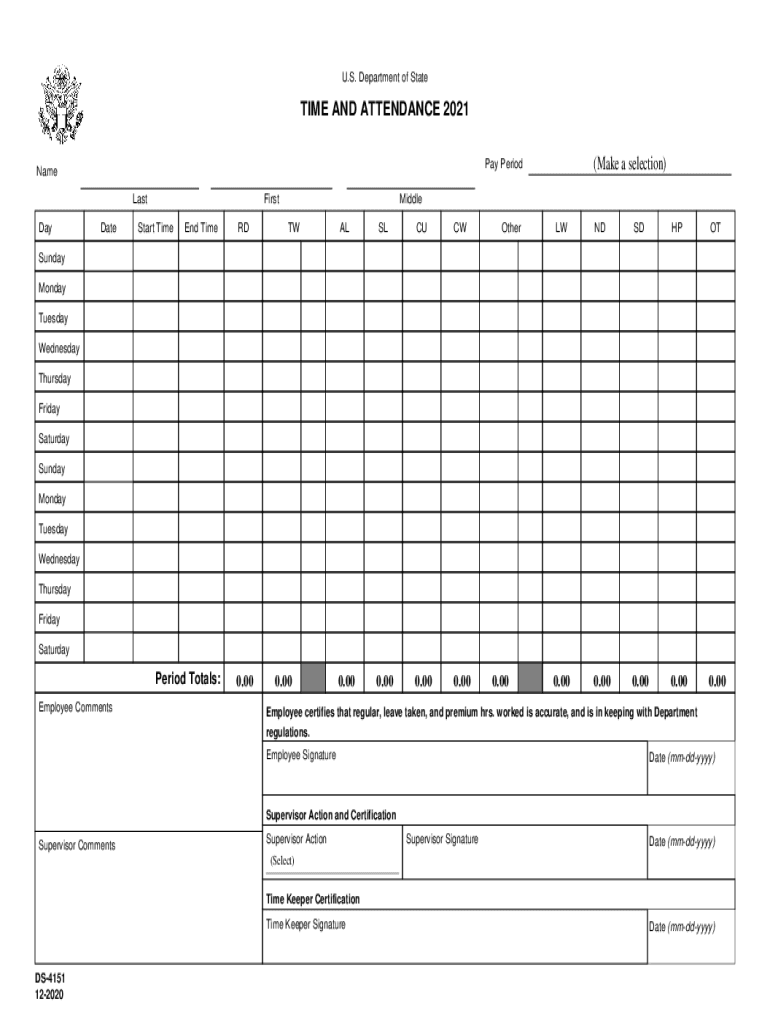







Definition and Purpose of DS-4151
The DS-4151 is a time and attendance record specifically designed for employees of the U.S. Department of State. This form is crucial for accurately tracking work hours, leave taken, and related certifications necessary for payroll processing. It ensures compliance with departmental regulations by documenting the exact time employees work, which is vital for both legal compliance and internal auditing purposes.
How to Use the DS-4151
When using the DS-4151, start by identifying the pay period you're recording. The form requires detailed entries of daily work hours, any leave taken, and additional remarks for any deviations from standard working patterns. Supervisors are required to review these entries for accuracy, ensuring all time worked is authentic and verified before finalizing the form.
- Record Work Hours: Enter the start and end time for each workday.
- Note Leave Taken: Log any leave days and specify the type of leave.
- Add Certification: Both employees and supervisors must certify the accuracy of the records by signing the form.
Steps to Complete the DS-4151
Completing the DS-4151 involves several methodical steps:
- Fill Out Employee Details: Include name, department, and employee ID.
- Log Daily Hours: Document the exact hours worked each day, including breaks.
- Record Leave: Clearly specify any type of leave (sick, vacation, etc.) and the dates taken.
- Certify and Submit: After verifying information accuracy, both the employee and supervisor must certify the entries.
Sub-Subsections:
- Verifying Information: Ensure all entries match the employee’s actual work schedule.
- Certification Process: Detail steps for digital or physical certification, depending on department policy.
Key Elements of the DS-4151 Form
The DS-4151 is structured to capture:
- Employee details: Name, ID, department.
- Work hours: Specific times each workday.
- Leave records: Types and dates.
- Certifications: Signatures from both employees and supervisors.
Legal Use of the DS-4151
As an official document, the DS-4151 must be completed accurately to comply with federal laws governing record-keeping for government employees. False entries can lead to disciplinary actions and may affect payroll and job status, making precision and honesty essential when handling this form.
Compliance Tips:
- Ensure accuracy by double-checking entries.
- Understand legal implications of falsifying records.
- Seek guidance from HR for compliance questions.
How to Obtain the DS-4151
Employees can typically access the DS-4151 through their department's internal portal or request a physical copy from their HR representative. For departments leveraging digital workflows, the form might be integrated into internal employee software platforms, streamlining access and submission.
Submission Methods (Online/Mail/In-Person)
The DS-4151 can be submitted through various methods depending on department preferences:
- Online Submission: Secure portals can be used for digital submissions.
- Mail: Physical copies can be sent to the designated department office.
- In-Person: Employees can also hand-deliver completed forms to supervisors or HR.
Digital vs. Paper Version of the DS-4151
Both digital and paper versions of the DS-4151 offer unique advantages. Digital forms enhance convenience and are easily integrated into workflow management systems, while paper formats remain available for departments without digital infrastructure or for employees who prefer traditional methods.
- Digital Formats: Offer quicker completion and submission processes, especially with integrated department software.
- Paper Formats: Still vital for locations lacking access to reliable technology or for employees unfamiliar with digital submissions.
Scenarios and Examples of DS-4151 Use
The DS-4151 is primarily used by full-time and part-time employees of the Department of State who are required to document their working hours and any leave taken. Real-world scenarios include:
- Case 1: An employee working remotely needs to log hours accurately to reflect varied work hours across different time zones.
- Case 2: A supervisor addressing discrepancies in logged hours during performance reviews.
Each section and example provided ensures employees understand the significance of precise and truthful reporting. These guidelines encourage compliance and support efficient workflows, aligning with procedural standards.




