



Here's how it works



How to use or fill out 480.20 CPT rev. 01.20 with our platform

- Click ‘Get Form’ to open it in the editor.
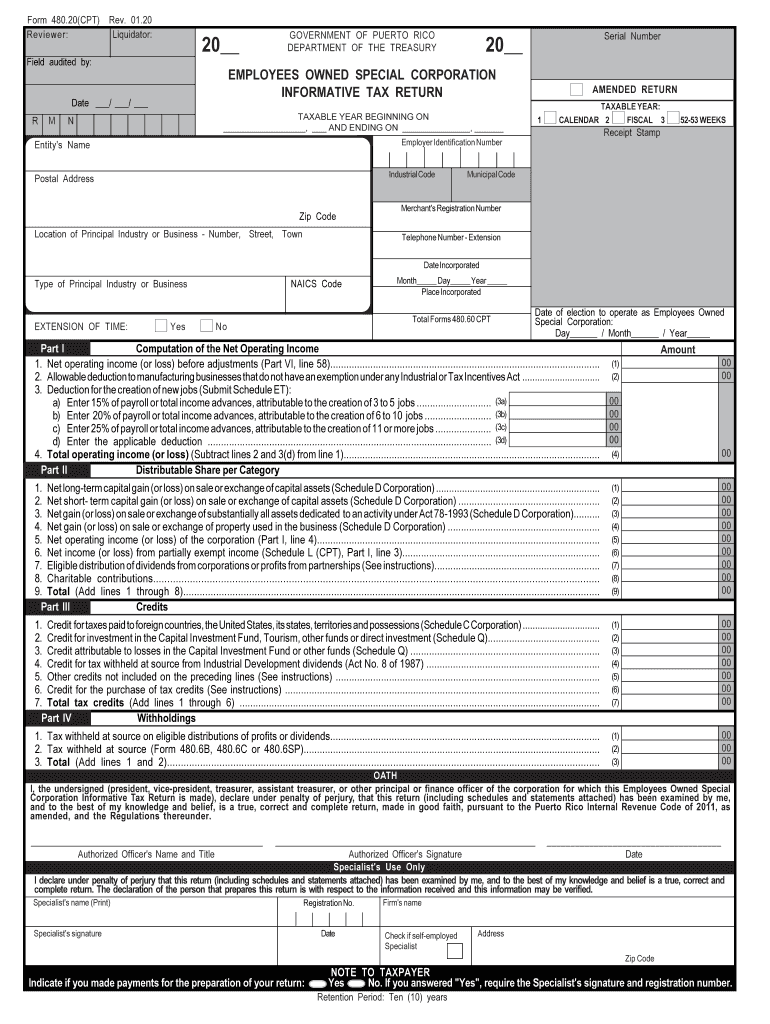
- Begin by entering the 'Employer Identification Number' and 'Entity's Name' at the top of the form.
- Fill in the 'Taxable Year' section, indicating whether it is a calendar or fiscal year.
- Complete Part I by calculating your net operating income, ensuring to include all necessary deductions as specified.
- Proceed to Part II and list distributable shares per category, making sure to accurately report gains or losses from capital assets.
- In Part III, input any applicable tax credits you are claiming, ensuring that all calculations are correct.
- Review all sections for accuracy before signing at the end of the document, confirming that all information is true and complete.
Start using our platform today for free to streamline your form completion process!
It's free
See more 480.20 CPT rev. 01.20. 480.20 CPT rev. 01.20 versions
Got questions?
How do I sign my 480.20 CPT rev. 01.20. 480.20 CPT rev. 01.20 without printing?
eSignatures are a perfect replacement for traditional signing, as they save time, effort, and costs people spend on printing, scanning, and paper delivery. You can electronically sign your 480.20 CPT rev. 01.20. 480.20 CPT rev. 01.20 utilizing a trustworthy and powerful online document processing tool like DocHub. It complies with primary eSignature standards (ESIGN and UETA), so all documents approved there are legally binding and have the same validity as physically signed ones.
Can I sign my 480.20 CPT rev. 01.20. 480.20 CPT rev. 01.20 while I edit it?
If you edit your 480.20 CPT rev. 01.20. 480.20 CPT rev. 01.20 with DocHub, you will not need to look for other software or solutions to sign it. An electronic signature is part of DocHub’s extensive editing toolset, which enables you to apply changes in your form without jumping between websites. Just complete your form, double-check the correctness of the data and place your electronic signature at the end to make it submission-ready quickly.
Security and compliance
At DocHub, your data security is our priority. We follow HIPAA, SOC2, GDPR, and other standards, so you can work on your documents with confidence.
Learn more


Related forms