




Here's how it works

01. Edit your divorce papers hawaii online
Type text, add images, blackout confidential details, add comments, highlights and more.

02. Sign it in a few clicks
Draw your signature, type it, upload its image, or use your mobile device as a signature pad.

03. Share your form with others
Send hawaii divorce forms via email, link, or fax. You can also download it, export it or print it out.
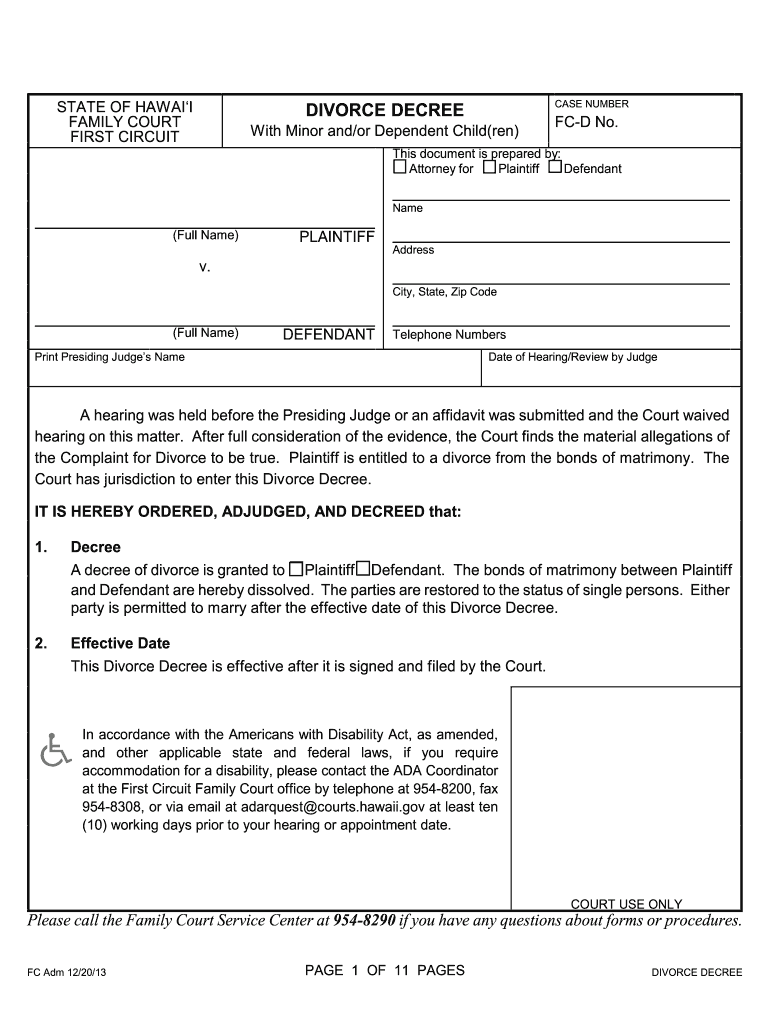
How to use or fill out Hawaii Divorce Decree with DocHub

- Click ‘Get Form’ to open the Hawaii Divorce Decree in our editor.
- Begin by entering the case number at the top of the form. This is essential for tracking your divorce proceedings.
- Fill in the names and addresses of both the Plaintiff and Defendant. Ensure that all contact information is accurate for future correspondence.
- In section 3, specify any alimony arrangements. Choose whether either party will pay alimony and detail the payment schedule if applicable.
- Proceed to section 4 to indicate if there are any children involved. If so, list their names and dates of birth.
- Complete sections on custody, visitation schedules, and child support in sections 5 through 9. Be thorough in detailing arrangements for each child.
- Review sections regarding property division, debts, and name changes to ensure all aspects are covered as per your agreement.
- Once completed, save your document and utilize our platform’s signing feature to finalize your Divorce Decree electronically.
Start using our platform today to fill out your Hawaii Divorce Decree easily and for free!
Fill out hawaii divorce decree online
It's free
It's free
See more hawaii divorce decree versions
We've got more versions of the hawaii divorce decree form. Select the right hawaii divorce decree version from the list and start editing it straight away!
Security and compliance
At DocHub, your data security is our priority. We follow HIPAA, SOC2, GDPR, and other standards, so you can work on your documents with confidence.
Learn more


Related forms

Curriculum evaluation form
The document is a curriculum evaluation form for the Tribal Advocates Curriculum, dated June 29, 2011. It seeks feedback ...

Denny's direct deposit
The document is an authorization agreement for direct payments and automatic deposits (ACH transactions) with Lee Mechan ...

THE CALIFORNIA STATE UNIVERSITY O F F IC E O F TH E C HA N C E L LO R BAKERSFIELD CHANNEL ISLANDS CH
THE CALIFORNIA STATE UNIVERSITY O F F IC E O F TH E C HA N C E L LO R BAKERSFIELD CHANNEL ISLANDS CH
The document is a memorandum from Charles B. Reed, Chancellor of the California State University, outlining Executive Or ...

ANNUAL REPORT FORMAT For Submission during 2008-2009 - csus
The document outlines the course SPHP 242C: Methods: Language Disorders III at California State University, Sacramento, ...

A descriptive analysis of homeschooling children with autism - csus-dspace calstate
The document is a thesis titled 'A Descriptive Analysis of Homeschooling Children with Autism' by Sarah Anne Johnson and ...

DOES INTERACTIVE INSTRUCTION REALLY MAKE A
The thesis by Elaina Zarka evaluates the impact of gender equitable, interactive science instruction in an after-school ...

Examples of Negative Stereotypes - csus-dspace calstate
The document outlines a workshop titled 'Mindset and Achievement' aimed at school professionals to promote mindset-based ...

STU'S BREAKFAST - sdsu-dspace calstate
The document is a thesis titled 'Stu's Breakfast' by Adrian J. Scherger, presented for a Master of Arts in Television, F ...