




Here's how it works

01. Edit your car title kansas online
Type text, add images, blackout confidential details, add comments, highlights and more.

02. Sign it in a few clicks
Draw your signature, type it, upload its image, or use your mobile device as a signature pad.

03. Share your form with others
Send tr 40 via email, link, or fax. You can also download it, export it or print it out.
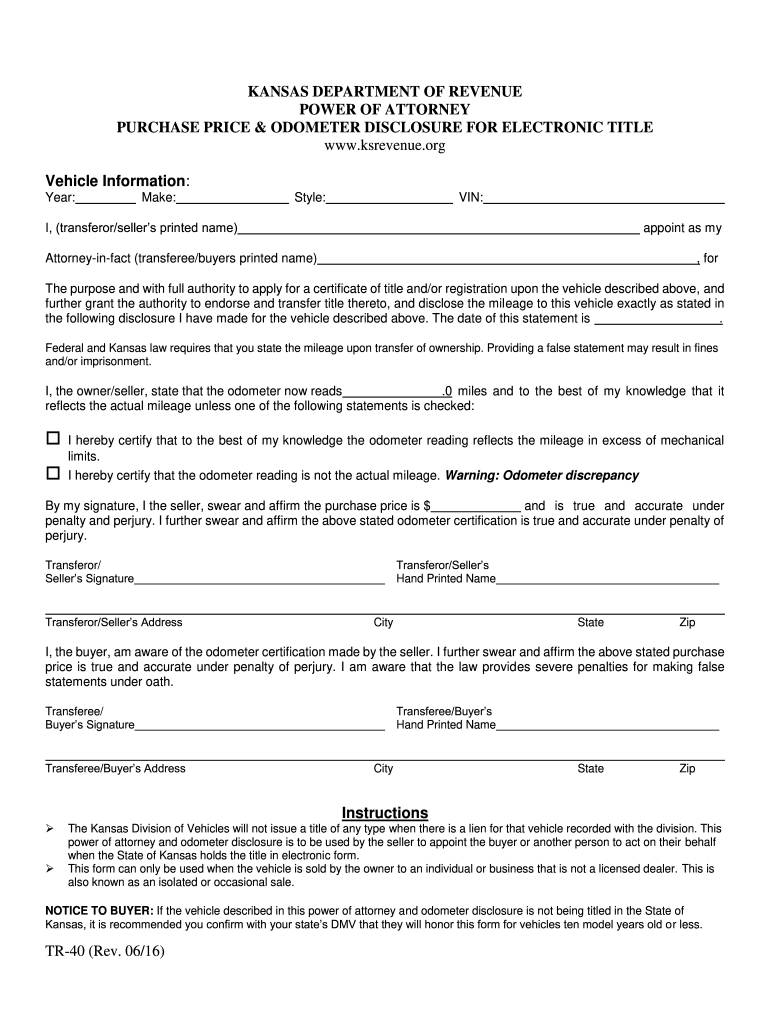
How to use or fill out Power of Attorney Purchase Price and Odometer Disclosure for Electronic Title - TR-40

- Click ‘Get Form’ to open it in the editor.
- Begin by entering the vehicle information, including Year, Make, Style, and VIN in the designated fields.
- In the section for transferor/seller’s printed name, input your full name as the seller.
- Next, enter the transferee/buyer’s printed name where indicated to appoint them as your Attorney-in-fact.
- Fill in the date of this statement and provide the current odometer reading in miles.
- Select one of the options regarding odometer discrepancies if applicable.
- Affirm the purchase price by entering it in the specified field and ensure you sign as both seller and buyer where required.
- Finally, review all entries for accuracy before saving or exporting your completed form.
Start using our platform today to streamline your document editing and signing process for free!
Fill out Power of Attorney Purchase Price and Odometer Disclosure for Electronic Title - TR-40. Power of Attorney Purchase Price and Odometer Disclosure for Electronic Title - TR-40 online
It's free
It's free
See more Power of Attorney Purchase Price and Odometer Disclosure for Electronic Title - TR-40. Power of Attorney Purchase Price and Odometer Disclosure for Electronic Title - TR-40 versions
We've got more versions of the Power of Attorney Purchase Price and Odometer Disclosure for Electronic Title - TR-40. Power of Attorney Purchase Price and Odometer Disclosure for Electronic Title - TR-40 form. Select the right Power of Attorney Purchase Price and Odometer Disclosure for Electronic Title - TR-40. Power of Attorney Purchase Price and Odometer Disclosure for Electronic Title - TR-40 version from the list and start editing it straight away!
Security and compliance
At DocHub, your data security is our priority. We follow HIPAA, SOC2, GDPR, and other standards, so you can work on your documents with confidence.
Learn more


Related forms

Airtime waiver
The document is a legal agreement from Michigan Airtime I, LLC that outlines the assumption of risk, waiver of liability ...

Pre-Authorized Payment Plan 333 Application
The document is a Pre-Authorized Payment Plan (PAD Agreement) application for SaskEnergy, allowing customers to authoriz ...

Applications and Forms - Cosmetology - State of Wyoming
The document is an application form for new independent contractors in the cosmetology field, detailing the necessary st ...

Clark County Circuit Court Rules
The document outlines the Local Court Rules for the Clark County Circuit Court, effective from February 19, 2001. It inc ...

Great Wisconsin Birdingand NatureTrail - Wisconsin Department of
The document is a comprehensive guide to the Great Wisconsin Birding and Nature Trail, specifically focusing on the Sout ...