PDF FIRE DEPARTMENT - NYC.gov 2026

Get Form
fdny certificate of correction Preview on Page 1

Here's how it works

01. Edit your fdny certificate of correction online
Type text, add images, blackout confidential details, add comments, highlights and more.
02. Sign it in a few clicks
Draw your signature, type it, upload its image, or use your mobile device as a signature pad.
03. Share your form with others
Send certificate of correction fdny via email, link, or fax. You can also download it, export it or print it out.

How to use or fill out PDF FIRE DEPARTMENT - NYC.gov with DocHub

Form edit decoration
9.5
Ease of Setup
DocHub User Ratings on G2
9.0
Ease of Use
DocHub User Ratings on G2
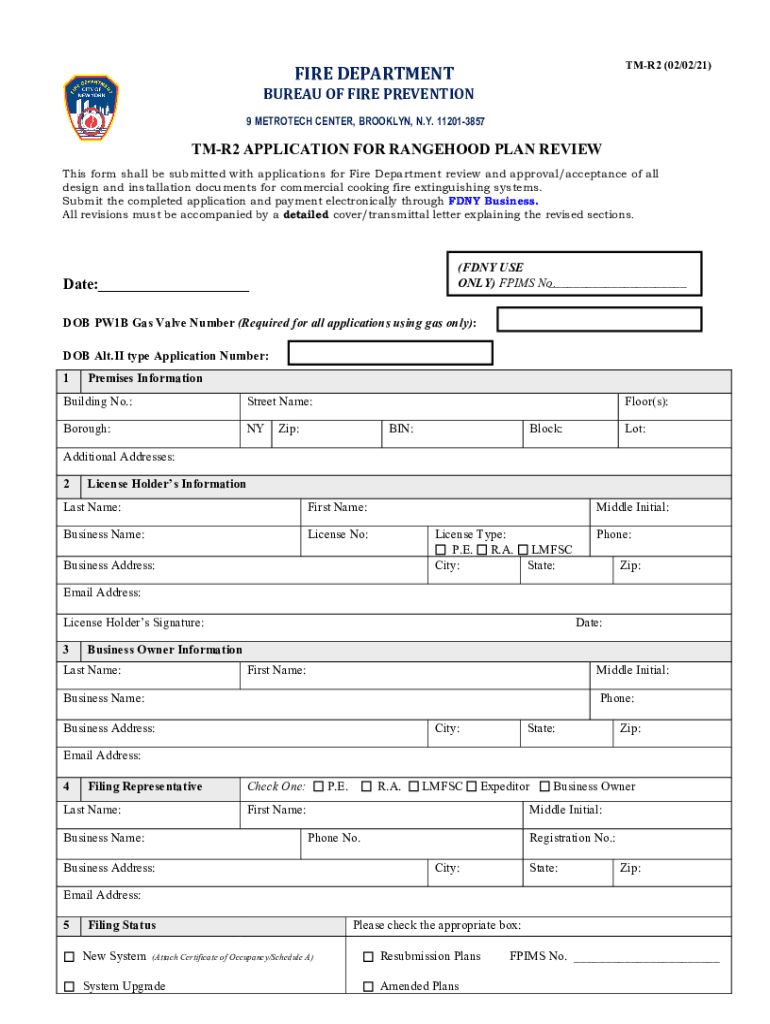
  1. Click ‘Get Form’ to open the PDF FIRE DEPARTMENT - NYC.gov application in our editor.
  2. Begin by filling out the 'Premises Information' section. Enter the building number, street name, borough, floor(s), zip code, BIN, block, and lot details accurately.
  3. Next, complete the 'License Holder’s Information' section. Provide your last name, first name, business name, license number, type of license (P.E., R.A., or LMFSC), city, state, phone number, and email address.
  4. In the 'Business Owner Information' section, repeat similar steps as above for the business owner’s details including their signature.
  5. Fill out the 'Filing Representative' section by selecting your role and providing necessary contact information.
  6. Indicate your filing status by checking the appropriate box for new systems or upgrades and provide a job description in the designated area.
  7. Complete any required asbestos abatement compliance documentation as per instructions provided in the form.
  8. Finally, review all entries for accuracy before signing and dating the application at the bottom of the form.

Start using our platform today to streamline your document editing and submission process for free!

be ready to get more

Complete this form in 5 minutes or less

Get form

Got questions?

We have answers to the most popular questions from our customers. If you can't find an answer to your question, please contact us.
Contact us

Yes, you’ll find numerous apps for this on the web. Nevertheless, if you need to eSign your fdny certificate of correction online without installing extra software, DocHub is the optimum choice you can make. This robust editor works on mobile devices just like on desktops. Open our editor in your preferred internet browser, register or sign in to your account, and start managing your documents.

You can easily fill out, modify, and even eSign your fdny certificate of correction form using DocHub. Create a new profile and begin your free trial. After that, you may upload the document with the form and easily make all the needed edits. No need to print on paper or use a third-party application to sign it, as you can put your electronic signature on your document quicker through DocHub.

If you receive a Violation Order and/or a Vacate Order, please contact and send all proof of correction to the issuing FDNY unit indicated on the Order or to the FDNY Customer Service Desk at FDNY.BusinessSupport@fdny.nyc.gov.
If your request is for the New York City Fire Department, you can call 718.999. 2000 or visit: . If you have a question about testing, please call 718.999. 2504.
If you receive a Violation Order and/or a Vacate Order, please contact and send all proof of correction to the issuing FDNY unit indicated on the Order or to the FDNY Customer Service Desk at FDNY.BusinessSupport@fdny.nyc.gov.

Security and compliance

At DocHub, your data security is our priority. We follow HIPAA, SOC2, GDPR, and other standards, so you can work on your documents with confidence.

Learn more
ccpa2
pci-dss
gdpr-compliance
hipaa
soc-compliance

People also ask

All COFs can be renewed online by logging in with a NYC ID, including Fee Exempt COFs. The FDNY strongly encourages you to create a NYC ID account and log in to view and/or renew all of your Certificates of Fitness information and expiration dates.
Fire Department violations are adjudicated by the Environmental Control Board. Email FDNY.BusinessSupport@fdny.nyc.gov. Existing violations and summonses can also be viewed online on FDNY Business. Call 311 or 212-NEW-YORK (212-639-9675) for assistance.
How to Renew a Certificate of Fitness To renew by mail, send renewal fee with the renewal notice to the address below, attention to Cashiers Unit. To renew in person, visit the testing center of FDNY at 9 MetroTech Center, Brooklyn, NY 11201.
If you receive a Violation Order and/or a Vacate Order, please contact and send all proof of correction to the issuing FDNY unit indicated on the Order or to the FDNY Customer Service Desk at FDNY.BusinessSupport@fdny.nyc.gov.
You can also get forms and instructions about open enforcement actions or request copies of fire reports online. Online. Visit the Fire Departments records page. By Mail. FDNY Public Records Unit. 9 MetroTech Center, 1st Floor. In Person. 9 MetroTech Center, 1st Floor; use the Flatbush Avenue entrance. By Phone.

fdny correction letter