




Here's how it works

01. Edit your va form 22 1995 online
Type text, add images, blackout confidential details, add comments, highlights and more.

02. Sign it in a few clicks
Draw your signature, type it, upload its image, or use your mobile device as a signature pad.

03. Share your form with others
Send form 22 1995 via email, link, or fax. You can also download it, export it or print it out.
How to use or fill out VA Form 22-1995 with DocHub

- Click ‘Get Form’ to open it in the editor.
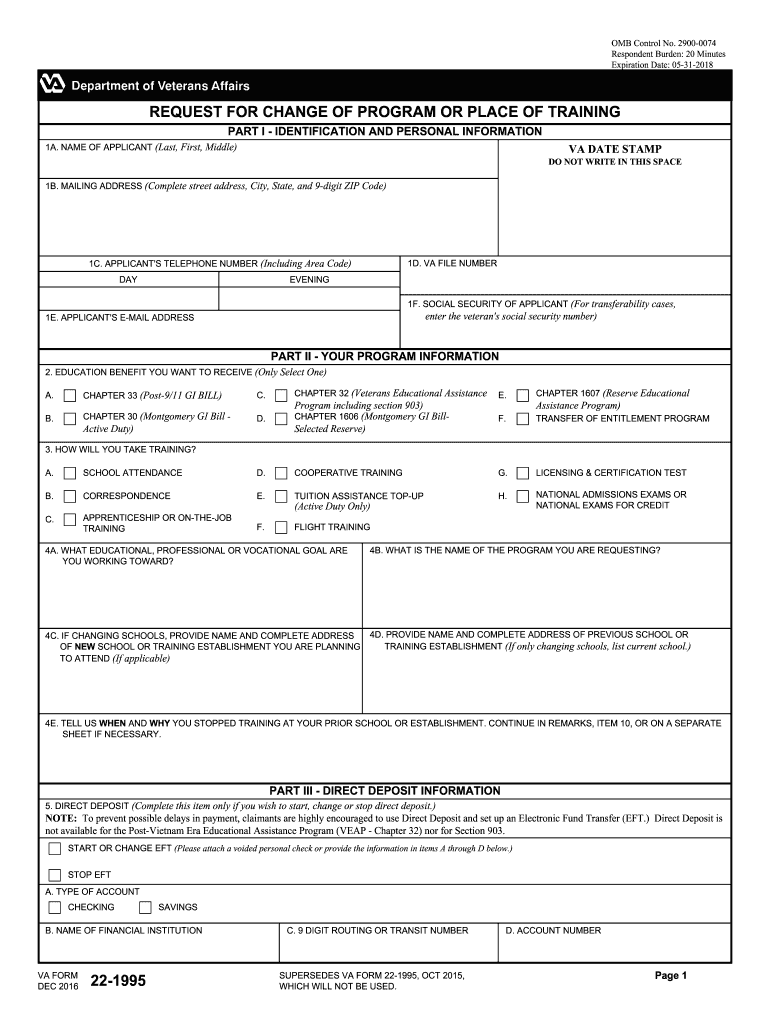
- Begin by filling out Part I, which includes your identification and personal information. Enter your name, mailing address, telephone number, VA file number, and social security number as required.
- Move to Part II to specify your program information. Select the education benefit you wish to receive from the provided options and describe your educational goals in fields 4A and 4B.
- In Part III, complete the direct deposit information if applicable. Ensure you provide accurate banking details to avoid payment delays.
- Proceed to Part IV for miscellaneous information. Answer questions regarding dependents and recent periods of service accurately.
- Finally, sign and date the form in Part V. Make sure all statements are true before submission.
Start using our platform today for free to streamline your VA Form 22-1995 completion!
Fill out va form 22 1995 online
It's free
It's free
See more va form 22 1995 versions
We've got more versions of the va form 22 1995 form. Select the right va form 22 1995 version from the list and start editing it straight away!
| Versions | Form popularity | Fillable & printable |
|---|---|---|
| 2024 | 4.7 Satisfied (32 Votes) | |
| 2021 | 4.8 Satisfied (152 Votes) | |
| 2020 | 3.9 Satisfied (29 Votes) | |
| 2018 | 4.4 Satisfied (124 Votes) | |
| 2016 | 4.1 Satisfied (63 Votes) | |
| 2015 | 4.4 Satisfied (81 Votes) | |
| 2014 | 4 Satisfied (43 Votes) | |
| 2012 | 4.2 Satisfied (65 Votes) | |
| 2010 | 4 Satisfied (39 Votes) | |
| 2002 | 4 Satisfied (28 Votes) |
Security and compliance
At DocHub, your data security is our priority. We follow HIPAA, SOC2, GDPR, and other standards, so you can work on your documents with confidence.
Learn more


Related forms

COLORADO DEPARTMENT OF TRANSPORTATION PRE-APPROVED PRODUCT EVALUATION REQUEST andamp - coloradodot
COLORADO DEPARTMENT OF TRANSPORTATION PRE-APPROVED PRODUCT EVALUATION REQUEST andamp - coloradodot
The document is a Pre-Approved Product Evaluation Request for 'Super Slick', a bituminous mixture release agent by Arrow ...

NOTICE OF SEALED BID AUCTION - coloradodot
The document is a Notice of Sealed Bid Auction for the sale of a 149,280 square foot property located at the northwester ...

$37m Spr Cash Spect-ex doc
The document outlines the rules and regulations for the Colorado Lottery Game Number 358, titled '$37 Million Super Cash ...

Cancel Direct Deposit - Colorado Lottery
The document is a request form for the Colorado Lottery, allowing an annuitant to stop direct deposit payments and inste ...

July 14-18, 2008 - Boulder Community Network
The document provides detailed information about the Twelfth Annual Peaks to Plains Suzuki Institute, scheduled for July ...

Noise risk assessment template doc
The document is a noise risk assessment for the Cedar School of Agriculture, detailing workplace hazards related to nois ...

Auto dealership accounting guide
Chapter 5 of the Dealership Accounting Training Manual focuses on used vehicle sales, detailing the various types of sal ...