



Here's how it works



How to use or fill out Career Ladder Guidance - Idaho State Department of Education with our platform

- Click ‘Get Form’ to open the Career Ladder Guidance document in the editor.
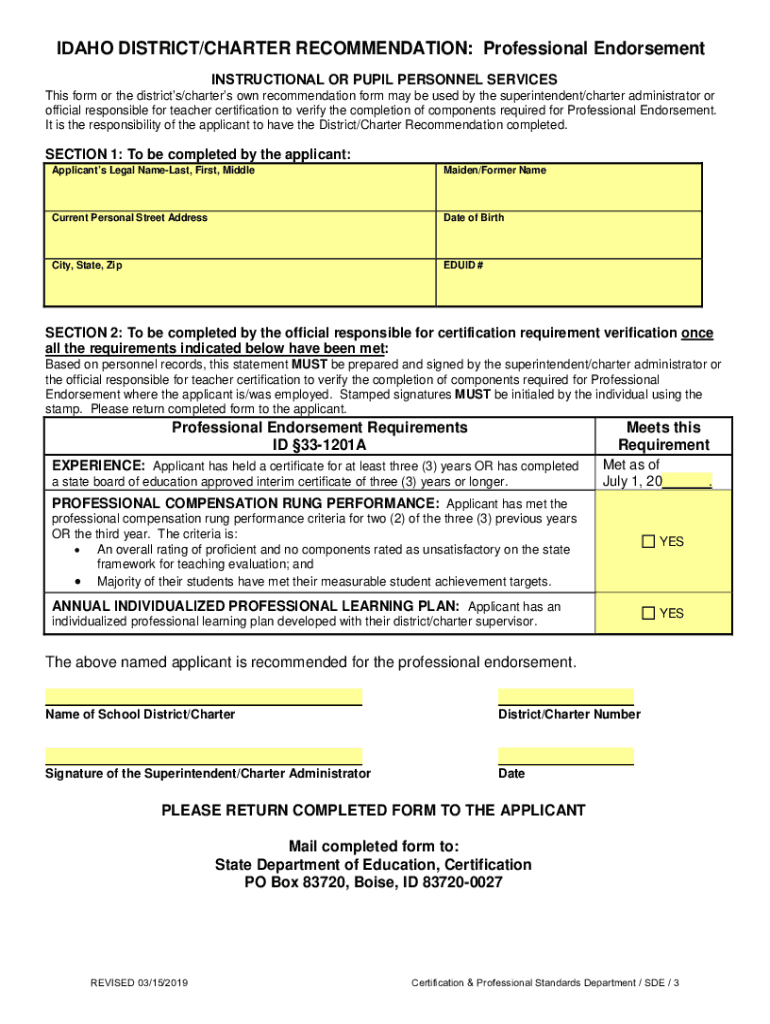
- Begin by filling out Section 1 with your legal name, maiden/former name, current address, date of birth, city, state, zip code, and EDUID number. Ensure all information is accurate for verification purposes.
- Proceed to Section 2 where the official responsible for certification must verify your experience. They will check if you have held a certificate for at least three years and sign off on this requirement.
- Next, confirm that you meet the professional compensation rung performance criteria. This includes having an overall rating of proficient and ensuring that the majority of your students have met their achievement targets.
- Lastly, ensure that you have an Individualized Professional Learning Plan (IPLP) developed with your supervisor. If all requirements are met, the official will complete and sign the form.
Start using our platform today to easily fill out your Career Ladder Guidance form for free!
It's free
See more Career Ladder Guidance - Idaho State Department of Education versions
Got questions?
How can I create an electronic signature in my idaho teacher career ladder on Android?
Approving documents on a mobile device is quick, simple, and doesn’t require software installation when you have an account with DocHub. Log in from any browser, complete your blank fields with your data, and click on Sign → Create your signature. You can draw your electronic signature the same way you usually do on paper, add its image to your idaho teacher career ladder, or type in your name and stylize its look. Whatever option you choose, your form will be valid.
How do you fill out both on iOS?
You need only an internet connection and a browser to fill out your both by using an iOS phone. Open the DocHub website and authenticate. Then, add your document or choose it from the list in your dashboard. Then use our editing instruments to fill out your form and save all your changes. You may also send it to a specified recipient straight away.
Security and compliance
At DocHub, your data security is our priority. We follow HIPAA, SOC2, GDPR, and other standards, so you can work on your documents with confidence.
Learn more


Related forms