




Here's how it works

01. Edit your dochub com fillable form online
Type text, add images, blackout confidential details, add comments, highlights and more.

02. Sign it in a few clicks
Draw your signature, type it, upload its image, or use your mobile device as a signature pad.

03. Share your form with others
Send pa600l via email, link, or fax. You can also download it, export it or print it out.
How to use or fill out pa 600 l sg with our platform

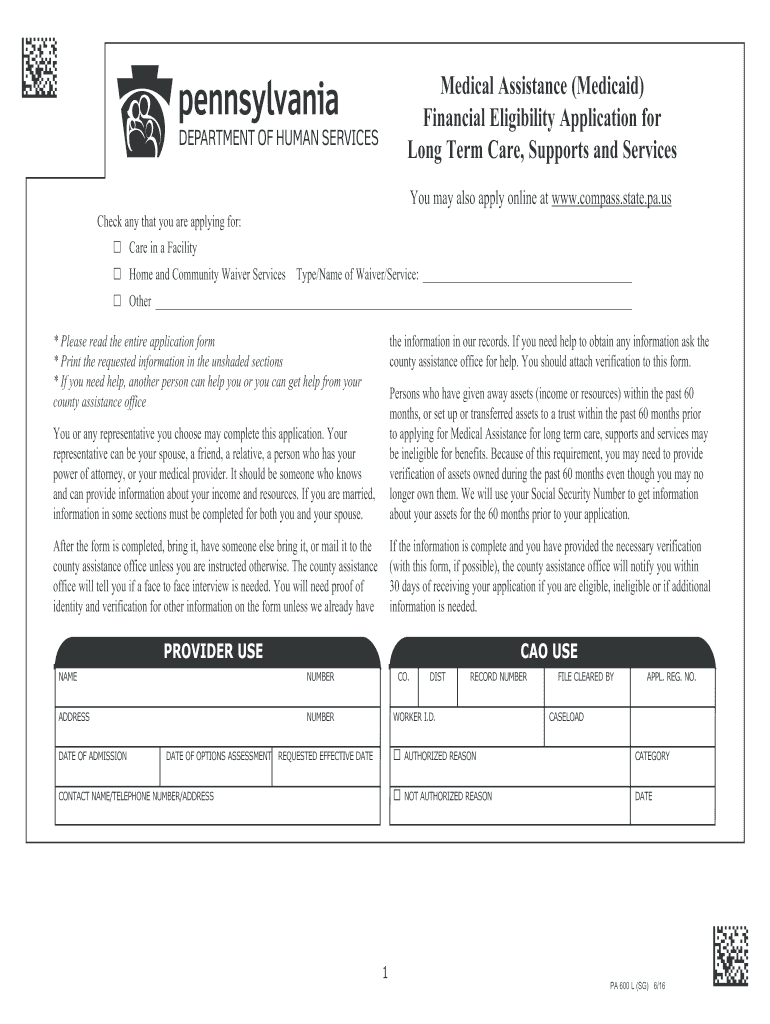
- Click ‘Get Form’ to open the pa 600 l sg in the editor.
- Begin by checking the boxes for the type of assistance you are applying for, such as 'Care in a Facility' or 'Home and Community Waiver Services'.
- Fill in your personal information in the unshaded sections, including your name, address, and contact details. Ensure that all entries are clear and legible.
- Complete the income and resource sections accurately. This includes detailing any assets owned within the past 60 months, as this information is crucial for eligibility.
- If applicable, provide information about your spouse or dependents. Make sure to attach additional sheets if necessary.
- Review all entered information for accuracy before submitting. Once complete, save your document and follow instructions to submit it to your county assistance office.
Start using our platform today to simplify your form completion process for free!
Fill out pa 600 l sg online
It's free
It's free
Security and compliance
At DocHub, your data security is our priority. We follow HIPAA, SOC2, GDPR, and other standards, so you can work on your documents with confidence.
Learn more


Related forms

Goodwill Industries of Central Indiana Inc donation receipt - media goodwillindy
The document is a donation receipt from Goodwill Industries of Central Indiana, Inc., intended for donors to retain for ...

Agreement for sale of business by sole proprietorship General form
The document is a General Form of Agreement for the Sale of a Business between a Buyer and a Seller, outlining the terms ...

Safety orientation checklist
The document is a New Employee Safety Orientation Checklist that outlines essential safety training and procedures for n ...

Minimum Essential Coverage (MEC) Enrollment Form 1
The document is a Minimum Essential Coverage (MEC) Enrollment Form that collects personal and dependent information from ...

African-American Youth in the Program of the Civilian
The document examines the experiences of African-American youth in the Civilian Conservation Corps (CCC) in California f ...

Coded corr for PPS - ctc ca
The document outlines proposed amendments to Title 5 of the California Code of Regulations regarding Pupil Personnel Ser ...