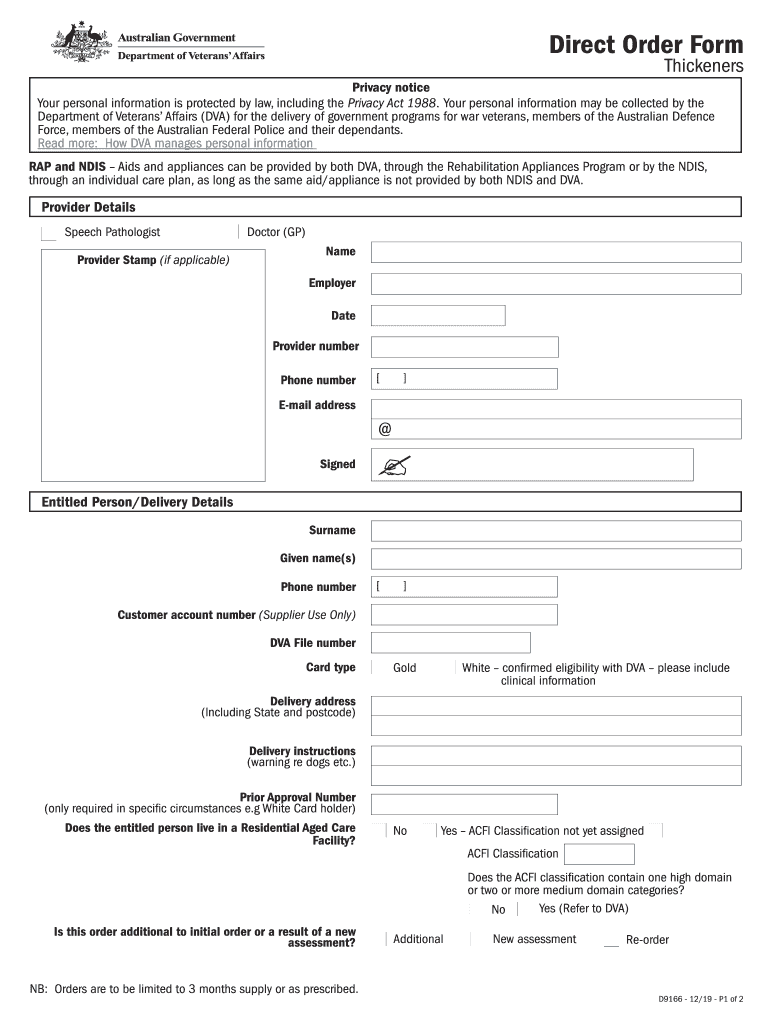
D9166 Direct Order Form - Thickeners. D9166 Direct Order Form - Thickeners 2026

Get Form
D9166 Direct Order Form - Thickeners. D9166 Direct Order Form - Thickeners Preview on Page 1

Here's how it works

01. Edit your form online
Type text, add images, blackout confidential details, add comments, highlights and more.
02. Sign it in a few clicks
Draw your signature, type it, upload its image, or use your mobile device as a signature pad.
03. Share your form with others
Send it via email, link, or fax. You can also download it, export it or print it out.

How to use or fill out D9166 Direct Order Form - Thickeners with our platform

Form edit decoration
9.5
Ease of Setup
DocHub User Ratings on G2
9.0
Ease of Use
DocHub User Ratings on G2
  1. Click ‘Get Form’ to open the D9166 Direct Order Form - Thickeners in the editor.
  2. Begin by filling in the 'Provider Details' section. Enter the name, employer, provider number, phone number, and email address of the speech pathologist or doctor. If applicable, include a provider stamp.
  3. Next, complete the 'Entitled Person/Delivery Details' section. Fill in the surname, given names, phone number, customer account number (if applicable), DVA file number, and card type. Provide a delivery address along with any specific delivery instructions.
  4. Indicate whether the entitled person resides in a Residential Aged Care Facility and answer related questions regarding ACFI classification.
  5. In the 'Recommendations' section, specify the item and level of thickness required, daily usage, quantity needed per month (limited to 3 months supply), and any follow-up plans.
  6. Once all fields are completed accurately, save your changes and either print or share the form directly from our platform.

Start using our platform today for free to streamline your document editing and form completion!

See more D9166 Direct Order Form - Thickeners. D9166 Direct Order Form - Thickeners versions

We've got more versions of the D9166 Direct Order Form - Thickeners. D9166 Direct Order Form - Thickeners form. Select the right D9166 Direct Order Form - Thickeners. D9166 Direct Order Form - Thickeners version from the list and start editing it straight away!
Versions Form popularity Fillable & printable
2020 4.8 Satisfied (35 Votes)
2020 4.3 Satisfied (163 Votes)
2019 4.3 Satisfied (198 Votes)
2014 4 Satisfied (36 Votes)
be ready to get more

Complete this form in 5 minutes or less

Get form

Got questions?

We have answers to the most popular questions from our customers. If you can't find an answer to your question, please contact us.
Contact us

If you regularly deal with documents kept in your Google Drive, DocHub is an excellent solution for you to easily and quickly complete, modify, and approve them. This editor integrates well with Google services, so you can export your D9166 Direct Order Form - Thickeners. D9166 Direct Order Form - Thickeners from your Google Drive to the editor without downloading and re-uploading it. Right-click on your document, choose Open With → DocHub PDF Sign and Edit. In our editor, add and assign Signature Fields for all people involved, then click on the Menu option above → Send → select how you want to share your form.

You can easily edit and complete your D9166 Direct Order Form - Thickeners. D9166 Direct Order Form - Thickeners on any iOS device. Open an internet browser of your choice, go to the DocHub site, authorize or create a new account, upload your file for editing, and make your desired adjustments. Our service is mobile-friendly, so utilizing its features on your smartphone will be a no-brainer, even on the first try.

Security and compliance

At DocHub, your data security is our priority. We follow HIPAA, SOC2, GDPR, and other standards, so you can work on your documents with confidence.

Learn more
ccpa2
pci-dss
gdpr-compliance
hipaa
soc-compliance
be ready to get more

Complete this form in 5 minutes or less

Get form