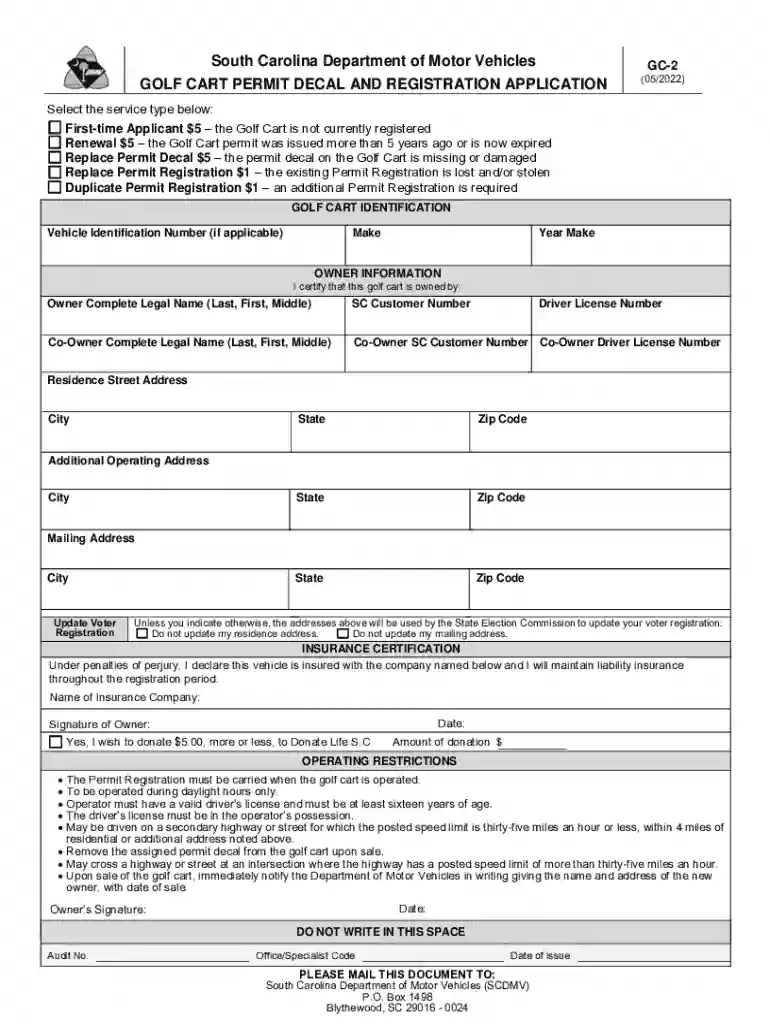
gc 2 form Preview on Page 1

Golf Carts 2026

Here's how it works

  • 01. Edit your gc 2 form online

    Type text, add images, blackout confidential details, add comments, highlights and more.

  • 02. Sign it in a few clicks

    Draw your signature, type it, upload its image, or use your mobile device as a signature pad.

  • 03. Share your form with others

    Send gc2 form via email, link, or fax. You can also download it, export it or print it out.

Definition & Meaning

A golf cart, in this context, refers to a small motorized vehicle designed primarily for the transportation of two to four people and their golf equipment around a golf course. However, their usage has expanded beyond recreational golf environments into residential communities, airports, and other venues where short-distance travel is needed. In South Carolina, obtaining a golf cart permit decal involves registering the vehicle with the Department of Motor Vehicles.

How to Use the Golf Cart

Golf carts are typically operated in low-speed areas and have a maximum speed of 20 mph. They offer convenient mobility for their users, including seniors or individuals with mobility constraints. Their compact size makes them ideal for traversing narrow pathways or confined spaces. When using a golf cart, it is essential to adhere to driving rules and ensure it is operated safely within designated areas to prevent accidents and damage.

Steps to Complete the Golf Cart Registration

  1. Gather Required Documents: Before initiating the registration process, collect documents such as proof of ownership, insurance certification, and a valid identification card.
  2. Complete the Form: Accurately fill out the golf cart permit decal and registration application with your personal information and vehicle details.
  3. Mail or Submit Online: You have the option to mail the completed form to the South Carolina DMV or submit it online through their platform.
  4. Pay Associated Fees: Remit the registration fee using accepted payment methods. Typically, this includes a first-time registration fee or a renewal fee.
  5. Receive Permit Decal: Upon successful processing of your application and payment, the DMV will send your golf cart permit decal to affix to your vehicle.

Legal Use of the Golf Cart

In South Carolina, golf carts must comply with specific legal requirements to operate on public roads. Owners must ensure that the carts are equipped with reflectors, a rearview mirror, and, in some cases, headlights if they are driven after daylight hours. It's permitted to drive golf carts on secondary roads where the posted speed limit is less than 35 mph during daylight hours. Drivers also need to be at least 16 years old and hold a valid driver's license.

Important Terms Related to Golf Carts

  • Permit Decal: A sticker issued by the DMV signifying that a golf cart is legally registered and permitted for road use.
  • Low-Speed Vehicle (LSV) Compliance: Refers to golf carts complying with additional safety equipment regulations, such as seat belts and a top speed range.
  • Insurance Certification: Verification that the golf cart owner has purchased liability insurance covering potential damages or injuries resulting from the cart's operation.

State-Specific Rules for the Golf Carts

In South Carolina, as with many states, there are unique regulations governing the use of golf carts. Drivers are only allowed to operate a golf cart within four miles of their registered address, and they must carry registration documents and proof of insurance while driving. Also, golf carts can cross highways and primary roads only at intersections where the speed limit is significantly lower.

Required Documents for Registration

When registering a golf cart, certain documents must be submitted to the DMV:

  • Proof of Ownership: Documentation asserting that you legally own the golf cart, such as a bill of sale.
  • Insurance Certification: A document from your insurance provider confirming coverage.
  • Driver's License: A copy of a valid driver's license to ensure that the applicant is authorized to operate the cart.

Form Submission Methods

Golf cart owners in South Carolina have several options for submitting their registration forms:

  • Online Submission: Utilize the South Carolina DMV's online services to upload documents and pay fees.
  • Mail-In: Send physical copies of your completed application form and supporting documents via mail to the DMV.
  • In-Person Service: Visit a local DMV office to submit your application in person and pay fees directly at the counter for an immediate receipt.

Key Elements of the Golf Cart Registration Form

The registration form for a golf cart includes several critical components:

  • Owner Information: Section where personal details, such as name and address, are listed.
  • Vehicle Description: Information about the golf cart, including make, model, year, and VIN.
  • Insurance Section: Field to input insurance details verification.
  • Permitting Request: Options to choose from the type of permit sought, including new registration or renewal.

Taking the time to familiarize yourself with these details ensures a smooth and hassle-free registration process for your golf cart, providing you legal assurance in its operation within South Carolina.

See more gc 2 form versions

We've got more versions of the gc 2 form form. Select the right gc 2 form version from the list and start editing it straight away!

VersionsForm popularityFillable & printable
20224.4 Satisfied (40 Votes)
20184.2 Satisfied (38 Votes)
20124 Satisfied (32 Votes)

be ready to get more

Complete this form in 5 minutes or less

Security and compliance

At DocHub, your data security is our priority. We follow HIPAA, SOC2, GDPR, and other standards, so you can work on your documents with confidence.

golf cart permit decal

Golf Carts/Utility Vehicles - inlocc - Indiana University

ORVs and golf carts shall not travel on state highways. They may cross state highways at 90 angles and may travel via sidewalks under the conditions listed

Learn more
If you believe that this page should be taken down, please follow our DMCA take down process here