




Here's how it works



How to use or fill out 2017 6395 with our platform

- Click ‘Get Form’ to open the 2017 6395 in the editor.
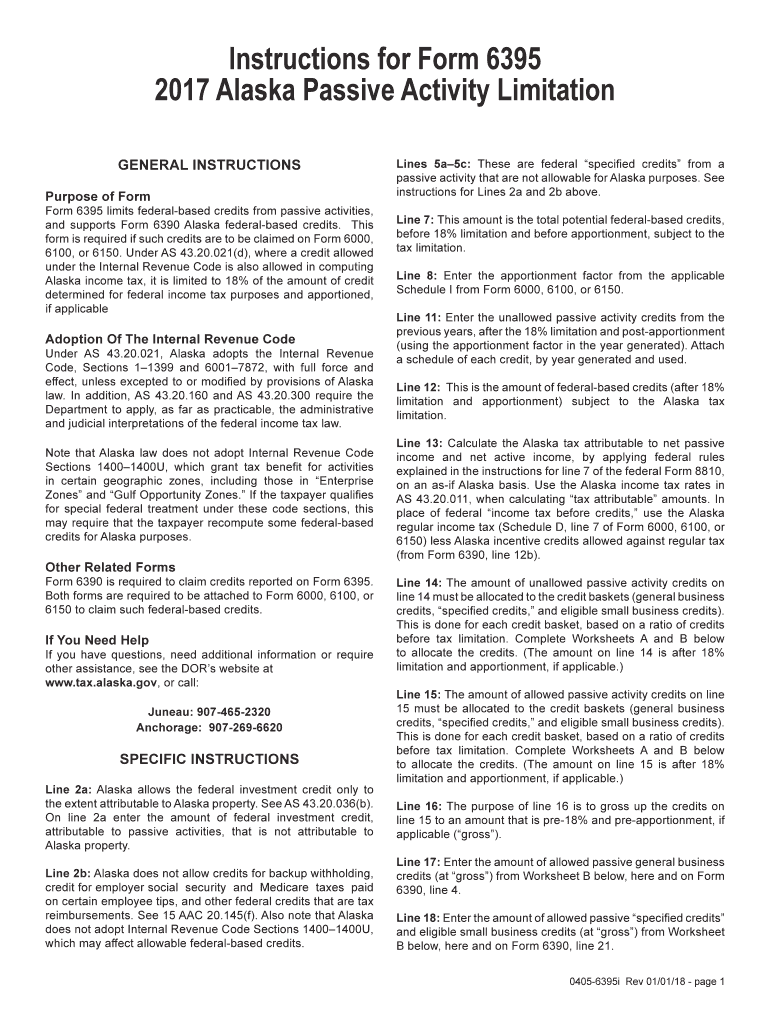
- Begin with Line 2a, where you will enter the federal investment credit amount attributable to passive activities that is not linked to Alaska property.
- For Line 2b, note that Alaska does not allow certain federal credits. Ensure you do not include backup withholding or employer social security credits.
- Proceed to Lines 5a–5c, which require you to report specified credits from passive activities that are not allowable for Alaska purposes.
- In Line 7, input the total potential federal-based credits before applying the 18% limitation and apportionment.
- Complete Line 8 by entering the apportionment factor from Schedule I of Forms 6000, 6100, or 6150.
- Continue with Lines 11 through 18, following specific instructions for each line regarding unallowed and allowed passive activity credits.
Start using our platform today for free to simplify your form completion process!
It's free
See more 2017 6395 versions
Got questions?
Can I sign my 2017 6395 on a mobile?
Yes, you’ll find numerous applications for this on the web. Nonetheless, if you need to eSign your 2017 6395 without installing extra software, DocHub is the optimum choice you can make. This robust editor works on mobile devices just as on desktops. Open our editor in your preferred internet browser, register or log in to your account, and start managing your documents.
Can I print my 2017 6395 and complete it by myself?
If you go for analog methods of completing your 2017 6395, it is simple to download your file for printing. Search DocHub’s Forms & Templates catalog to find the exact document template you require and open it for editing or download it on your device in the format of your choice. It is easy to complete your form electronically and put your handwritten signature on it right after printing or eSign your document with DocHub.
Security and compliance
At DocHub, your data security is our priority. We follow HIPAA, SOC2, GDPR, and other standards, so you can work on your documents with confidence.
Learn more


