Request vehicle information 2013-2019-2026

Get Form
request vehicle information 2013-2019 Preview on Page 1

Here's how it works

01. Edit your form online
Type text, add images, blackout confidential details, add comments, highlights and more.

02. Sign it in a few clicks
Draw your signature, type it, upload its image, or use your mobile device as a signature pad.

03. Share your form with others
Send it via email, link, or fax. You can also download it, export it or print it out.

How to use or fill out request vehicle information 2013-2019 with our platform

Form edit decoration
9.5
Ease of Setup
DocHub User Ratings on G2
9.0
Ease of Use
DocHub User Ratings on G2
  1. Click ‘Get Form’ to open it in the editor.
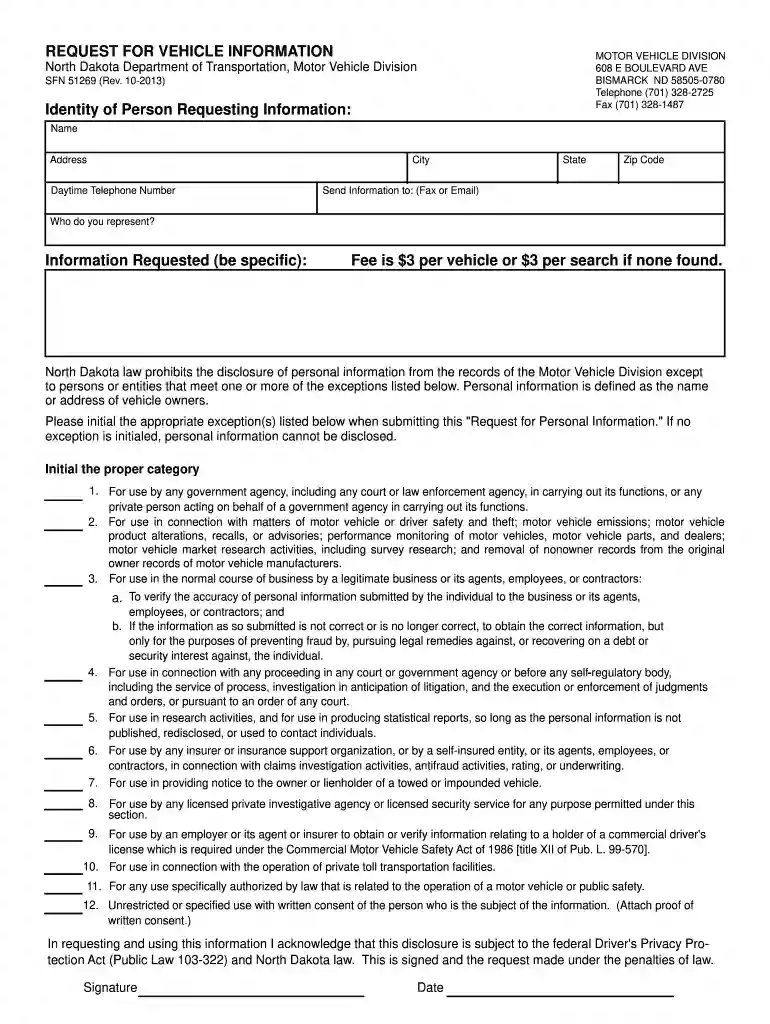
  2. Begin by filling out the 'Identity of Person Requesting Information' section. Enter your name, address, city, state, zip code, and daytime telephone number.
  3. In the 'Send Information to' section, specify whether you want the information sent via fax or email.
  4. Indicate who you represent by providing the necessary details in the designated field.
  5. Clearly state the specific information you are requesting in the 'Information Requested' section.
  6. Review the fee structure; note that there is a $3 fee per vehicle or search if none is found.
  7. Initial the appropriate exceptions listed to comply with North Dakota law regarding personal information disclosure.
  8. Finally, sign and date your request at the bottom of the form to acknowledge understanding of legal implications.

Start using our platform today for free to streamline your document editing and form completion!

See more request vehicle information 2013-2019 versions

We've got more versions of the request vehicle information 2013-2019 form. Select the right request vehicle information 2013-2019 version from the list and start editing it straight away!
Versions Form popularity Fillable & printable
2020 4.8 Satisfied (96 Votes)
2019 3.9 Satisfied (42 Votes)
2019 4.3 Satisfied (183 Votes)
2018 4.1 Satisfied (68 Votes)
2013 4.4 Satisfied (566 Votes)
2010 4.3 Satisfied (64 Votes)
be ready to get more

Complete this form in 5 minutes or less

Get form

Got questions?

We have answers to the most popular questions from our customers. If you can't find an answer to your question, please contact us.
Contact us

Sure, and it’s really easy! DocHub is a web-based PDF editor with advanced document management functions that allow you rapidly modify your forms, complete empty fields and drop new ones for other people to fill out, and create eSignatures in several ways. Add your request vehicle information 2013-2019, give information as required, and choose how you want to eSign your template - by typing your name, drawing your signature, uploading its picture, or utilizing a QR code.

Document editing with DocHub is equally convenient on desktop and mobile devices. You just need an internet browser to modify your request vehicle information 2013-2019 on Android. Open our website and sign in to access the instruments you need. Add your file and introduce your intended modifications. After that, you can keep your form in your file storage or send it out right away.

This online system allows you to print your vehicle/vessel registration record. You may only request your own vehicle record using our online system; if you need someone elses vehicle record, see below.
Visit the National Motor Vehicle Title Information System (NMVTIS) website, vehiclehistory.gov, to get a vehicle history report with title, insurance loss, and salvage information.
Note: StateElectronicMail-In Arkansas $10.00 - 3 year $13.00 - CDL $8.50 - 3 year $10.00 - CDL California $2.00 $5.00 Colorado $9.00 $10.00 certified $9.00 $10.00 certified Connecticut $20.00 $20.0047 more rows

Security and compliance

At DocHub, your data security is our priority. We follow HIPAA, SOC2, GDPR, and other standards, so you can work on your documents with confidence.

Learn more
ccpa2
pci-dss
gdpr-compliance
hipaa
soc-compliance
be ready to get more

Complete this form in 5 minutes or less

Get form

People also ask

Quick answer: To obtain a copy of your driving record, you can request it from the DMV either in person, by mail, or online, with fees varying by state.
This online system allows you to print your vehicle/vessel registration record. Start vehicle record request. You may only request your own vehicle record using our online system; if you need someone elses vehicle record, see below.
In accordance with CVC Section 8057(a), vehicle cost records must be preserved for four years after the close of the registration year in which the vehicle was deleted. The Vehicle License Fee (VLF) portion of the California fees is based on the purchase price and purchase date of the vehicle.
The California DMV makes it simple to access your driving record online. Visit the Online Driver Record Request page. Log in or create a DMV account. Provide your drivers license information. Pay the $2 fee.
Please contact the Department of Revenue at 573-526-3669, Option 3, for further information regarding obtaining motor vehicle records.

Related links