




Here's how it works

01. Edit your ca 602 form online
Type text, add images, blackout confidential details, add comments, highlights and more.

02. Sign it in a few clicks
Draw your signature, type it, upload its image, or use your mobile device as a signature pad.

03. Share your form with others
Send it via email, link, or fax. You can also download it, export it or print it out.
How to use or fill out MC-602 ORDER AFTER HEARING (Menacing Dog) Judicial Council forms - courts ca

- Click ‘Get Form’ to open it in the editor.
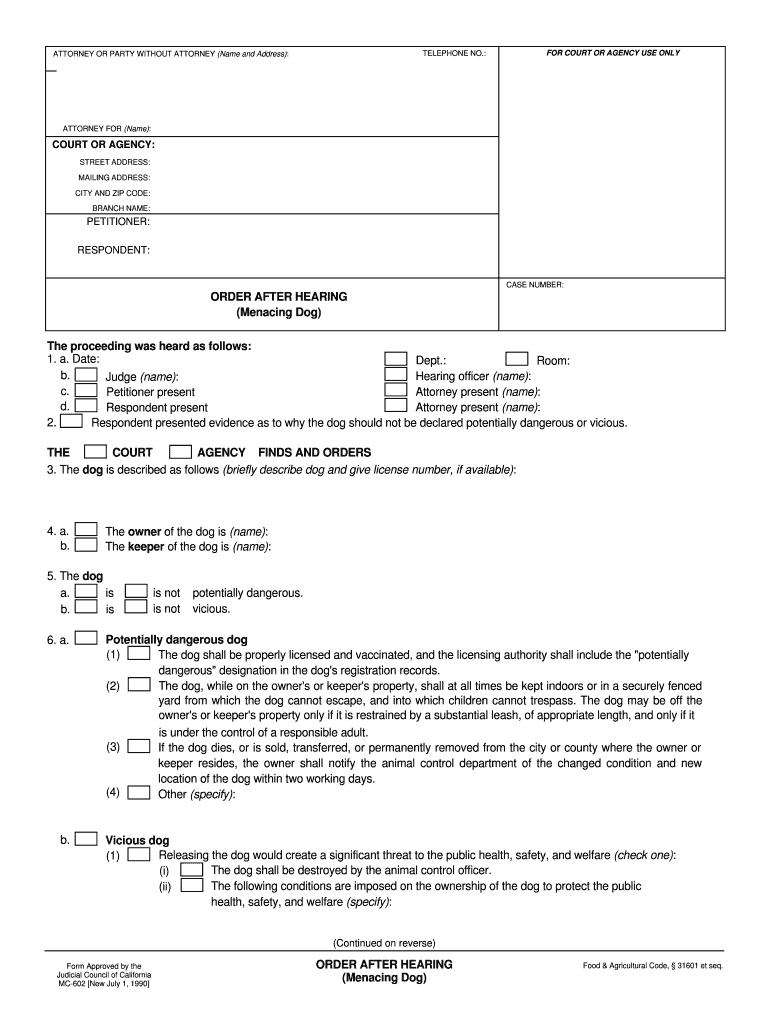
- Begin by entering your contact information in the 'ATTORNEY OR PARTY WITHOUT ATTORNEY' section, including your name and address.
- Fill in the 'COURT OR AGENCY' details, specifying the court's name, street address, mailing address, city, and zip code.
- Identify the parties involved by completing the 'PETITIONER' and 'RESPONDENT' fields along with the 'CASE NUMBER'.
- In section 1, provide details of the hearing such as date, department, room number, names of hearing officers and attorneys present.
- Describe the dog in section 3 and provide its license number if available. Specify ownership details in sections 4a and 4b.
- Indicate whether the dog is potentially dangerous or vicious in section 5. Follow up with any conditions imposed on ownership as outlined in sections 6 and 7.
- Finally, review all entries for accuracy before saving or printing your completed form using our platform's features.
Start filling out your MC-602 form today for free using our editor!
Fill out MC-602 ORDER AFTER HEARING (Menacing Dog). Judicial Council forms - courts ca online
It's free
It's free
See more MC-602 ORDER AFTER HEARING (Menacing Dog). Judicial Council forms - courts ca versions
We've got more versions of the MC-602 ORDER AFTER HEARING (Menacing Dog). Judicial Council forms - courts ca form. Select the right MC-602 ORDER AFTER HEARING (Menacing Dog). Judicial Council forms - courts ca version from the list and start editing it straight away!
Security and compliance
At DocHub, your data security is our priority. We follow HIPAA, SOC2, GDPR, and other standards, so you can work on your documents with confidence.
Learn more


Related forms

VN135 docx
The document is a request form for a continuance in probate or parental rights cases at the Superior Court of California ...

CR-160 S Judicial Council forms
The document is a legal form from the Superior Court of California regarding a Penal Protective Order related to domesti ...

NIKITA PATEL
The document is a Software Requirements Specification (SRS) for the SDMSTM Synergy Distributed Meeting Scheduler, detail ...

Unlikely scenario
The document discusses the analysis of scenarios in system design, particularly focusing on how users interact with syst ...

Revised 5 17 2011 REVIEW AND APPROVAL FORM ADDENDUM - uthouston
The document is a Review and Approval Form Addendum from The University of Texas Health Science Center at Houston, inten ...

Sangai international university
The document is an application form for obtaining various certificates from Sangai International University, established ...

HS200 Form - Application to register with a GP In Norther Ireland for Patients registered with a GP
HS200 Form - Application to register with a GP In Norther Ireland for Patients registered with a GP
The document is an application form for patients registered with a GP in Great Britain to register with a GP in Northern ...

Once you have a court date, to obtain disclosure, please complete the information below and send the
Once you have a court date, to obtain disclosure, please complete the information below and send the
The document is a request form for obtaining disclosure related to court cases in Hamilton, Ontario. It outlines the nec ...