VN135 docx 2026

Get Form
VN135 docx Preview on Page 1

Here's how it works

01. Edit your form online
Type text, add images, blackout confidential details, add comments, highlights and more.

02. Sign it in a few clicks
Draw your signature, type it, upload its image, or use your mobile device as a signature pad.

03. Share your form with others
Send it via email, link, or fax. You can also download it, export it or print it out.

Definition and Meaning of VN135 docx

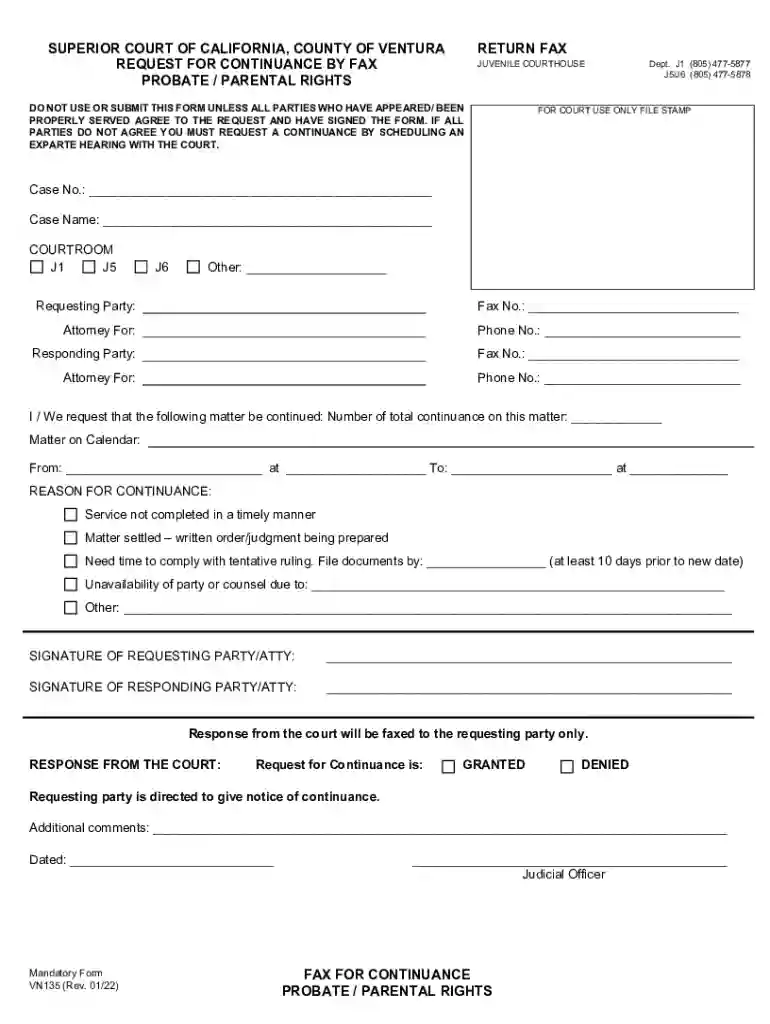
The "VN135 docx" is a specific legal form used primarily within the jurisdiction of the Superior Court of California, County of Ventura. It serves as a request form for a continuance in probate or parental rights cases. This document is essential for parties who need additional time to prepare for a court hearing or trial. It formalizes the request by outlining the necessary details and justifications that support the need for a delay. Ensuring that all parties agree to the continuance is a critical requirement for the form's acceptance.

How to Use the VN135 docx

Using the VN135 docx requires a careful understanding of its structure and purpose. Here’s how you can effectively utilize the form:

  1. Identify the Need: Determine whether the continuance is necessary for your case based on preparedness, pending information, or mutual agreement between parties.
  2. Complete the Form: Accurately fill out sections related to case details, reasons for continuance, and other required information.
  3. Collect Signatures: Obtain signatures from all involved parties, affirming agreement to the continuance.
  4. Submit to Court: Deliver the completed form to the appropriate court department. Each County may have specific submission guidelines or channels.

How to Obtain the VN135 docx

Obtaining the VN135 docx can be accomplished through several methods:

  • Court Website: Visit the Superior Court of California, County of Ventura's official website for downloadable forms.
  • Legal Document Services: Some third-party services provide access to court forms either online or through in-person visits.
  • Court Clerk's Office: Directly request a copy at the courthouse's clerk office.

Steps to Complete the VN135 docx

Filling out the VN135 docx accurately is crucial for a valid submission. Here’s a step-by-step process:

  1. Case Information: Enter the full case number, involved parties, and court department details.
  2. Grounds for Continuance: Clearly state the reasons for requesting the delay, elaborating on preparedness issues or needing additional information.
  3. Agreement Section: Ensure both requesting and responding parties agree to the proposed continuance.
  4. Signatures: Collect signatures from all parties involved in the case.
  5. Submission: File the document with the court for consideration.

Key Elements of the VN135 docx

The VN135 docx is comprised of several components that must be completed accurately:

  • Case Details: Comprehensive information about the case, including the docket number and parties.
  • Reasons for Continuance: Detailed justifications that substantiate the need for additional time.
  • Signatures: Legal signatures from all parties ensure mutual agreement and legitimacy.
  • Court Communication: Information on how the court will respond, typically via fax, is also an essential part of the form.

Who Typically Uses the VN135 docx

The VN135 docx is primarily used by:

  • Attorneys: Representing clients in probate or parental rights cases within California.
  • Individuals: Directly involved in a case without legal representation.
  • Family Members: Involved parties in parental rights disputes.
decoration image ratings of Dochub

Important Terms Related to VN135 docx

Understanding specific terminology used in VN135 docx ensures clarity:

  • Continuance: A formal request to delay court proceedings to a later date.
  • Probate Cases: Legal processes that deal with the distribution of a deceased person's estate.
  • Parental Rights Cases: Legal proceedings that address custody, visitation, and parental obligations.
  • Signatory Parties: All individuals required to sign the form, ensuring consent.

Legal Use of the VN135 docx

The VN135 docx must be used according to legal guidelines set forth by the Superior Court of California. Failure to adhere to these requirements can result in delays or rejection:

  • Mutual Consent: All parties involved must agree to the continuance.
  • Timely Submission: The form should be filed well ahead of the requested hearing date.
  • Accurate Information: All details provided on the form must be truthful and accurate, as they are legally binding.

See more VN135 docx versions

We've got more versions of the VN135 docx form. Select the right VN135 docx version from the list and start editing it straight away!
Versions Form popularity Fillable & printable
2022 4.8 Satisfied (28 Votes)
2019 4.9 Satisfied (31 Votes)
2013 4.3 Satisfied (67 Votes)
be ready to get more

Complete this form in 5 minutes or less

Get form

Got questions?

We have answers to the most popular questions from our customers. If you can't find an answer to your question, please contact us.
Contact us
How to convert NUMBERS to DOCX Select the file by clicking the NUMBERS to DOCX App or simply drag drop a NUMBERS file. Click the Convert button to upload NUMBERS and convert it to a DOCX file. Click on the Save button when it appears after successful NUMBERS to DOCX format conversion. That is all!
Check for compatibility issues: If you have recently upgraded to a new version of Microsoft Word, the file may be incompatible with your new version. Try opening the file in an older version of Word, or using a compatibility mode in the newer version of Word.
The Open and Repair command might be able to recover your file. Click File Open Browse and then go to the location or folder where the document (Word), workbook (Excel), or presentation (PowerPoint) is stored. Click the file you want, and then click the arrow next to Open, and click Open and Repair.
Put your cursor at the end of the text you want to cite. Go to References Style, and choose a citation style. Select Insert Citation. Choose Add New Source and fill out the information about your source.
Open Microsoft Word. Click on File Open. Navigate to the location of the corrupt file. Select the file but do not open it directly. Instead, click on the dropdown arrow next to the Open button. Choose Open and Repair.

Security and compliance

At DocHub, your data security is our priority. We follow HIPAA, SOC2, GDPR, and other standards, so you can work on your documents with confidence.

Learn more
ccpa2
pci-dss
gdpr-compliance
hipaa
soc-compliance

People also ask

How to repair DOCX file of corrupted Microsoft Word documents DOCX Repair Kit. Start DOCX Repair Kit. Select corrupted document. Press Analyze. Confirm the recovery of file by press Yes to start recovery and export into new Word document.
Read on to find out some of the quickest ways to restore corrupted files and fix them. 1 Restore Previous Versions. 2 Use System Restore. 3 The Best Corrupted Files Recovery Software - Recoverit. 4 Use the SFC /Scannow command. 5 Use DISM tool. 6 Use the CHKDSK command. 7 Perform SFC scan before Windows 10 starts.

Related links