




Here's how it works

01. Edit your form online
Type text, add images, blackout confidential details, add comments, highlights and more.

02. Sign it in a few clicks
Draw your signature, type it, upload its image, or use your mobile device as a signature pad.

03. Share your form with others
Send it via email, link, or fax. You can also download it, export it or print it out.
How to use or fill out 310 California 2003 form with our platform

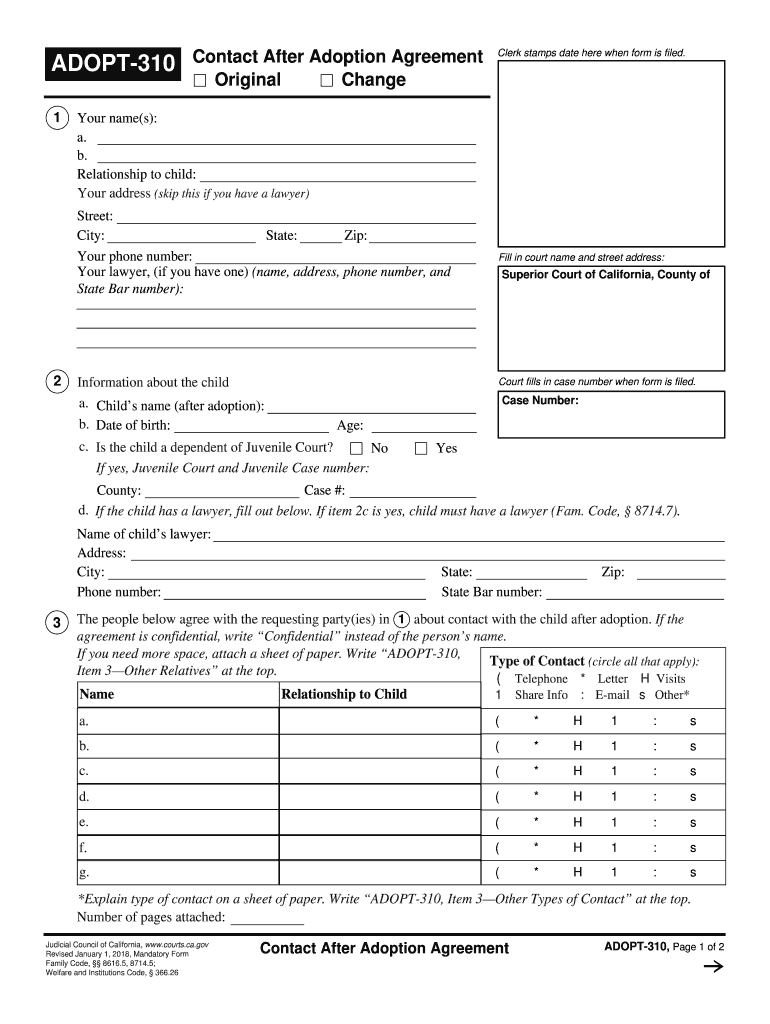
- Click ‘Get Form’ to open the 310 California 2003 form in the editor.
- Begin by entering your name(s) as the adopting parent(s) in the designated fields at the top of the form.
- Fill in your relationship to the child and provide your address, phone number, and lawyer's details if applicable.
- In section two, input information about the child including their name after adoption, date of birth, and whether they are a dependent of Juvenile Court.
- Complete section three by listing individuals who agree with you on contact arrangements post-adoption. Specify types of contact such as telephone or visits.
- Ensure all parties involved sign at the end of the document. If more signatures are needed, attach an additional sheet as instructed.
Start using our platform today for free to streamline your document editing and signing process!
Fill out 310 california 2003 form online
It's free
It's free
See more 310 california 2003 form versions
We've got more versions of the 310 california 2003 form form. Select the right 310 california 2003 form version from the list and start editing it straight away!
Security and compliance
At DocHub, your data security is our priority. We follow HIPAA, SOC2, GDPR, and other standards, so you can work on your documents with confidence.
Learn more


Related forms

F1309201Fill-in Leased Vehicle Owner's Authorization to Lessee
The document is a form from the Tennessee Department of Revenue titled 'Leased Vehicle Owner's Authorization to Lessee.' ...

Order granting motion to order granting motion - Ventura Superior - ventura courts ca
The document is an order from the Superior Court of California, County of Ventura, granting a defendant's motion to set ...

FASHION SHOW PERMISSION FORM - MCBE
The document is a registration and consent form for the 'Wild About Fashion' show organized by MCBE, scheduled for March ...

ANTI - FRAUD UNIT COMPLAINT FORM 1 2 4 5 - ok
The document is an Anti-Fraud Unit Complaint Form from the Oklahoma Insurance Department, designed for individuals to re ...

Kids Listing Agreement
The document is a Kid's Listing Agreement where a child agrees to maintain cleanliness in their home while it is for sal ...

Manta cmklj7z6Rothschild Police Department Rothschild WI, 54474Manta
The Rothschild Police Department is requesting local businesses to update their keyholder contact information for emerge ...

Ho-Chunk Nation Change of Address Form
The document is a Change of Address Form for the Ho-Chunk Nation Office of Tribal Enrollment, designed for members to up ...

121 Hopkins Road, West Greenwich, RI 02817 P 401-392-3580 F 201-392-3595
The document is a credit application form for a company seeking to extend credit. It includes sections for contact infor ...