



Here's how it works



How to use or fill out PO Box 373, Newbury NH 03255 Permit to Install and Operate with our platform

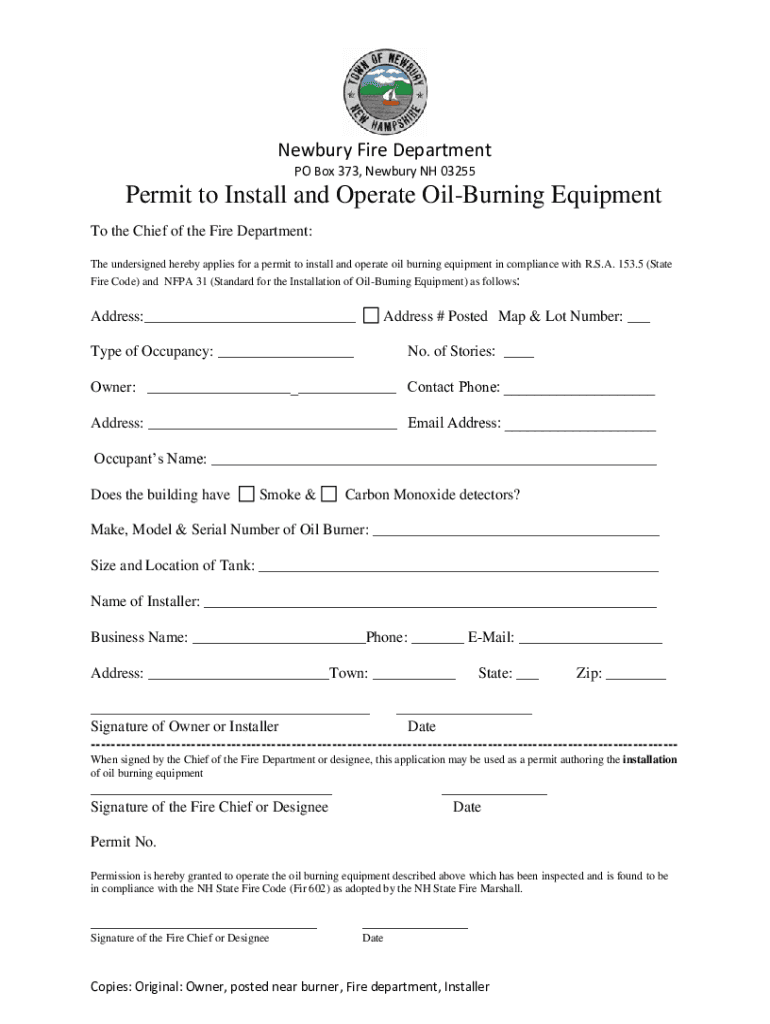
- Click ‘Get Form’ to open the permit application in the editor.
- Begin by entering the address where the oil-burning equipment will be installed in the designated field.
- Fill in the 'Address # Posted Map & Lot Number' section to provide specific location details.
- Indicate the type of occupancy and number of stories for the building in their respective fields.
- Complete the owner’s information, including name, contact phone, address, and email address.
- Provide the occupant's name and confirm if smoke and carbon monoxide detectors are present.
- Enter details about the oil burner, including make, model, serial number, size, and location of the tank.
- Fill out installer information including name, business name, contact phone, email address, town, state, and zip code.
- Ensure that either the owner or installer signs and dates the application at the bottom of the form.
Start using our platform today to complete your permit application quickly and efficiently!
It's free
See more PO Box 373, Newbury NH 03255 Permit to Install and Operate ... versions
| Versions | Form popularity | Fillable & printable |
|---|---|---|
| 2020 | 4.9 Satisfied (36 Votes) |
Got questions?
How do I sign my PO Box 373, Newbury NH 03255 Permit to Install and Operate ... on iOS?
With DocHub, you can rapidly sign your PO Box 373, Newbury NH 03255 Permit to Install and Operate ... or any other paperwork on iOS, even without installing extra applications. You can access your DocHub account from any web-connected browser and fill out and sign your document in any way you like with just a couple of clicks.
How do you create an e-signature for the PO Box 373, Newbury NH 03255 Permit to Install and Operate ... on iOS?
Apart from an extensive toolset for editing PDFs on mobile phones, DocHub enables you to sign your PO Box 373, Newbury NH 03255 Permit to Install and Operate ... along the way. Open our editor in your internet browser, make changes using DocHub’s toolset, and finish your editing by eSigning the completed form.
Security and compliance
At DocHub, your data security is our priority. We follow HIPAA, SOC2, GDPR, and other standards, so you can work on your documents with confidence.
Learn more