




Here's how it works

01. Edit your vehicle license plates revocation request online
Type text, add images, blackout confidential details, add comments, highlights and more.

02. Sign it in a few clicks
Draw your signature, type it, upload its image, or use your mobile device as a signature pad.

03. Share your form with others
Send vehicle license plates revocation request illinois via email, link, or fax. You can also download it, export it or print it out.
How to use or fill out Illinois Revocation Form with DocHub

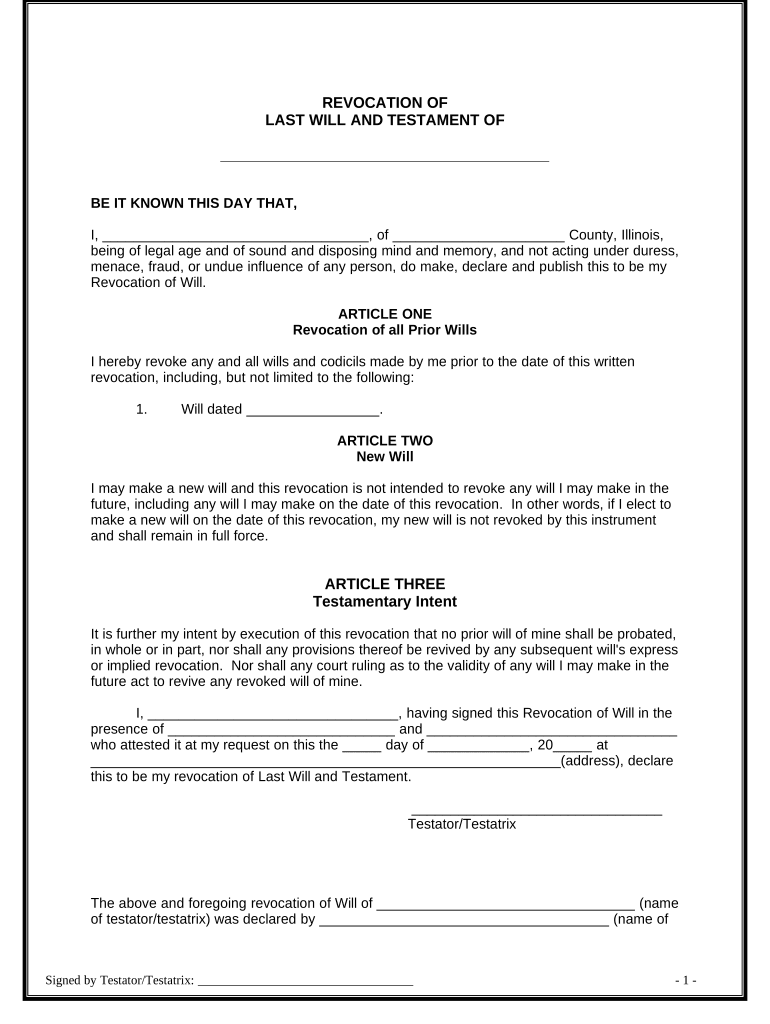
- Click ‘Get Form’ to open the Illinois Revocation Form in our platform's editor.
- Begin by filling in your name and county at the top of the form. This identifies you as the testator/testatrix revoking the will.
- In Article One, list any prior wills you wish to revoke, including their dates. This ensures clarity on which documents are no longer valid.
- Article Two clarifies that this revocation does not affect any future wills you may create. You can leave this section as is unless you want to add a note about a new will.
- In Article Three, affirm your intent regarding the revocation. Ensure that all statements reflect your wishes accurately.
- Sign and date the document at the bottom, ensuring that witnesses also sign in their designated areas. Their signatures validate your revocation.
Start using our platform today for free to easily complete your Illinois Revocation Form!
Fill out illinois revocation form online
It's free
It's free
Got questions?
We have answers to the most popular questions from our customers. If you can't find an answer to your question, please contact us.
Contact us
How do I unregister a car in Illinois?
To request a revocation, you must provide the correct owner(s) and vehicle information, reason for revocation and signature(s) of all registered/titled owner(s). If the vehicle is leased, the lessor must also sign. Revocation of the license plate does not remove your name from the vehicle record.
How do I unregister a vehicle in Illinois?
First warm the sticker with a heat gun on low, a hair dryer or by parking in the sun. Heat will soften and loosen the adhesive, making it easier to remove. Start by freeing a corner of the sticker. Use a plastic razor blade to scrape a corner loose if you cant do this with your fingers.
Security and compliance
At DocHub, your data security is our priority. We follow HIPAA, SOC2, GDPR, and other standards, so you can work on your documents with confidence.
Learn more


Related forms
Hearing notice
The document provides instructions for using Florida Supreme Court Approved Family Law Form 12.923, Notice of Hearing (G ...
Training verification
The document is a CDA Renewal Candidate Training Verification Form, intended for use by Center/Program Directors or auth ...
B2400ab alt
The document is a Reaffirmation Agreement form used in U.S. Bankruptcy Court, detailing the process and requirements for ...
Aptp form nj
The document is an 'Attending Provider Treatment Plan' form used for submitting initial and follow-up treatment plans fo ...

N 400 addendum
The document is an N-400 Addendum that requires the applicant to list all trips taken outside the United States lasting ...
Physical form
The document is an Adult Physical Examination Form for the Connecticut Technical High School System, requiring personal ...
Georgia contempt form county
The document is a packet from the Henry County Superior Court providing instructions and forms for filing a Petition for ...