Type text, add images, blackout confidential details, add comments, highlights and more.
02. Sign it in a few clicks
Draw your signature, type it, upload its image, or use your mobile device as a signature pad.
03. Share your form with others
Send form 3300 georgia via email, link, or fax. You can also download it, export it or print it out.
How to use or fill out form 3300 1998 with our platform
Ease of Setup
DocHub User Ratings on G2
Ease of Use
DocHub User Ratings on G2
Click ‘Get Form’ to open it in the editor.
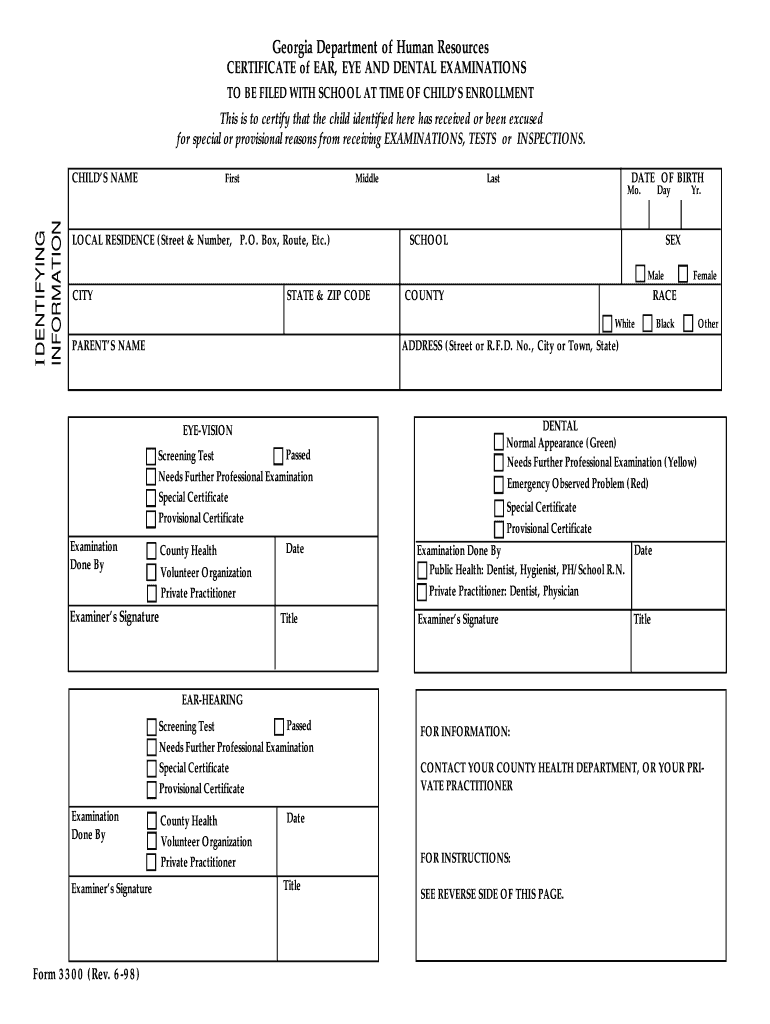
Begin by filling in the child's identifying information, including their name, date of birth, and local residence. Ensure accuracy for smooth processing.
Select the appropriate options for sex and race from the provided choices. This information is essential for demographic purposes.
In the dental section, indicate whether the child has a normal appearance, needs further examination, or has an emergency problem. Use color codes (Green, Yellow, Red) for clarity.
For eye vision and ear hearing sections, mark if the child passed the screening test or needs further professional examination. Include details about who performed the examinations.
Ensure that all signatures are collected from examiners and that dates are filled in accurately to validate the document.
Start using our platform today to fill out form 3300 1998 easily and for free!
Where to get Form 3300 filled outForm 3300 1998 pdfPrintable Form 3300 GeorgiaHow to fill out form 3300 1998Form 3300 1998 georgia departmentForm 3300 1998 instructionsDoes form 3300 expireForm 3300 1998 download
Security and compliance
At DocHub, your data security is our priority. We follow HIPAA, SOC2, GDPR, and other standards, so you can work on your documents with confidence.
Cookie consent notice
This site uses cookies to enhance site navigation and personalize your experience.
By using this site you agree to our use of cookies as described in our Privacy Notice.
You can modify your selections by visiting our Cookie and Advertising Notice.