Type text, add images, blackout confidential details, add comments, highlights and more.
02. Sign it in a few clicks
Draw your signature, type it, upload its image, or use your mobile device as a signature pad.
03. Share your form with others
Send ud 13 via email, link, or fax. You can also download it, export it or print it out.
How to use or fill out ud 13 with our platform
Ease of Setup
DocHub User Ratings on G2
Ease of Use
DocHub User Ratings on G2
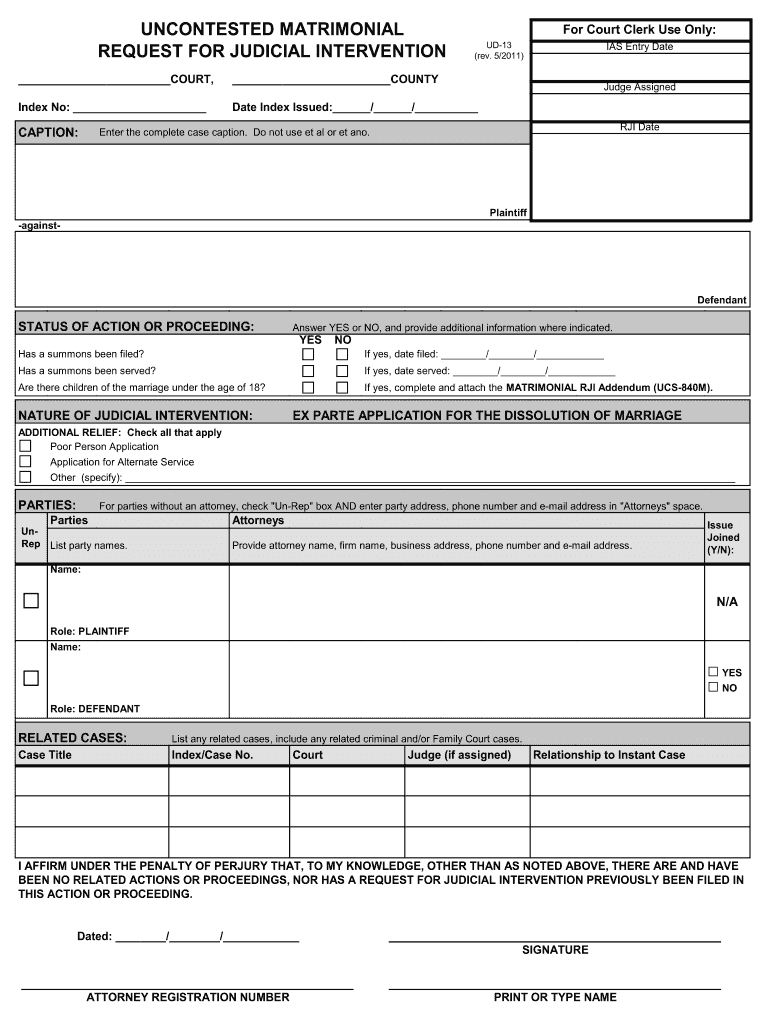
Click ‘Get Form’ to open the ud 13 document in the editor.
Begin by entering the court and county information at the top of the form. Ensure accuracy as this identifies your case.
Fill in the Index Number, IAS Entry Date, and Date Index Issued. These details are crucial for tracking your submission.
In the CAPTION section, enter the complete case caption without abbreviations like 'et al' or 'et ano'. Clearly state 'Plaintiff' against 'Defendant'.
Indicate the STATUS OF ACTION OR PROCEEDING by answering YES or NO to each question regarding summons filing and service, as well as children under 18.
For NATURE OF JUDICIAL INTERVENTION, provide dates if applicable and attach any necessary addendums.
Complete the ADDITIONAL RELIEF section by checking all relevant boxes and specifying any other requests.
List all parties involved in the case, ensuring to include contact information for those unrepresented by an attorney.
Finally, affirm under penalty of perjury that there are no related actions or proceedings before signing and dating your submission.
Start using our platform today to easily fill out your ud 13 form online for free!
Freshman Year Is Not Grade 13 The transition from high school to college can be both exciting and challenging. Academic Coaching Tutoring (ACT) is here toRead more
Cookie consent notice
This site uses cookies to enhance site navigation and personalize your experience.
By using this site you agree to our use of cookies as described in our Privacy Notice.
You can modify your selections by visiting our Cookie and Advertising Notice.