Esb nw1 form 2026

Get Form
nw1 form esb Preview on Page 1

Here's how it works

01. Edit your nw1 form esb online
Type text, add images, blackout confidential details, add comments, highlights and more.

02. Sign it in a few clicks
Draw your signature, type it, upload its image, or use your mobile device as a signature pad.

03. Share your form with others
Send nw1 form via email, link, or fax. You can also download it, export it or print it out.

How to use or fill out esb nw1 form with our platform

Form edit decoration
9.5
Ease of Setup
DocHub User Ratings on G2
9.0
Ease of Use
DocHub User Ratings on G2
  1. Click ‘Get Form’ to open the esb nw1 form in the editor.
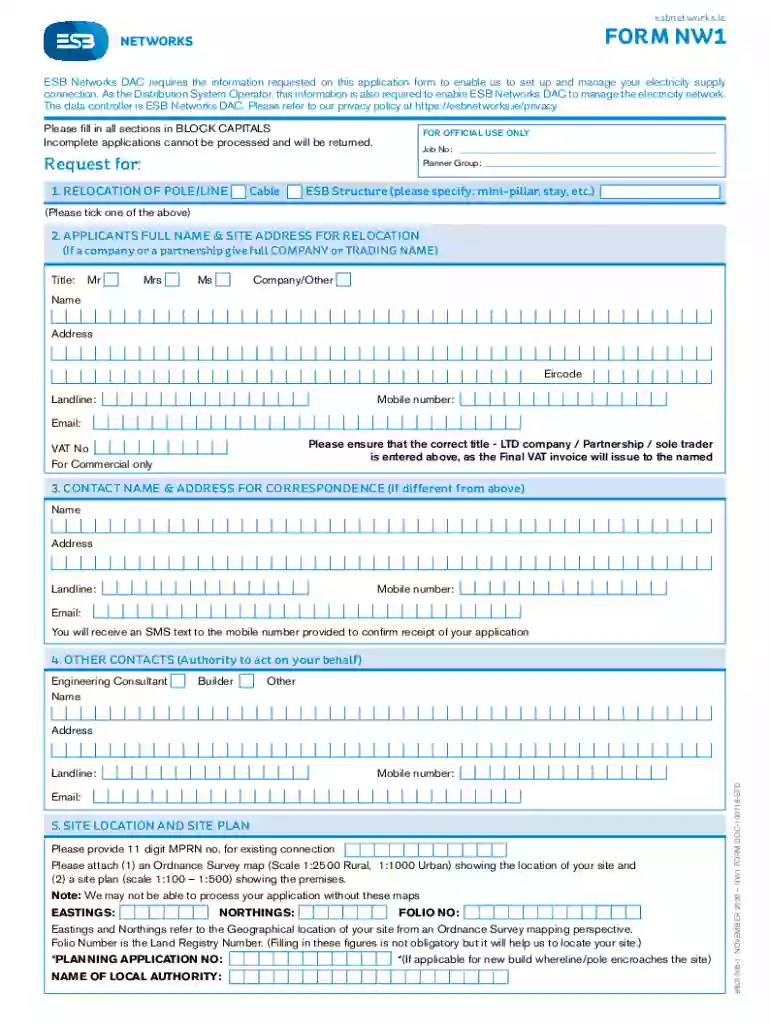
  2. Begin by filling in your full name and site address for relocation. Ensure you select the correct title (Mr, Mrs, Ms, Company) and provide a valid email and phone number.
  3. If your correspondence address differs from your application address, complete the contact name and address section accordingly.
  4. In the 'Site Location and Site Plan' section, provide the 11-digit MPRN number for your existing connection. Attach an Ordnance Survey map and a site plan as specified.
  5. Outline your reason for relocation in the 'Additional Information' section to clarify your request.
  6. Finally, sign and date the application form. Review all sections to ensure completeness before submission.

Start using our platform today to fill out your esb nw1 form online for free!

See more esb nw1 form versions

We've got more versions of the esb nw1 form form. Select the right esb nw1 form version from the list and start editing it straight away!
Versions Form popularity Fillable & printable
2022 4.7 Satisfied (50 Votes)
2020 4.8 Satisfied (70 Votes)
2018 4.2 Satisfied (40 Votes)
be ready to get more

Complete this form in 5 minutes or less

Get form

Got questions?

We have answers to the most popular questions from our customers. If you can't find an answer to your question, please contact us.
Contact us
Project time frame typical pricing We aim to provide a quote within 15 business days. The typical charge for a single, standard connection is 3,486 and for a single enhanced connection (16 KVA) 4,721. Once you have accepted the quote and made payment, we aim to complete your new connection within 60 business days.
To switch, just contact the supplier you want and their customer service people will walk you through the process. Pretty much you pick a price plan and they will get your verbal agreement to a supply contract. Then they will ask for your utility account number.
New connection in a new housing estate or apartment: You should call ESB Networks on 1800 372 757 with your Meter Point Reference Number (MPRN). This will be available from your builder.
Relocation of Pole or Line. Application Form (NW1) ESB Networks DAC requires the information requested on this application form to enable us to set up and. manage your electricity supply connection.
Project time frame typical pricing Once you have accepted the quote and made payment, we aim to complete your new connection within 60 business days.

Security and compliance

At DocHub, your data security is our priority. We follow HIPAA, SOC2, GDPR, and other standards, so you can work on your documents with confidence.


Learn more
ccpa2
pci-dss
gdpr-compliance
hipaa
soc-compliance
be ready to get more

Complete this form in 5 minutes or less

Get form

People also ask

To be eligible for payments, ESB Networks first need to be notified of your microgeneration so they can start recording your export to the grid. This is done by completing an NC6 form. This would have been completed with your technician at the time of installation.
Apply for a new connection You can find more information and apply for a new electricity connection on ESB Networks website. You can also contact ESB Networks on 1800 372 999.

form nw1