Oregon dmv forms 2026

Get Form
oregon dmv forms online Preview on Page 1

Here's how it works

01. Edit your oregon dmv forms online online
Type text, add images, blackout confidential details, add comments, highlights and more.

02. Sign it in a few clicks
Draw your signature, type it, upload its image, or use your mobile device as a signature pad.

03. Share your form with others
Send oregon dmv forms via email, link, or fax. You can also download it, export it or print it out.

How to use or fill out Oregon DMV forms with our platform

Form edit decoration
9.5
Ease of Setup
DocHub User Ratings on G2
9.0
Ease of Use
DocHub User Ratings on G2
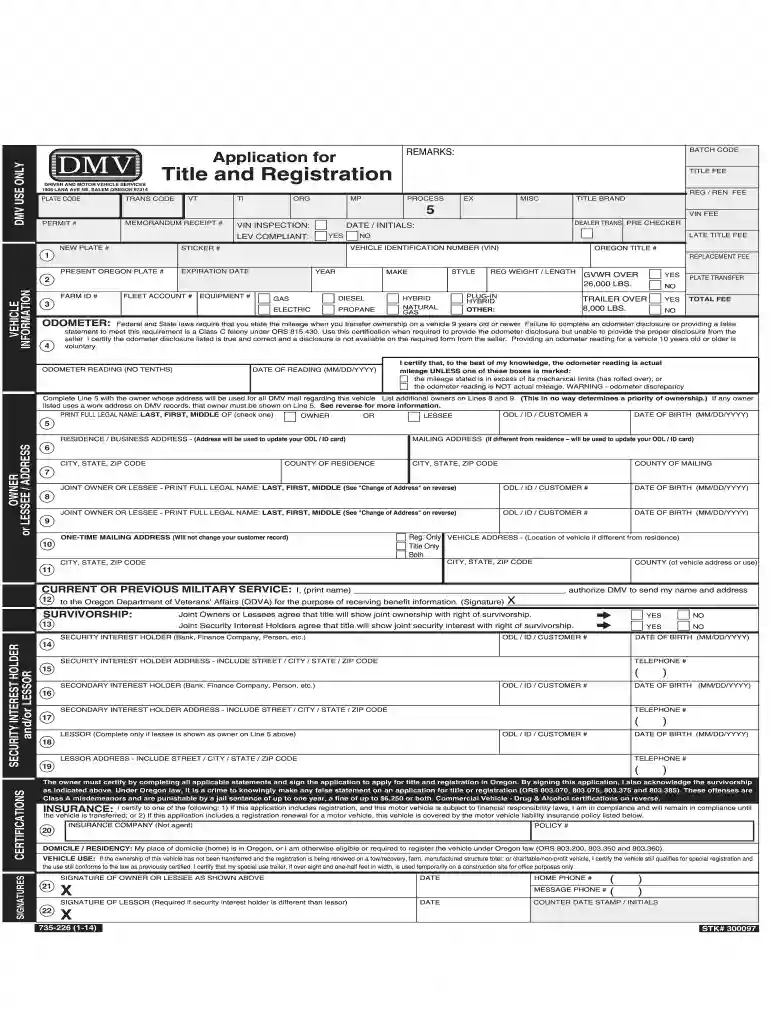
  1. Click ‘Get Form’ to open the Oregon DMV form in the editor.
  2. Begin by filling out the vehicle information section, including the Vehicle Identification Number (VIN), make, model, and year of your vehicle. Ensure accuracy as this information is crucial for registration.
  3. Next, provide your personal details in the owner or lessee section. Include your full name, date of birth, and address. If you have a different mailing address, be sure to fill that out as well.
  4. Complete the odometer reading section by entering the current mileage of your vehicle. If applicable, check any boxes regarding odometer discrepancies.
  5. Finally, review all sections for completeness and accuracy before signing at the bottom of the form. Your signature certifies that all provided information is true.

Start using our platform today to easily complete your Oregon DMV forms online for free!

See more oregon dmv forms versions

We've got more versions of the oregon dmv forms form. Select the right oregon dmv forms version from the list and start editing it straight away!
Versions Form popularity Fillable & printable
2023 4.8 Satisfied (42 Votes)
2020 4.8 Satisfied (157 Votes)
2018 4.1 Satisfied (104 Votes)
2015 4.2 Satisfied (88 Votes)
2014 4 Satisfied (58 Votes)
2011 4 Satisfied (33 Votes)
be ready to get more

Complete this form in 5 minutes or less

Get form

Got questions?

We have answers to the most popular questions from our customers. If you can't find an answer to your question, please contact us.
Contact us

eSignatures are an excellent alternative to traditional signing, as they save time, effort, and money people spend on printing, scanning, and paper delivery. You can electronically sign your dmv forms utilizing a trustworthy and robust online document processing tool like DocHub. It complies with major eSignature policies (ESIGN and UETA), so all forms approved there are legally binding and have the same validity as manually signed ones.

You can easily edit and complete your 735 226 on any iOS device. Open an internet browser of your choice, go to the DocHub website, authorize or create a new account, upload your file for editing, and make your desired changes. Our service is mobile-friendly, so utilizing its features on your phone will be a no-brainer, even on the first try.

The following are standard vehicle titling fees in Oregon: Vehicle title fee: $101 to $192. Vehicle title replacement fee: $101 to $192. Vehicle title replacement with transfer: $101 to $192.
Portland Metro - 503-299-9999. Roseburg - 541-440-3395. Salem Metro Area - 503-945-5000. Statewide Relay (TTY) - 7-1-1.
Right now, the longest time someone has had to wait for an Oregon title is 18 weeks \u2013 over four months. The title is the document confirming your ownership of the car. You need to apply for a title when you buy a car or relocate to Oregon from another state. You also need to register the car with the state.

Security and compliance

At DocHub, your data security is our priority. We follow HIPAA, SOC2, GDPR, and other standards, so you can work on your documents with confidence.

Learn more
ccpa2
pci-dss
gdpr-compliance
hipaa
soc-compliance
be ready to get more

Complete this form in 5 minutes or less

Get form

People also ask

How to do a title transfer in Oregon An Application for Title and Registration. A Manufacturer's Certificate of Origin (MCO) An odometer disclosure. Bill of sale. A lien release (if you have a lien on the vehicle, your lender or lienholder will likely need to submit documents on your behalf) Title fee, which can vary.
DMV offices accept cash, checks, money orders (exact amount only), debit and credit cards for payment. Make checks and money orders payable to Oregon DMV.
How to get the Oregon Real ID option: Make an appointment at DMV2U.Oregon.gov or drop by your local DMV office. You cannot change to Real ID online \u2013 you must apply in person and bring the federally required documents to qualify for Real ID.
Other Title Fees Other Title Fees\u200b\u200bHeavy Vehicle Title*\u200b$90\u200bSalvage Title\u200b$27\u200bLate Title Transfer Fee (31-60 days)**\u200b$25\u200b\u200bLate Title Transfer Fee (61 days or more)**\u200b$501 more row
To transfer a car title, the buyer needs to bring the old title, a completed Application for Title and Registration, and money to pay the fee to an Oregon DMV office. In some cases, a completed bill of sales is also required. You can find this form on the DMV website.

form 735 226