




Here's how it works



How to use or fill out cos011 with our platform

- Click ‘Get Form’ to open the cos011 application in the editor.
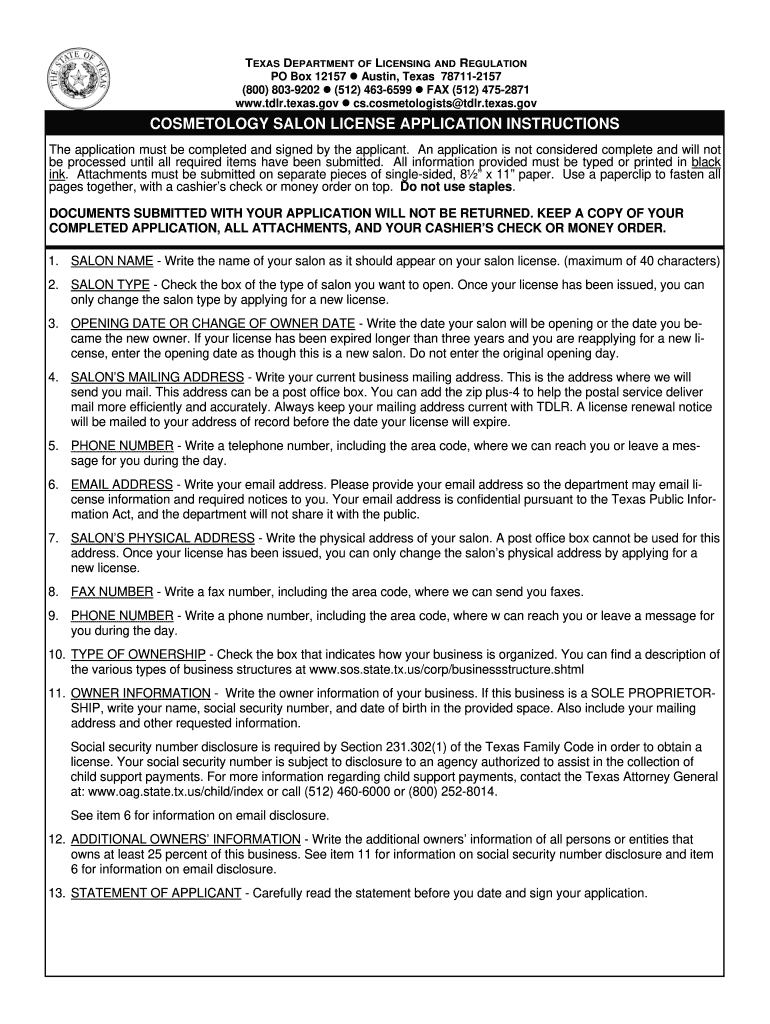
- Begin by entering your salon name in the designated field, ensuring it does not exceed 40 characters.
- Select the type of salon you wish to open by checking the appropriate box. Remember, this choice is permanent unless you apply for a new license.
- Input the opening date of your salon or the date you became the new owner. If reapplying after an expiration of over three years, treat it as a new salon.
- Fill in your salon’s mailing address accurately, including any PO Box if applicable. This is crucial for receiving important correspondence.
- Provide a daytime phone number and email address where you can be reached. Ensure these are current for effective communication.
- Enter your salon's physical address, which cannot be a PO Box. This is essential for licensing purposes.
- Complete ownership details by listing all owners with at least 25% ownership, including their social security numbers and contact information as required.
- Finally, read and sign the statement of applicant section before submitting your application to confirm compliance with all regulations.
Start filling out your cos011 form today on our platform for free!
It's free
See more cos011 versions
Got questions?
Can I complete and sign my code to check original phone online?
Yes, and it’s really straightforward! DocHub is a web-based PDF editor with advanced document processing functions that allow you rapidly adjust your paperwork, fill out empty fields and add new ones for other people to fill out, and create electronic signatures in several ways. Import your code to check original phone, give information as required, and choose how you want to eSign your template - by typing your name, drawing your signature, uploading its picture, or utilizing a QR code.
How to complete and sign cos011 online?
You may quickly complete, edit, and even eSign your cos011 utilizing DocHub. Create a new account and begin your free trial. After that, you may upload the document with the form and easily make all the required edits. No need to print on paper or use a third-party application to sign it, as you can place your electronic signature on your document quicker via DocHub.
Can you run a salon out of your house in Texas?
Can you run a salon out of your home in Texas?
How long does it take to get your cosmetology license in Texas?
Security and compliance
At DocHub, your data security is our priority. We follow HIPAA, SOC2, GDPR, and other standards, so you can work on your documents with confidence.
Learn more


