




Here's how it works



How to use or fill out Maine 1 11_1040X_downloadable.pdf - Find Laws with Our Platform

- Click ‘Get Form’ to open it in the editor.
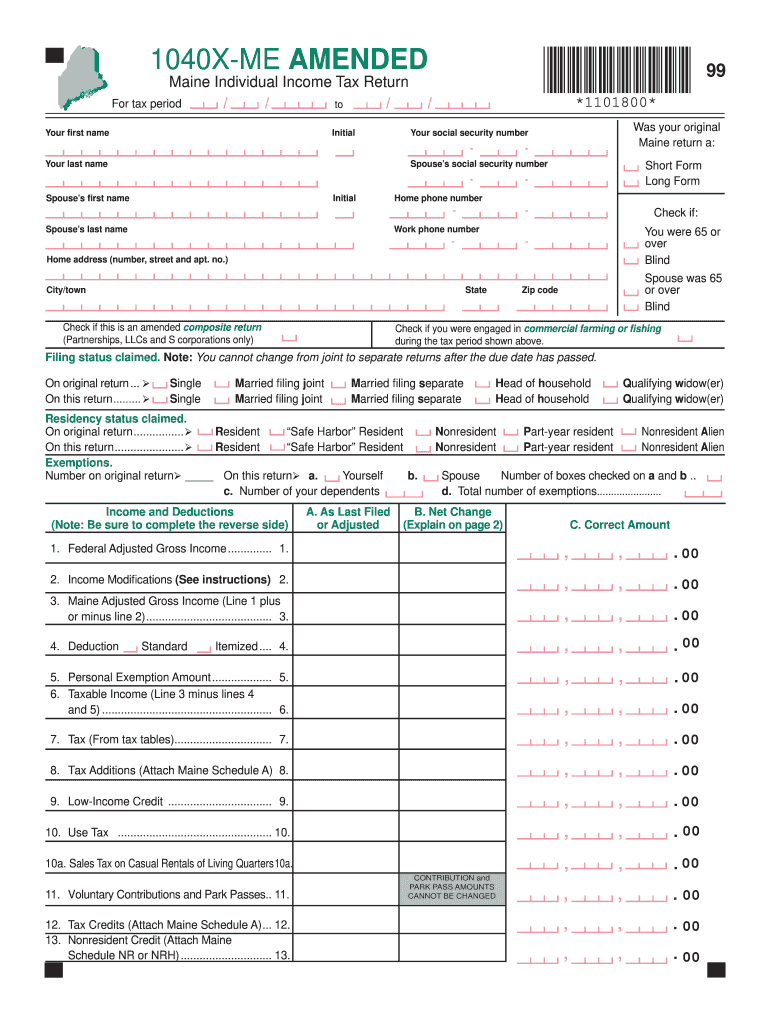
- Begin by entering your personal information, including your first name, last name, and social security number. Ensure accuracy as this information is crucial for processing your return.
- Indicate whether your original Maine return was a short form or long form by checking the appropriate box.
- Fill in your home address and check any applicable boxes regarding age or blindness status for you and your spouse.
- Select your filing status and residency status claimed on both the original and amended returns. This is important for determining tax obligations.
- Complete the income and deductions section carefully, ensuring that all figures are accurate. Refer to previous returns if necessary.
- Review the refund or amount owed section at the end of the form to ensure all calculations are correct before submitting.
Start editing your Maine tax return today for free using our platform!
It's free
See more Maine 1 11_1040X_downloadable.pdf - Find Laws versions
Got questions?
Can I sign my Maine 1 11_1040X_downloadable.pdf - Find Laws electronically?
According to eSignature laws, forms signed electronically have the same validity as traditionally approved ones. You can eSign almost any business and personal paperwork. Four types of paperwork still demand handwritten signatures only - wills and testamentary trusts, court orders and other court papers, state statutes governing divorce, adoption, or other family law, and notice of cancellation of utility services. If you follow the regulations and use a safe and compliant software solution, like DocHub, you can eSign your Maine 1 11_1040X_downloadable.pdf - Find Laws without printing it.
How do you complete Maine 1 11_1040X_downloadable.pdf - Find Laws online?
You can complete and sign your Maine 1 11_1040X_downloadable.pdf - Find Laws online, even on a tight deadline. All you need to access high quality editing tools on any device is a DocHub account, which you can sign up in just a few moments. Once you sign up, upload your document or find what you are looking for in our catalog, complete it using the editing tools you want, and place your electronic signature on it at the end.
Security and compliance
At DocHub, your data security is our priority. We follow HIPAA, SOC2, GDPR, and other standards, so you can work on your documents with confidence.
Learn more


