Permission district communicate 2026

Get Form
permission district communicate Preview on Page 1

Here's how it works

01. Edit your form online
Type text, add images, blackout confidential details, add comments, highlights and more.
02. Sign it in a few clicks
Draw your signature, type it, upload its image, or use your mobile device as a signature pad.
03. Share your form with others
Send it via email, link, or fax. You can also download it, export it or print it out.

How to use or fill out permission district communicate with our platform

Form edit decoration
9.5
Ease of Setup
DocHub User Ratings on G2
9.0
Ease of Use
DocHub User Ratings on G2
  1. Click ‘Get Form’ to open it in the editor.
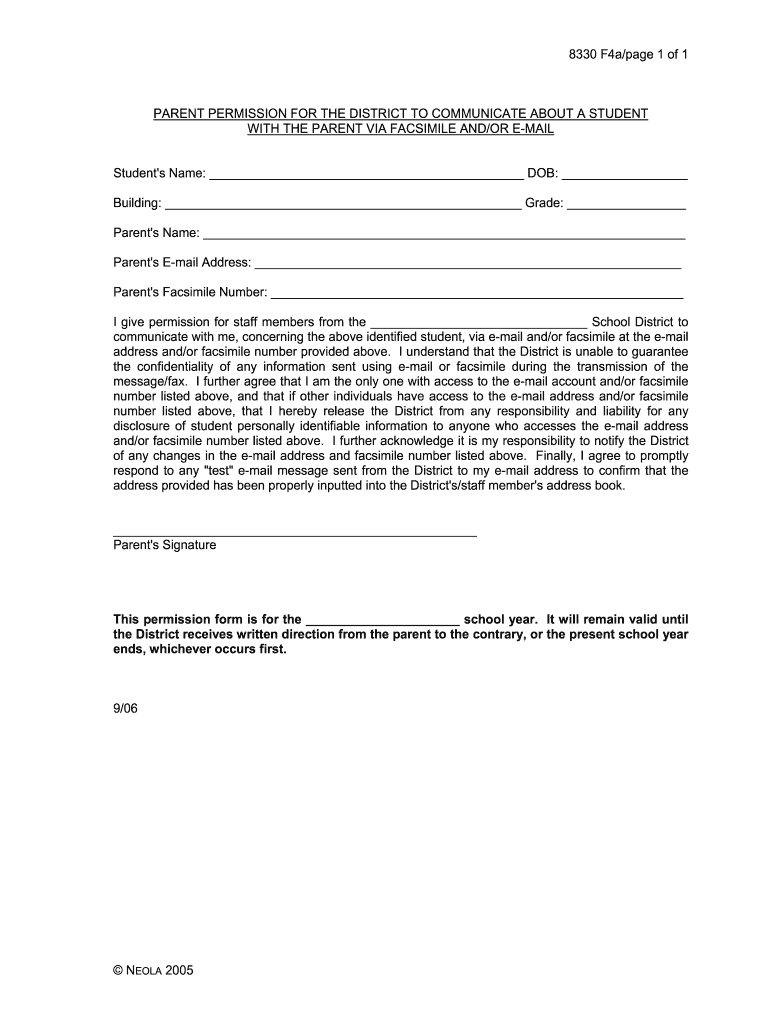
  2. Begin by entering the student's name and date of birth in the designated fields. This information is crucial for identifying the student associated with this permission.
  3. Next, fill in the building and grade where the student is enrolled. This helps ensure that communications are directed appropriately within the school district.
  4. Provide your name as the parent, along with your email address and facsimile number. Ensure these details are accurate to facilitate effective communication.
  5. Review the consent statement carefully. By signing, you authorize staff members from the school district to communicate with you via email and/or facsimile regarding your child.
  6. Finally, sign and date the form at the bottom. This confirms your agreement and allows for ongoing communication throughout the school year.

Start using our platform today to streamline your document editing and communication needs for free!

See more permission district communicate versions

We've got more versions of the permission district communicate form. Select the right permission district communicate version from the list and start editing it straight away!
Versions Form popularity Fillable & printable
2006 4.8 Satisfied (16440 Votes)
be ready to get more

Complete this form in 5 minutes or less

Get form

Got questions?

We have answers to the most popular questions from our customers. If you can't find an answer to your question, please contact us.
Contact us
Message Read Feature With read receipts, staff can now see if their direct message has been read by the recipient.
If you are a designated ParentSquare administrator (Admin) at your District, you can view posts for the District, all grades, classes and Groups. If you are a school Principal or District Admin, you can view direct messages at your District.
A good permission slip template should include all of the necessary information, such as: the name of the child. the name of the organization or event. the date and time of the activity. the location. the purpose of the event or activity. any special instructions or requirements.
ParentSquare is a secure, encrypted platform, and data transmitted via ParentSquare is not accessible to third parties.
Log in to ParentSquare, go to Account Settings, and ensure email and notification settings are enabled. If the issue persists, contact ParentSquare support at support@parentsquare.com.

Security and compliance

At DocHub, your data security is our priority. We follow HIPAA, SOC2, GDPR, and other standards, so you can work on your documents with confidence.

Learn more
ccpa2
pci-dss
gdpr-compliance
hipaa
soc-compliance
be ready to get more

Complete this form in 5 minutes or less

Get form

People also ask

ParentSquare is designed with equity in mind. Messages are automatically translated into over 100 languages, ensuring all familiesregardless of their preferred languagestay informed. The platform is accessible via mobile app, web browser, text message, or phone call, meeting families where they are.

Related links