




Here's how it works



How to use or fill out ROAD RESTRICTION PERMIT APPLICATION - City of Edina

- Click ‘Get Form’ to open it in the editor.
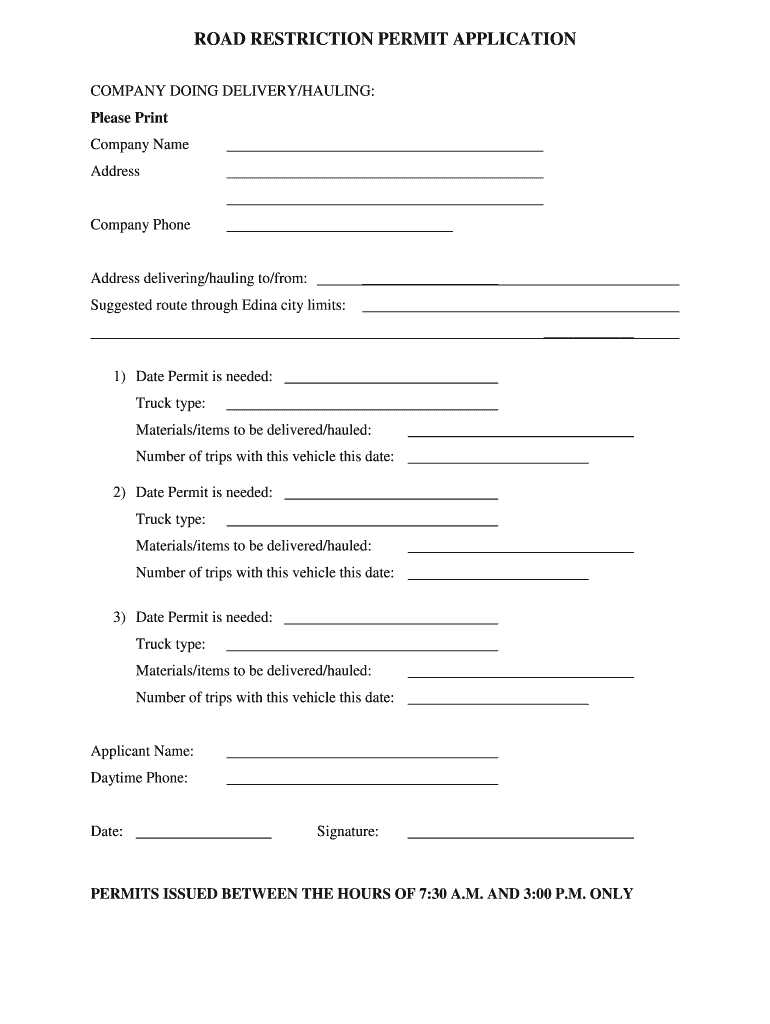
- Begin by entering the 'Company Name' and 'Address' in the designated fields. Ensure that all information is printed clearly for easy reading.
- Fill in the 'Company Phone' number, followed by the address where materials are being delivered or hauled to/from.
- In the section for suggested routes, provide a clear description of your intended path through Edina city limits.
- For each date permit is needed, specify the 'Truck type', 'Materials/items to be delivered/hauled', and 'Number of trips with this vehicle on this date'. Repeat this for up to three dates as required.
- Complete the application by filling in your name under 'Applicant Name', providing a daytime phone number, and signing at the bottom. Remember that permits are issued only between 7:30 A.M. and 3:00 P.M.
Start using our platform today to fill out your ROAD RESTRICTION PERMIT APPLICATION easily and for free!
It's free
See more ROAD RESTRICTION PERMIT bAPPLICATIONb - City of Edina - edinamn versions
| Versions | Form popularity | Fillable & printable |
|---|---|---|
| 2010 | 4 Satisfied (22 Votes) |
Got questions?
How can I send my edina building permit from Google Drive for signing?
If you frequently deal with documents stored in your Google Drive, DocHub is a superb option for you to easily and quickly complete, modify, and sign them. This editor integrates properly with Google services, so you can export your edina building permit from your Google Drive to the editor without downloading and re-uploading it. Right-click on your document, choose Open With → DocHub PDF Sign and Edit. In our editor, add and assign Signature Fields for all parties involved, then click on the Menu button above → Send → choose how you want to share your paperwork.
How do you edit edina building permits on iOS?
You can easily edit fill out your edina building permits on any iOS device. Open an internet browser of your choice, go to the DocHub site, authorize or create a new account, add your file for editing, and make your desired alterations. Our service is mobile-friendly, so using its features on your smartphone will be a no-brainer, even on the first try.
Security and compliance
At DocHub, your data security is our priority. We follow HIPAA, SOC2, GDPR, and other standards, so you can work on your documents with confidence.
Learn more


