




Here's how it works



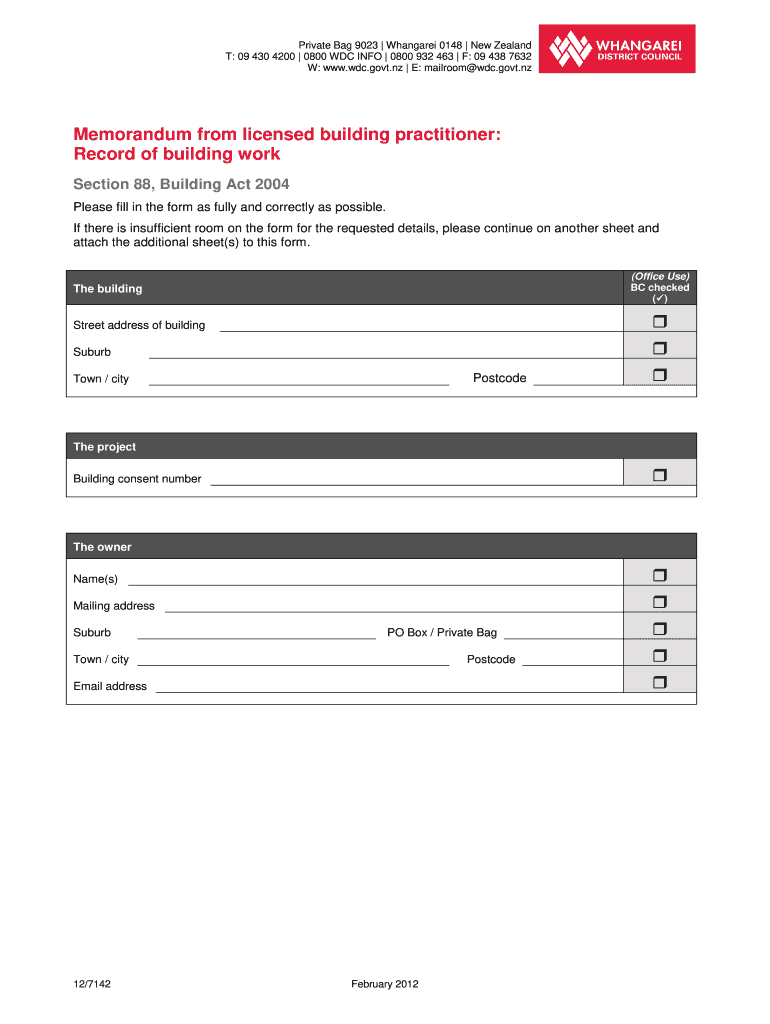
How to use or fill out Memorandum from licensed building practitioner: Record of building ... - wdc govt

- Click ‘Get Form’ to open it in the editor.
- Begin by entering the street address, suburb, postcode, and town/city of the building in the designated fields.
- Fill in the project details, including the building consent number.
- Provide the owner's name(s) and mailing address. Ensure all contact information is accurate for effective communication.
- In the 'Record of work that is restricted building work' section, indicate whether you carried out or supervised the work by checking the appropriate boxes.
- For each type of restricted building work listed (e.g., foundations, walls), provide a description and confirm your license class.
- Complete your contact details as a licensed building practitioner, ensuring all fields are filled accurately.
- Finally, sign and date the declaration section to confirm your involvement in the work recorded on this form.
Start using our platform today to streamline your document editing and form completion for free!
It's free
See more Memorandum from licensed building practitioner: Record of building ... - wdc govt versions
Got questions?
Can I complete and sign my lbp memorandum form online?
Sure, and it’s really easy! DocHub is a web-based PDF editor with advanced document processing functions that allow you rapidly adjust your paperwork, complete blank fields and drop new ones for other people to fill out, and create eSignatures in several ways. Import your lbp memorandum form, provide information as requested, and decide how you want to eSign your template - by typing your name, drawing your signature, uploading its image, or using a QR code.
How do you edit lbp memorandum on Android?
Document editing with DocHub is equally convenient on desktop and mobile devices. You only need an internet browser to revise your lbp memorandum on Android. Open our website and sign in to access the instruments you need. Add your file and introduce your intended changes. After that, you can keep your form in your file storage or send it out immediately.
What is a building memorandum?
What is the purpose of a memorandum?
Who can provide a certificate of design work?
Security and compliance
At DocHub, your data security is our priority. We follow HIPAA, SOC2, GDPR, and other standards, so you can work on your documents with confidence.
Learn more


