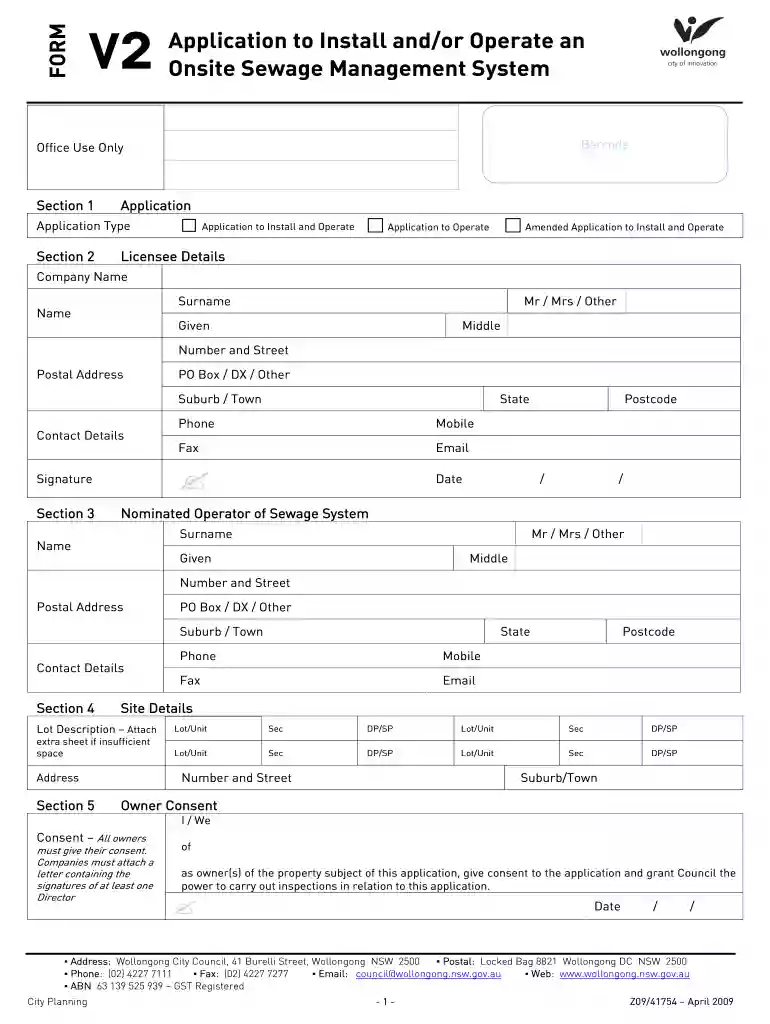
Au form v2 system 2026

Get Form
form hub Preview on Page 1

Here's how it works

01. Edit your form hub online
Type text, add images, blackout confidential details, add comments, highlights and more.

02. Sign it in a few clicks
Draw your signature, type it, upload its image, or use your mobile device as a signature pad.

03. Share your form with others
Send form hub com via email, link, or fax. You can also download it, export it or print it out.

How to use or fill out au form v2 system with our platform

Form edit decoration
9.5
Ease of Setup
DocHub User Ratings on G2
9.0
Ease of Use
DocHub User Ratings on G2
  1. Click ‘Get Form’ to open the au form v2 system in the editor.
  2. Begin with Section 1, where you will select the application type. Choose between 'Application to Install and Operate', 'Application to Operate', or 'Amended Application'.
  3. In Section 2, fill in your licensee details including your company name, surname, given name, and contact information such as phone and email.
  4. Proceed to Section 3 to provide details of the nominated operator of the sewage system. Ensure all fields are completed accurately.
  5. In Section 4, enter site details including lot description and address. If more space is needed, attach an extra sheet.
  6. Section 5 requires owner consent. Ensure all owners sign and date this section for approval.
  7. Complete Sections 6 through 8 by detailing system specifications, operational requirements, and sketching a site plan if necessary.

Start using our platform today for free to streamline your form completion process!

See more au form v2 system versions

We've got more versions of the au form v2 system form. Select the right au form v2 system version from the list and start editing it straight away!
Versions Form popularity Fillable & printable
2009 4.9 Satisfied (502 Votes)
be ready to get more

Complete this form in 5 minutes or less

Get form

Got questions?

We have answers to the most popular questions from our customers. If you can't find an answer to your question, please contact us.
Contact us

Yes, and it’s really easy! DocHub is an online PDF editor with advanced document processing features that allow you quickly modify your forms, fill out empty fields and insert new ones for others to fill out, and create electronic signatures in several ways. Add your formhub, provide information as required, and decide how you want to eSign your template - by typing your name, drawing your signature, uploading its picture, or using a QR code.

With a swift editing system like DocHub, you do not need anything but a browser and internet connection to edit your afman 90 161 online quickly. Upload your document or get the appropriate form in DocHub’s catalog, open our editor with one click, and complete it electronically. To edit your forms at any time, sign up a free account with DocHub.

An Enlisted Performance Report (EPR) is an evaluation form used by the United States Air Force. Instructions for constructing an EPR appear in chapter 3 of Air Force Instruction 36-2406: Officer and Enlisted Evaluation Systems. The EPR replaced the Airman Performance Report (APR) in the late 1980s.
- To log into Outlook you will need to go to https://owa.us.af.mil - Once you connect it will prompt you to choose a certificate. Be sure to choose the non-email cert for this as well.
The 422 may be obtained from the member's servicing Military Treatment Facility (MTF). Record Review Rip (Go to vMPF, click \u201cSelf-Service Actions,\u201d then click \u201cPersonal Data,\u201d then click \u201cRecord Review/Update,\u201d then \u201cView/Print All Pages.\u201d

Security and compliance

At DocHub, your data security is our priority. We follow HIPAA, SOC2, GDPR, and other standards, so you can work on your documents with confidence.

Learn more

People also ask

AF Form 422 - Notice of AF Members Qualification Status: With NO restrictions and validated within the last 60 days from the date your application is received. Form must indicate member does not have a deployment restriction (Code 31) or is undergoing an MEB (Code 37).
AF Form 1168, Statement of Suspect/Witness/Complainant. This form is to be used when taking a written statement from a suspect, accused person, witness or complainant (military or civilian). When the statement is handwritten, the writer initials the end of each paragraph, any errors and signs the state- ment.
0:24 2:21 Learn How to Fill the AF FORM 988 Leave Request/Authorization YouTube Start of suggested clip End of suggested clip Information about your requested leave provide. The number of days of leave the dates. Where youMoreInformation about your requested leave provide. The number of days of leave the dates. Where you will be your address during your leave an emergency. Contact number during your leave and any Duty.
1 April 2010 Page 2 Administrative Changes to AFI 33-360, Publications and Forms Management OPR: SAF/AAX References throughout to \u201cAir Force Communication Agency (AFCA)\u201d are hereby changed to \u201cAir Force Network Integration Center (AFNIC)\u201d.
Where Can I Find My AF Form 422? Blank AF Form 422 copies are stoked and issued by Medical Treatment Facilities (MTFs). To request and receive a copy, it is necessary to contact the servicing MTF (Flight & Operational Medicine Clinic/Medical Standard Management Element).

dafman90 161