Canada visa application forms pdf 2026

Get Form
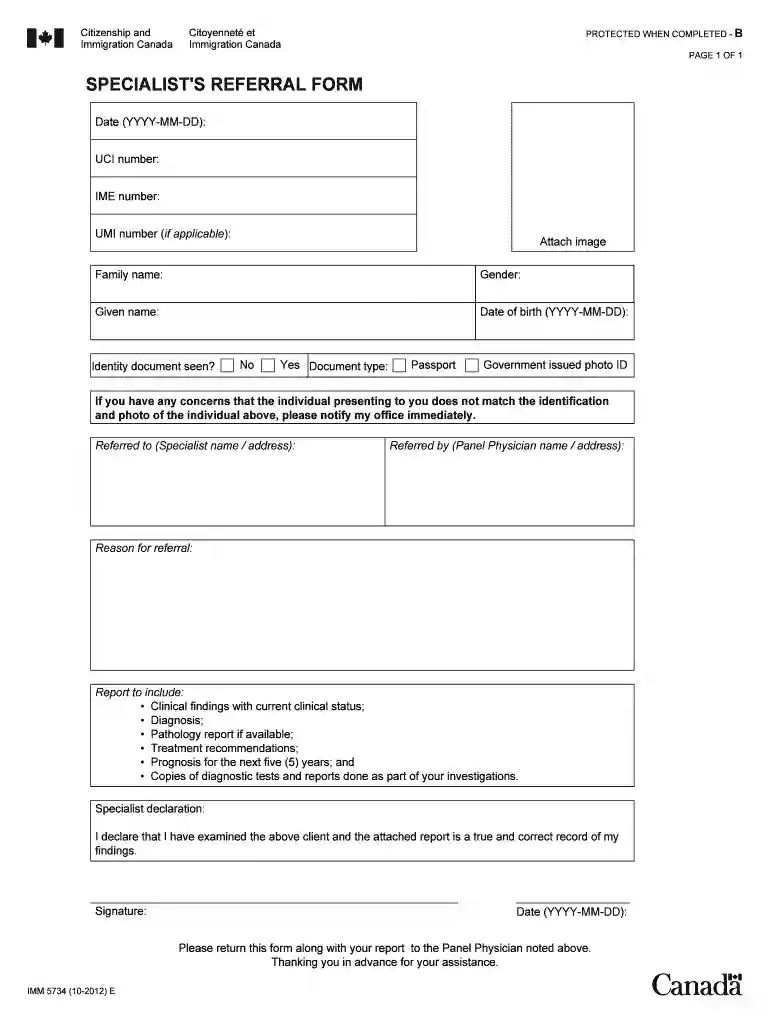
canada visa application form pdf free download Preview on Page 1

Here's how it works

01. Edit your canada visa application form pdf free download online
Type text, add images, blackout confidential details, add comments, highlights and more.

02. Sign it in a few clicks
Draw your signature, type it, upload its image, or use your mobile device as a signature pad.

03. Share your form with others
Send canada visa application form pdf via email, link, or fax. You can also download it, export it or print it out.

How to use or fill out Canada visa application forms PDF with our platform

Form edit decoration
9.5
Ease of Setup
DocHub User Ratings on G2
9.0
Ease of Use
DocHub User Ratings on G2
  1. Click ‘Get Form’ to open the Canada visa application forms PDF in the editor.
  2. Begin by entering the date in the format YYYY-MM-DD at the top of the form. This is essential for tracking your application.
  3. Fill in your UCI number, IME number, and UMI number if applicable. These identifiers are crucial for processing your application.
  4. Attach an image if required, ensuring it meets any specified guidelines for identification.
  5. Complete your personal details: family name, gender, given name, and date of birth (YYYY-MM-DD). Accuracy here is vital.
  6. Indicate whether an identity document has been seen by selecting 'Yes' or 'No', and specify the document type if applicable.
  7. Provide details about the specialist referral including names and addresses as required in the designated fields.
  8. Finally, ensure you sign and date the declaration section to confirm that all information provided is accurate before submitting your form.

Start using our platform today to fill out your Canada visa application forms PDF easily and for free!

See more canada visa application forms pdf versions

We've got more versions of the canada visa application forms pdf form. Select the right canada visa application forms pdf version from the list and start editing it straight away!
Versions Form popularity Fillable & printable
2019 4.8 Satisfied (42 Votes)
2012 4.4 Satisfied (224 Votes)
be ready to get more

Complete this form in 5 minutes or less

Get form

Got questions?

We have answers to the most popular questions from our customers. If you can't find an answer to your question, please contact us.
Contact us
Downloading and opening PDF files Find the link of the file you want to save (you may need to go back to the previous page to find it). Right-click the link. Select Save target as or Save link as. Choose the location on your computer where you would like to save the file. Select Save.
How to download and open a PDF form Find the link of the PDF form you wish to download; Right-click the link and select Save as link or Save target as; Choose the location on your computer where you want to save the PDF form; Go to the file location where you saved the PDF form;
To download a form: Click on the form link. When the form opens, save the form on your computer. OR. ress the right button on your mouse on the required link. Select Save Target As from the list. Save the form on your computer.
All applicants must visit the nearest VAC to complete their biometrics, including fingerprints and a photograph, and file their application if they did not do so online. The Canada visa application will be processed by Government of Canada officials. If approved, a request for the applicants passport will be sent.
Save the form on your computer in a place you can remember. For most Internet browsers, clicking on the link above will automatically download the form. If the form doesnt automatically download, right-click on the link and select Save as.

Security and compliance

At DocHub, your data security is our priority. We follow HIPAA, SOC2, GDPR, and other standards, so you can work on your documents with confidence.

Learn more
ccpa2
pci-dss
gdpr-compliance
hipaa
soc-compliance
be ready to get more

Complete this form in 5 minutes or less

Get form