Des form 190 3 2026

Get Form
190 3 Preview on Page 1

Here's how it works

01. Edit your 190 3 online
Type text, add images, blackout confidential details, add comments, highlights and more.

02. Sign it in a few clicks
Draw your signature, type it, upload its image, or use your mobile device as a signature pad.

03. Share your form with others
Send des form 190 3 via email, link, or fax. You can also download it, export it or print it out.

How to use or fill out des form 190 3 with our platform

Form edit decoration
9.5
Ease of Setup
DocHub User Ratings on G2
9.0
Ease of Use
DocHub User Ratings on G2
  1. Click ‘Get Form’ to open it in the editor.
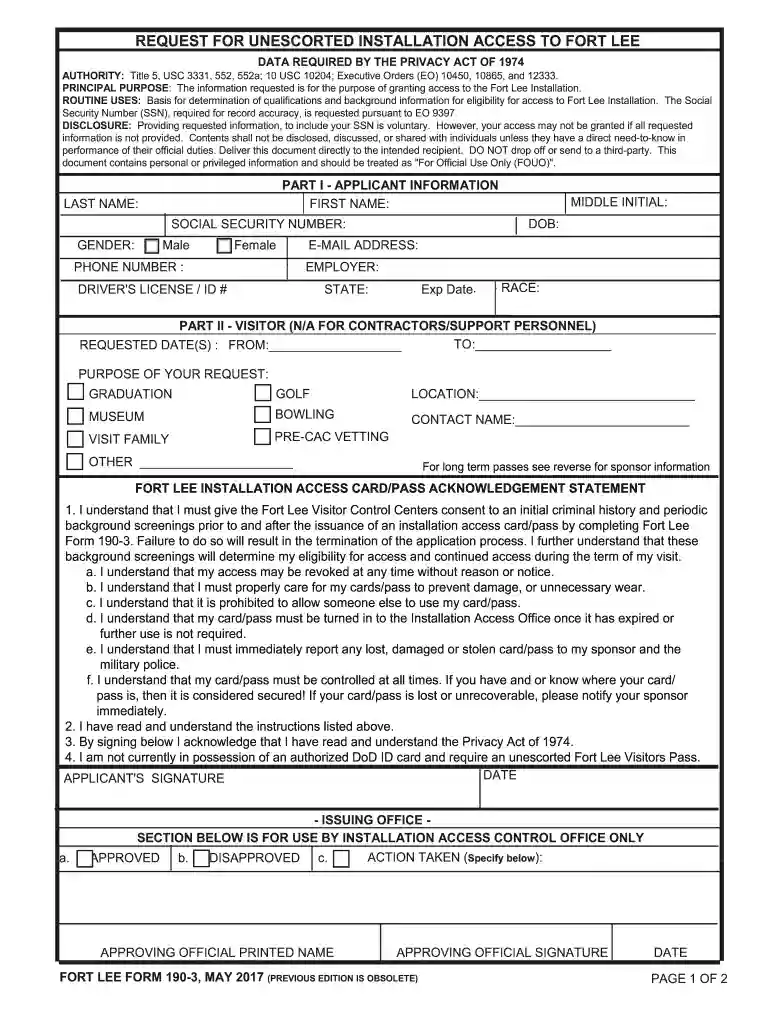
  2. Begin with Part I - Applicant Information. Fill in your first name, last name, date of birth, social security number, gender, phone number, middle initial, email address, employer, driver's license/ID number, expiration date, state, and race.
  3. If applicable, move to Part II - Visitor. Specify the requested dates and purpose of your visit by selecting from options like graduation or museum. Include the contact name and location.
  4. Review the Fort Lee Installation Access Card/Pass Acknowledgement Statement carefully. Ensure you understand all conditions regarding access and responsibilities before signing.
  5. Complete any additional sections relevant to contractors or support personnel if necessary.
  6. Once all fields are filled out accurately, save your document and follow the instructions for submission as indicated on the form.

Start using our platform today for free to streamline your form completion process!

See more des form 190 3 versions

We've got more versions of the des form 190 3 form. Select the right des form 190 3 version from the list and start editing it straight away!
Versions Form popularity Fillable & printable
2020 4.1 Satisfied (50 Votes)
2017 4.8 Satisfied (32 Votes)
2015 4.1 Satisfied (77 Votes)
be ready to get more

Complete this form in 5 minutes or less

Get form

Got questions?

We have answers to the most popular questions from our customers. If you can't find an answer to your question, please contact us.
Contact us
Anyone coming to Fort Lee for the FIRST TIME without a federal identification card, or with an expired access pass, MUST go to the Visitor Control Center with a valid government-issued photo ID (such as a drivers license) to receive an initial background check. The VCC is open 8 a.m. - 4 p.m. daily, except holidays.
Getting to the MEPS Requirements to get on base are: o All visitors without a valid military ID card must register. Registration can be done online by filling out the DES Form 190-3 on the Fort Gregg-Adams garrison website, or in person at the Visitors Center: ▪ Visitors Center: 500 Gregg Avenue, Building 5228.
Requirements to get on base are: o All visitors without a valid military ID card must register. Registration can be done online by filling out the DES Form 190-3 on the Fort Gregg-Adams garrison website, or in person at the Visitors Center: ▪ Visitors Center: 500 Gregg Avenue, Building 5228.
Vistiors Center is located at 500 Leet Avenue, Buildingg 5228, Fort Lee, VA 23801. Vistiors Center can be docHubed by their main phone number at (804) 734-4593. Alternatively, you can docHub Vistiors Center by phone at (804) 765-3000.
Effective May 7, adults who plan to visit military bases, including Fort Gregg-Adams, will need a REAL ID or another acceptable form of identification to gain access.

Security and compliance

At DocHub, your data security is our priority. We follow HIPAA, SOC2, GDPR, and other standards, so you can work on your documents with confidence.

Learn more
ccpa2
pci-dss
gdpr-compliance
hipaa
soc-compliance
be ready to get more

Complete this form in 5 minutes or less

Get form