




Here's how it works

01. Edit your psc2 example of filled psc form online
Type text, add images, blackout confidential details, add comments, highlights and more.

02. Sign it in a few clicks
Draw your signature, type it, upload its image, or use your mobile device as a signature pad.

03. Share your form with others
Send how to fill psc form online via email, link, or fax. You can also download it, export it or print it out.
How to fill out the PSC Form 2012 with our platform

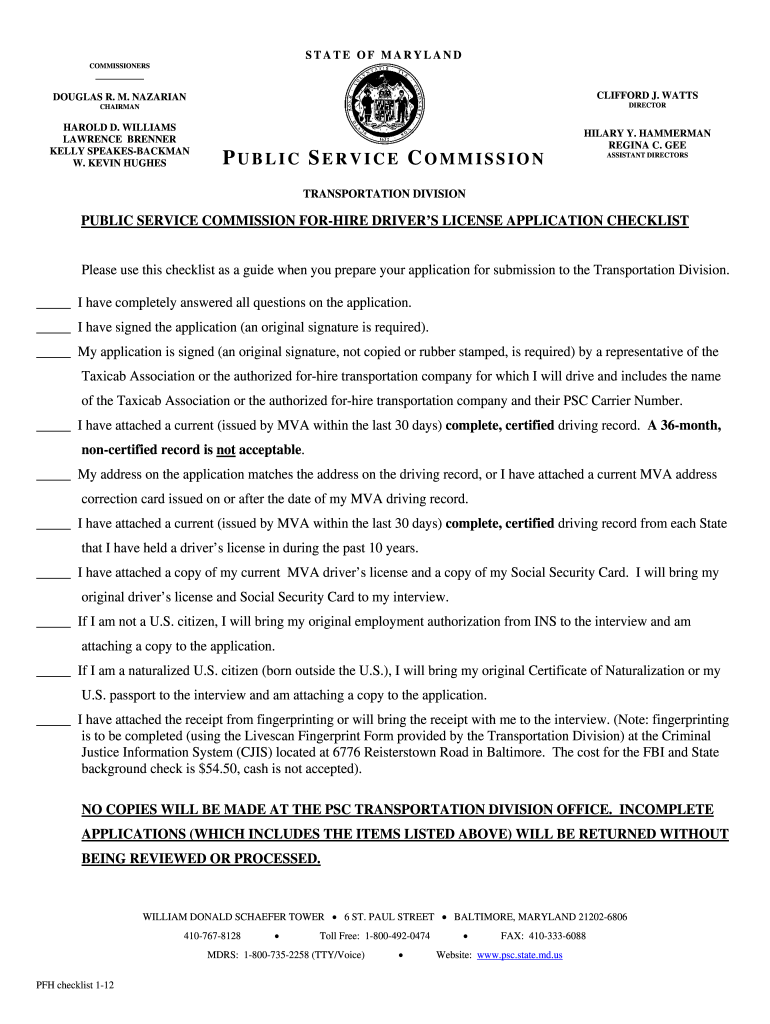
- Click ‘Get Form’ to open the PSC Form 2012 in the editor.
- Begin by filling out your personal information, including your name, address, and contact details. Ensure that all entries are accurate and match your identification documents.
- Complete the section regarding your driving history. Attach certified driving records from each state where you held a license in the past ten years, as required.
- Sign the application using our platform’s signature feature. Remember that an original signature is necessary for submission.
- Gather additional documents such as your Social Security card and any required identification for non-citizens. Upload these documents directly through our editor.
- Review all sections of the form to ensure completeness. Incomplete applications will be returned without processing.
- Submit your completed application along with all attachments via mail or personal delivery to the PSC Transportation Division.
Start using our platform today to simplify your form-filling process for free!
Fill out how to fill psc form 2012 online
It's free
It's free
See more how to fill psc form 2012 versions
We've got more versions of the how to fill psc form 2012 form. Select the right how to fill psc form 2012 version from the list and start editing it straight away!
Got questions?
We have answers to the most popular questions from our customers. If you can't find an answer to your question, please contact us.
Contact us
What is a sample application form?
When filling out a form, your goal is to provide complete, correct information. Think about who needs this information and why. Dont be intimidated: Keep your mind on what the form will accomplish for you. Follow the directions. Are all required fields completed? Have you checked spelling, especially of names?
How to fill out a PDF application form?
A sample application form is filled out by an applicant to apply for a specific job, course, or other opportunities. Sample applications can be used by employers and educational institutions to recruit and screen applicants.
How to fill out the application form?
Follow these steps to fill out your next job application properly: Read the application before filling it out. Take your time. Answer completely and truthfully. Include your resume . Fill out job information chronologically. Put in the extra effort. Research your salary.
How to fill an application form on a phone?
You can fill out PDF forms in Google Drive on your Android device. On your Android device, open the Google Drive app. Tap the PDF that you want to fill out. At the bottom right, tap Edit. Form Filling . Enter your information in the PDF form. At the top right, tap Save. To save as a copy, click More.
How to fill in a PDF application form?
Open a PDF document in Acrobat. Click the Fill Sign tool in the right pane. Fill in your form: Complete form filling by clicking a text field and typing or adding a text box. You can add checkmarks and fill in radio buttons too.
Security and compliance
At DocHub, your data security is our priority. We follow HIPAA, SOC2, GDPR, and other standards, so you can work on your documents with confidence.
Learn more


People also ask
How do I fill out an application form?
How to fill out a job application Read the application before filling it out. Take your time. Answer completely and truthfully. Include your resume . Fill out job information chronologically. Put in the extra effort. Research your salary.
How to fill forms correctly?
When filling out a form, your goal is to provide complete, correct information. Think about who needs this information and why. Dont be intimidated: Keep your mind on what the form will accomplish for you.