



Mce alternative 2026

Get Form
dochub alternatives Preview on Page 1

Here's how it works

01. Edit your dochub alternatives online
Type text, add images, blackout confidential details, add comments, highlights and more.

02. Sign it in a few clicks
Draw your signature, type it, upload its image, or use your mobile device as a signature pad.

03. Share your form with others
Send tinymce alternative via email, link, or fax. You can also download it, export it or print it out.

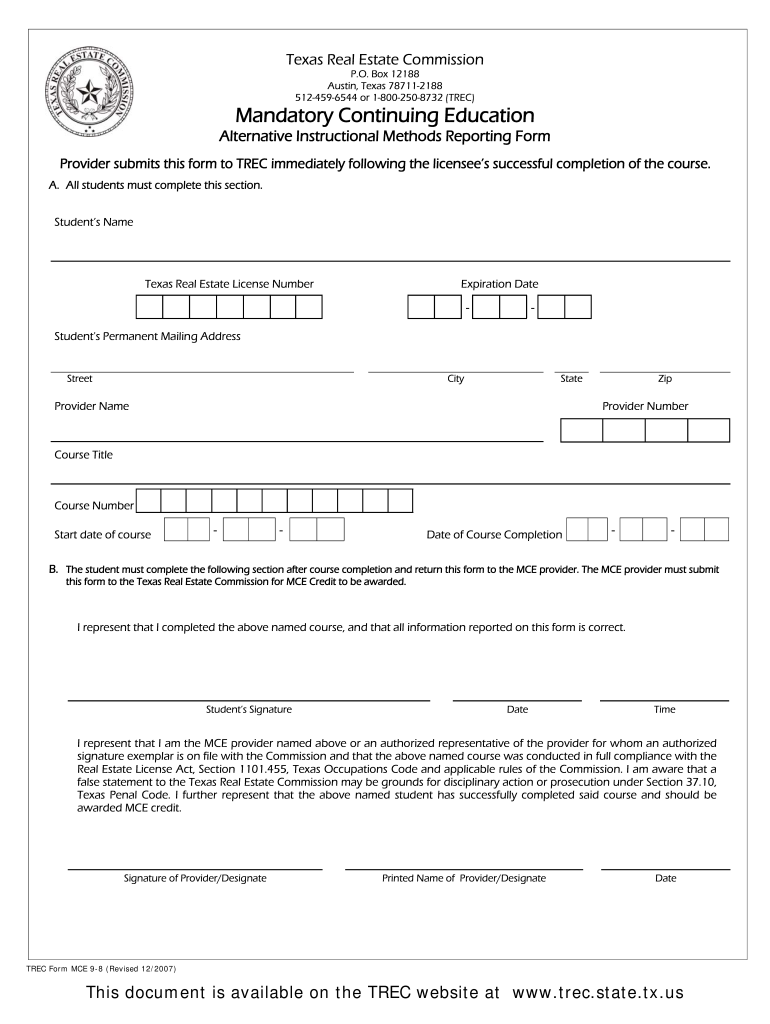
How to use or fill out the MCE Alternative Instructional Methods Reporting Form

Form edit decoration
9.5
Ease of Setup
DocHub User Ratings on G2
9.0
Ease of Use
DocHub User Ratings on G2
  1. Click ‘Get Form’ to open it in the editor.
  2. In Section A, enter your name, Texas Real Estate License Number, and expiration date. Ensure all details are accurate.
  3. Fill in your permanent mailing address, including street, city, state, and zip code.
  4. Provide the Provider Name and Provider Number as approved by the commission.
  5. Enter the Course Title and Course Number exactly as they appear on your course documentation.
  6. Record the start date of the course and the completion date in the designated fields.
  7. In Section B, read the certification statement carefully. Sign and date this form to confirm completion of the course.
  8. Submit this form to your MCE provider for processing. The provider must then submit it to TREC for credit.

Start filling out your MCE form online for free today!

See more mce alternative versions

We've got more versions of the mce alternative form. Select the right mce alternative version from the list and start editing it straight away!
Versions Form popularity Fillable & printable
2007 4.9 Satisfied (58 Votes)
be ready to get more

Complete this form in 5 minutes or less

Get form

Got questions?

We have answers to the most popular questions from our customers. If you can't find an answer to your question, please contact us.
Contact us
Certainly, there are many other good programs like Windows Media Center in the market, for example, VLC, MediaPortal, and Plex. You are free to choose any one you like to replace Windows Media Center as part of Windows 10/11.
Windows Media Center (WMC) is a discontinued digital video recorder and media player created by Microsoft.
TinyMCE is a free WYSIWYG HTML editor.
VLC or media player classic are probably the best ones around.
A Microsoft representative said last year that Windows Media Center would not be included the Windows 10 operating system due to decreased usage. If you run Microsofts Compatibility Report software on a Windows 7 system, you will also see a message informing you that Windows Media Center does not work with Windows

Security and compliance

At DocHub, your data security is our priority. We follow HIPAA, SOC2, GDPR, and other standards, so you can work on your documents with confidence.

Learn more
ccpa2
pci-dss
gdpr-compliance
hipaa
soc-compliance
be ready to get more

Complete this form in 5 minutes or less

Get form

People also ask

TinyMCE or tinymce Use the capitalized version of TinyMCE when referring to the open source project or the editor. TinyMCE is an abbreviation of Tiny MoxieCode Editor, but is better known as TinyMCE.
CKEditor is a better choice if you require extensive features, robust real-time collaboration, and seamless integration with various platforms. TinyMCE stands out for its simplicity, ease of use, and transparent pricing structure, making it ideal for users who prioritize quick setup and user-friendliness.
Best Windows Media Player Alternatives PowerDVD - Best Overall. KMPlayer - Best for Tech-Savvy Users. PotPlayer - Best for Customization. Kodi - Best for Organizing Your Media Collection. GOM Player Best for Subtitle Lovers.

Related links