DO NOT LEAVE ANY ITEMS BLANK In the - New York State Unified ... - courts state ny 2026

Get Form
ecourts login ny Preview on Page 1

Here's how it works

01. Edit your ecourts login ny online
Type text, add images, blackout confidential details, add comments, highlights and more.
02. Sign it in a few clicks
Draw your signature, type it, upload its image, or use your mobile device as a signature pad.
03. Share your form with others
Send new york ecourts via email, link, or fax. You can also download it, export it or print it out.

How to use or fill out DO NOT LEAVE ANY ITEMS BLANK In the - New York State Unified Courts with our platform

Form edit decoration
9.5
Ease of Setup
DocHub User Ratings on G2
9.0
Ease of Use
DocHub User Ratings on G2
  1. Click ‘Get Form’ to open it in the editor.
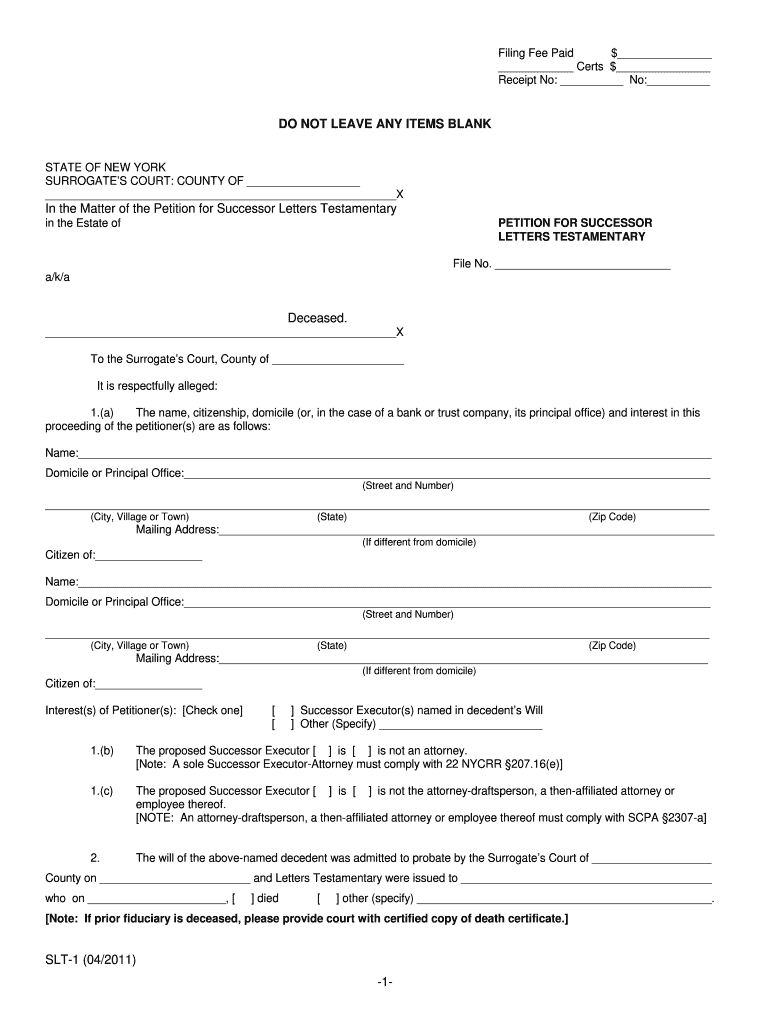
  2. Begin by entering the Filing Fee Paid amount in the designated field. Ensure this is accurate as it is crucial for processing your petition.
  3. Fill in the Surrogate’s Court County and File Number at the top of the form. This information helps identify your case.
  4. Complete Section 1(a) with your name, domicile, and mailing address. If you are representing a bank or trust company, include its principal office details.
  5. In Section 1(b), indicate whether the proposed Successor Executor is an attorney by checking the appropriate box.
  6. Continue filling out Sections 2 through 6, ensuring all names and addresses of interested parties are included without leaving any items blank.
  7. Finally, review all entries for accuracy before signing at the bottom of the form. Use our platform's features to save and share your completed document easily.

Start using our platform today to streamline your document editing and ensure a smooth filing process!

See more DO NOT LEAVE ANY ITEMS BLANK In the - New York State Unified ... - courts state ny versions

We've got more versions of the DO NOT LEAVE ANY ITEMS BLANK In the - New York State Unified ... - courts state ny form. Select the right DO NOT LEAVE ANY ITEMS BLANK In the - New York State Unified ... - courts state ny version from the list and start editing it straight away!
Versions Form popularity Fillable & printable
2011 4.9 Satisfied (450 Votes)
be ready to get more

Complete this form in 5 minutes or less

Get form

Got questions?

We have answers to the most popular questions from our customers. If you can't find an answer to your question, please contact us.
Contact us
Judicial branch of the State of New York. The mission of the Unified Court System (UCS) is to deliver equal justice under the law and to achieve the just, fair and timely resolution of all matters that come before our courts.
Uniform, quality justice is the goal of the unification process. Other benefits include the reduction or elimination of overlapping and fragmented jurisdiction among trial courts, streamlined trial and appellate processes, and management and planning for the entire system.
The courts that compose the states judicial system generally may be arranged on three functional levels: (1) appellate courts, including the Court of Appeals and the Appellate Divisions of Supreme Court; (2) trial courts of superior jurisdiction, including the Supreme Court and various county level courts; and (3)
The Supreme Court is the state-wide trial court with the broadest jurisdiction, both in criminal and civil matters. It can hear virtually any type of case brought before it, with the exception of claims brought against the state which must be heard by the Court of Claims.

Security and compliance

At DocHub, your data security is our priority. We follow HIPAA, SOC2, GDPR, and other standards, so you can work on your documents with confidence.

Learn more
ccpa2
pci-dss
gdpr-compliance
hipaa
soc-compliance
be ready to get more

Complete this form in 5 minutes or less

Get form