Eye prescription template word 2026

Get Form
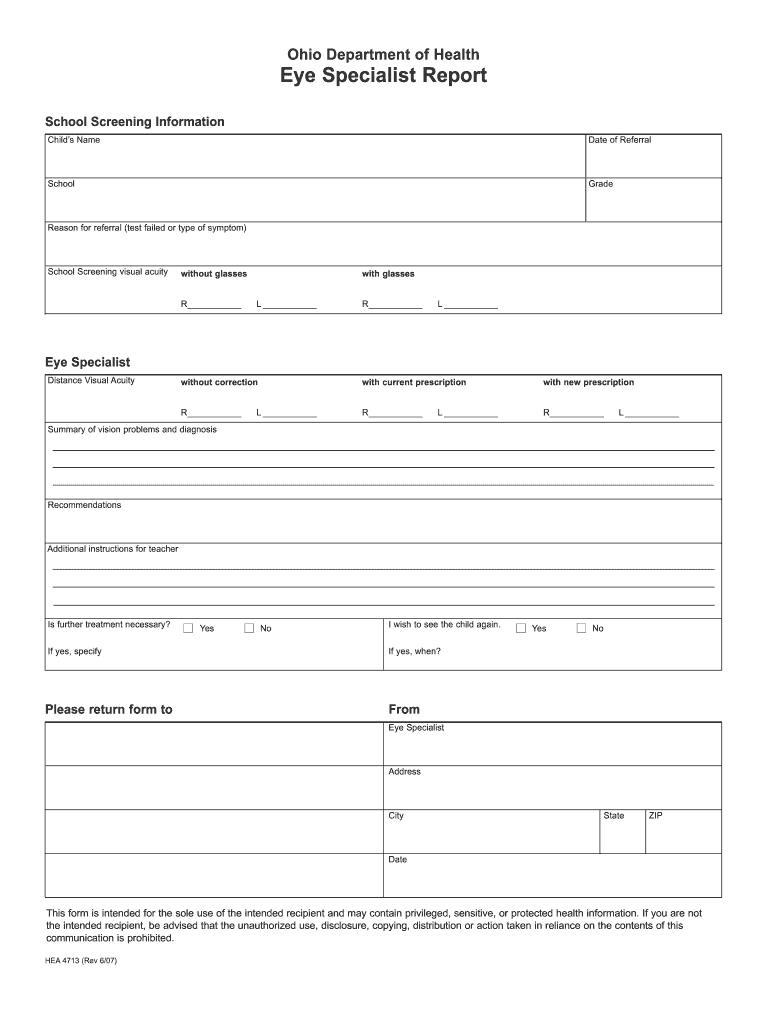
eye prescription template word Preview on Page 1

Here's how it works

01. Edit your eye prescription template word online
Type text, add images, blackout confidential details, add comments, highlights and more.
02. Sign it in a few clicks
Draw your signature, type it, upload its image, or use your mobile device as a signature pad.
03. Share your form with others
Send optometry prescription pad template via email, link, or fax. You can also download it, export it or print it out.

How to use or fill out eye prescription template word with our platform

Form edit decoration
9.5
Ease of Setup
DocHub User Ratings on G2
9.0
Ease of Use
DocHub User Ratings on G2
  1. Click ‘Get Form’ to open the eye prescription template in the editor.
  2. Begin by entering the child's name, date of referral, school, and grade in the designated fields at the top of the form.
  3. In the 'Reason for referral' section, specify whether a test failed or describe any symptoms observed.
  4. Fill in the visual acuity measurements for both eyes under 'School Screening visual acuity without glasses'.
  5. Next, complete the 'Distance Visual Acuity' section by providing measurements with and without correction for each eye.
  6. Summarize any vision problems and diagnoses in the provided space, followed by recommendations and additional instructions for teachers.
  7. Indicate if further treatment is necessary and provide details if applicable. Finally, fill out your information as the eye specialist at the bottom of the form.

Start using our platform today to easily fill out your eye prescription template for free!

See more eye prescription template word versions

We've got more versions of the eye prescription template word form. Select the right eye prescription template word version from the list and start editing it straight away!
Versions Form popularity Fillable & printable
2007 4.8 Satisfied (160 Votes)
be ready to get more

Complete this form in 5 minutes or less

Get form

Got questions?

We have answers to the most popular questions from our customers. If you can't find an answer to your question, please contact us.
Contact us

Electronic document approval requires a software solution that complies with data security and eSignature standards. DocHub is an excellent tool for that, because it meets all the above mentioned requirements. Whatever method you prefer to sign your printable eye prescription template in DocHub, your electronic signature will be legally binding and court-admissible.

If you edit your optometrist prescription template with DocHub, you merely require a stable web connection and virtually any browser installed on your device. No need to set up any third-party applications or research guides. Simply open a tab with DocHub, drag and drop your file, and edit it on the spot.

Standard Grid Format This is the most common format with clearly printed fields for OD, OS, SPH, CYL, etc.; values are usually entered with computer, but may be handwritten by doctor. Rx Notes: Sphere (SPH) and Cylinder (CYL) always have a (+) or (-) sign.
For a pharmacist to dispense a controlled substance, the prescription must include specific information to be considered valid: Date of issue. Patients name and address. Patients date of birth. Clinician name, address, DEA number. Drug name. Drug strength. Dosage form. Quantity prescribed.
All corrective eyewear prescriptions must always be approved by an optometrist or ophthalmologist. If you have a high-power or irregular prescription, skip the home vision tests and schedule an exam with your ophthalmologist or optometrist.

Security and compliance

At DocHub, your data security is our priority. We follow HIPAA, SOC2, GDPR, and other standards, so you can work on your documents with confidence.

Learn more
ccpa2
pci-dss
gdpr-compliance
hipaa
soc-compliance

People also ask

4:29 12:28 Go to the insert menu and insert a text. Box. We are going to use this text box to write theMoreGo to the insert menu and insert a text. Box. We are going to use this text box to write the doctors name job title education or qualifications. And the healthcare department name he is working. In.
Place your cursor where you want to insert the line. In the Home tab, select the Borders button. Select Horizontal line from the drop-down menu. This places the line in the specified location on your page.
A +0.25 eye prescription indicates a person has mild farsightedness (hyperopia), meaning they have a slight difficulty seeing objects up close.
Other Top Recommended Medical Practice Management Software RXNT. 4.3 (486) Recently recommended 244 times. athenaOne. 3.8 (919) Recently recommended 197 times. Tebra. 3.9 (1333) Recently recommended 168 times. CharmHealth. 4.2 (149) Recently recommended 105 times.

blank eye prescription form