Type text, add images, blackout confidential details, add comments, highlights and more.

02. Sign it in a few clicks
Draw your signature, type it, upload its image, or use your mobile device as a signature pad.

03. Share your form with others
Send aviva credit card payment via email, link, or fax. You can also download it, export it or print it out.

How to use or fill out aviva credit card form with our platform
Ease of Setup
DocHub User Ratings on G2
Ease of Use
DocHub User Ratings on G2
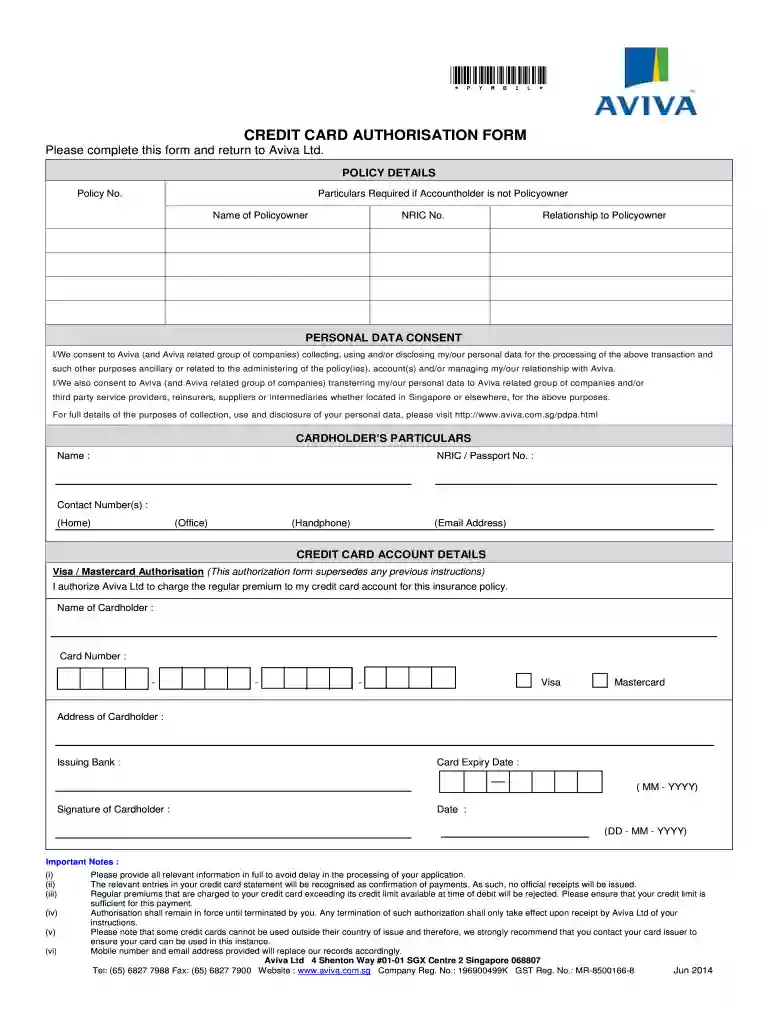
Click ‘Get Form’ to open the aviva credit card form in the editor.
Begin by entering your Policy No. in the 'POLICY DETAILS' section. If you are not the Policyowner, provide the Name, NRIC No., and Relationship to the Policyowner.
In the 'PERSONAL DATA CONSENT' section, review and acknowledge your consent for Aviva to handle your personal data as outlined.
Fill in your details under 'CARDHOLDER’S PARTICULARS', including your Name, NRIC/Passport No., Contact Numbers (Home, Office, Handphone), and Email Address.
Proceed to 'CREDIT CARD ACCOUNT DETAILS'. Select either Visa or Mastercard, then enter your Cardholder Name, Card Number, Address of Cardholder, Issuing Bank, and Card Expiry Date.
Finally, sign and date the form at the bottom. Ensure all information is accurate to avoid processing delays.
Start filling out your aviva credit card form online for free today!
We've got more versions of the aviva credit card form form. Select the right aviva credit card form version from the list and start editing it straight away!
You have two options for payment: You can make a credit card payment by either calling us at 1-866-456-6620 or calling Aviva Billing directly at 647-696-4253. You can also make a payment through online banking with Aviva Canada as the payee and your Aviva policy account number.
aviva payment authorization form
Aviva credit card form pdfAviva credit card paymentAviva credit card form onlineaviva.ca paymentAviva paymentAviva insuranceaviva.ca manage my policy pay by credit cardAviva manage my policy
aviva card
AVIVA USA CORPORATION POLITICAL ACTION
The payments are not considered contributions but instead are reported as Communication Costs on Form 7. See 11 CFR 104.6(a). Form 5, Form 7 and Form 9
Use Your Buzzcard - Georgia Institute of Technology
Aviva. 756 W Peachtree St NW Parents can make fund deposits to students BuzzCard! Make deposits through BuzzCard eAccounts web portal using credit card.
Cookie consent notice
This site uses cookies to enhance site navigation and personalize your experience.
By using this site you agree to our use of cookies as described in our Privacy Notice.
You can modify your selections by visiting our Cookie and Advertising Notice.