






Understanding the CT Health Assessment Form
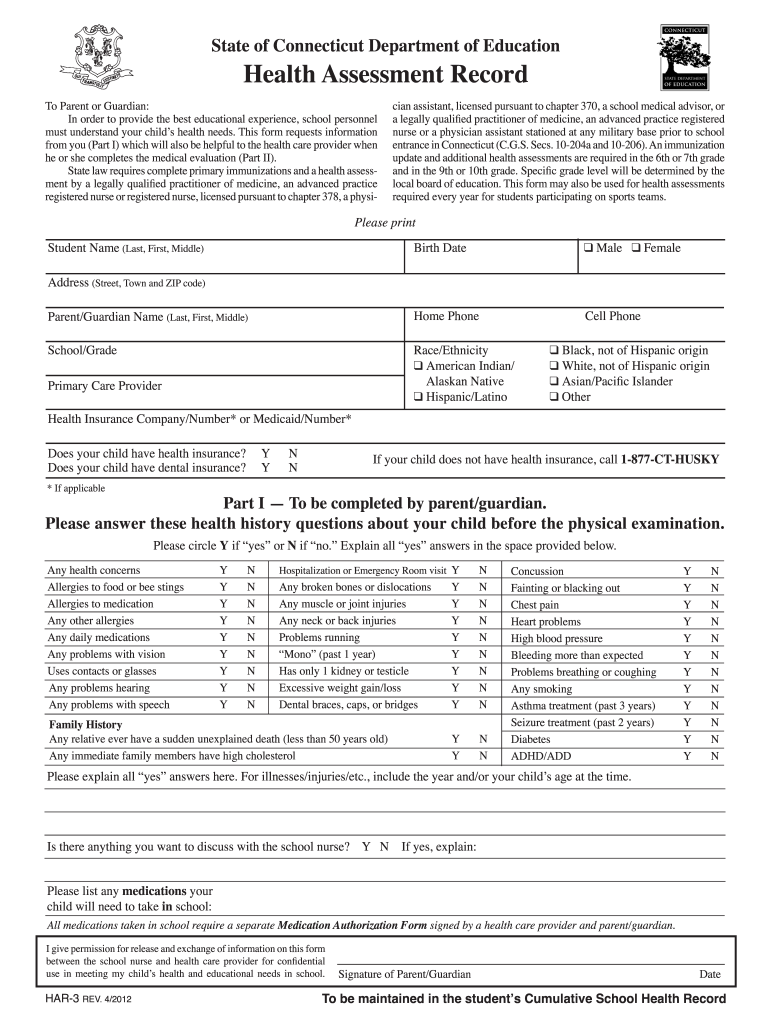
The CT health assessment form is a crucial document designed to capture vital health information about students within Connecticut. It serves as a comprehensive health record, ensuring school personnel are equipped with necessary health data to support students appropriately.
Purpose of the CT Health Assessment Form
The primary aim of the form is to collect essential health information from parents or guardians regarding their child's health status. This ensures that schools can adequately support each student's educational needs and accommodate any health-related concerns or requirements.
- Mandated Health Requirements: The form outlines immunization and health assessment requirements established by Connecticut state laws for school entry and specific grade levels.
- Health History Documentation: Key sections include personal details, comprehensive health history, and any medical evaluations, ensuring that all relevant information is documented.
Who Must Complete the CT Health Assessment Form
Typically, this form needs to be filled out by the parents or guardians of children who are:
- Entering school for the first time
- Transitioning to a new school level (e.g., kindergarten, seventh grade)
- In need of updated health information due to changes in health status
It ensures that students meet the health threshold that aligns with the regulations set by the Connecticut Department of Education.
Key Components of the CT Health Assessment Form
The CT health assessment form comprises several essential sections:
- Personal Information: This section records the child’s name, date of birth, and parent or guardian contact details.
- Immunization Records: Documentation of vaccinations must be provided, adhering to the specified state vaccination requirements.
- Health History Section: Parents must disclose significant health conditions, allergies, medications, and prior medical treatments. These details are vital for planning safety measures and interventions within the school setting.
- Physical Examination Results: A space is allocated for healthcare providers to document findings from a recent physical examination, which may be mandated for school entry.
Completion Guidelines for the CT Health Assessment Form
Filling out the CT health assessment form requires careful attention to detail from parents or guardians. Here is a step-by-step guide to help ensure completion is thorough and accurate:
- Gather Necessary Information: This includes vaccination records, the child's medical history, and contact details.
- Consult with a Healthcare Provider: If unsure about specific health queries, consulting with a healthcare professional can help ensure accurate information.
- Complete All Sections: Fill in every section of the form diligently; this includes both the health history and immunization parts.
- Submit Timely: Ensure the form is submitted before the deadlines set by the school or educational institution to avoid any enrollment issues.
Legal and Compliance Aspects of the CT Health Assessment Form
The CT health assessment form must be completed in accordance with state laws governing student health records. Key considerations include:
- Confidentiality: The information shared on the form must be treated with confidentiality and used solely for educational and health support purposes.
- Legal Requirements: Failing to complete or submit the health assessment may lead to implications, such as being unable to enroll in school or participate in school activities.
Important Dates for Submission
Parents and guardians should be mindful of specific timelines related to the CT health assessment form. These may include:
- Enrollment Deadlines: Typically coincide with the start of the academic year or specific registration periods set by schools.
- Immunization Update Requirements: Some schools may require updated health assessments at designated intervals, such as before the start of each school year or upon promotion to a new grade.
Variants and Updates to the CT Health Assessment Form
While the CT health assessment form remains a standardized document, changes may occur over time reflecting new health guidelines and educational policies. It is advisable to:
- Check for Updated Versions: Parents should ensure they are using the latest version of the form to comply with current state regulations and requirements.
- Understand the Implications of Versions: Previous editions of the health assessment may not meet new standards, potentially affecting a child's enrollment or health eligibility.
By understanding these critical elements of the CT health assessment form, parents and guardians can ensure that they provide comprehensive and accurate health information, which is vital for student success and well-being in the educational environment.