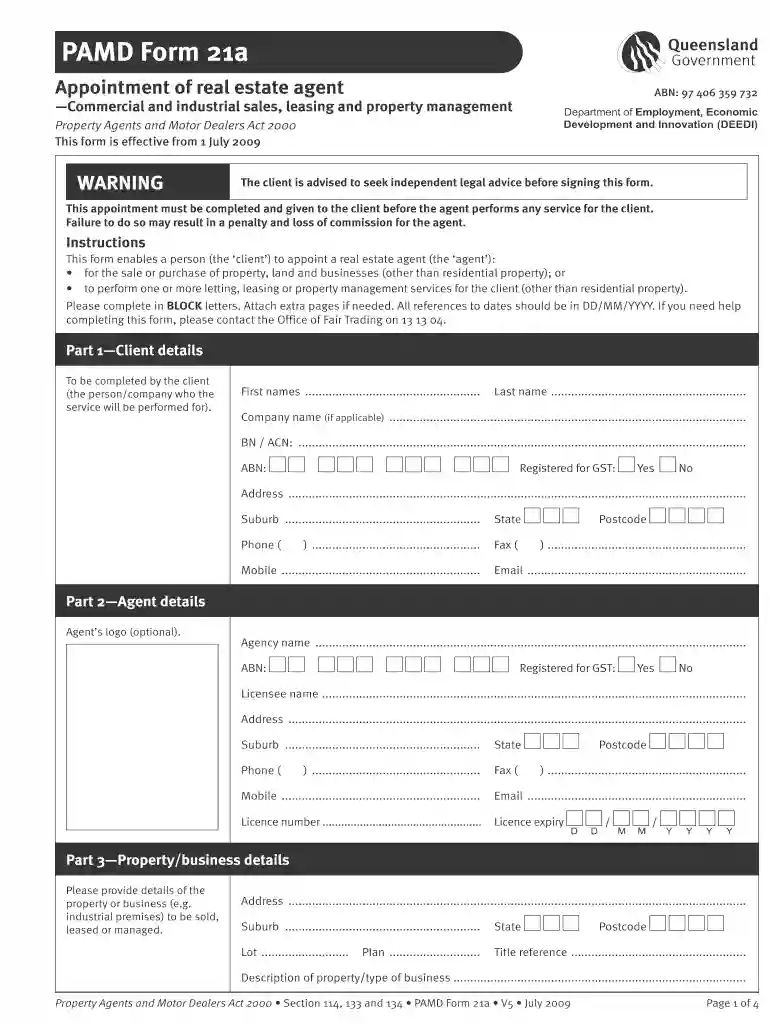
Form pamd 21a agent editable 2026

Get Form
form pamd 21a agent editable Preview on Page 1

Here's how it works

01. Edit your form online
Type text, add images, blackout confidential details, add comments, highlights and more.

02. Sign it in a few clicks
Draw your signature, type it, upload its image, or use your mobile device as a signature pad.

03. Share your form with others
Send it via email, link, or fax. You can also download it, export it or print it out.

How to use or fill out form pamd 21a agent editable

Form edit decoration
9.5
Ease of Setup
DocHub User Ratings on G2
9.0
Ease of Use
DocHub User Ratings on G2
  1. Click ‘Get Form’ to open it in the editor.
  2. Begin with Part 1—Client details. Fill in your first name, last name, and company name if applicable. Ensure you provide your ABN and GST registration status.
  3. Proceed to Part 2—Agent details. Enter the agency name, licensee name, and contact information. Confirm GST registration and provide the license number.
  4. In Part 3—Property/business details, specify the address and description of the property or business involved in the appointment.
  5. Complete Part 4—Appointment of agent by selecting the services you wish to appoint the agent for, such as sale or leasing.
  6. Review Parts 5 through 12 for conditions, commission agreements, fees, and expenses. Fill these sections according to your agreement with the agent.
  7. Finally, sign in Part 13 along with any other clients involved. Ensure all signatures are dated correctly.

Start using our platform today to easily fill out your PAMD Form 21a for free!

See more form pamd 21a agent editable versions

We've got more versions of the form pamd 21a agent editable form. Select the right form pamd 21a agent editable version from the list and start editing it straight away!
Versions Form popularity Fillable & printable
2012 4.8 Satisfied (189 Votes)
2009 4 Satisfied (49 Votes)
be ready to get more

Complete this form in 5 minutes or less

Get form

Got questions?

We have answers to the most popular questions from our customers. If you can't find an answer to your question, please contact us.
Contact us

Electronic document signing demands a software solution that complies with data security and eSignature standards. DocHub is a perfect tool for that, as it meets all the aforementioned requirements. Whatever method you prefer to sign your form pamd 21a agent editable in DocHub, your eSignature will be legally binding and court-admissible.

You can find the latest and most relevant version of the form pamd 21a agent editable in our DocHub forms collection. Search it by categories or use the search field to find the exact template that fits your situation. You can open this form for editing once you find it.

Security and compliance

At DocHub, your data security is our priority. We follow HIPAA, SOC2, GDPR, and other standards, so you can work on your documents with confidence.

Learn more
ccpa2
pci-dss
gdpr-compliance
hipaa
soc-compliance