




Here's how it works



How to use or fill out nj online bc 502r 10 13 form with our platform

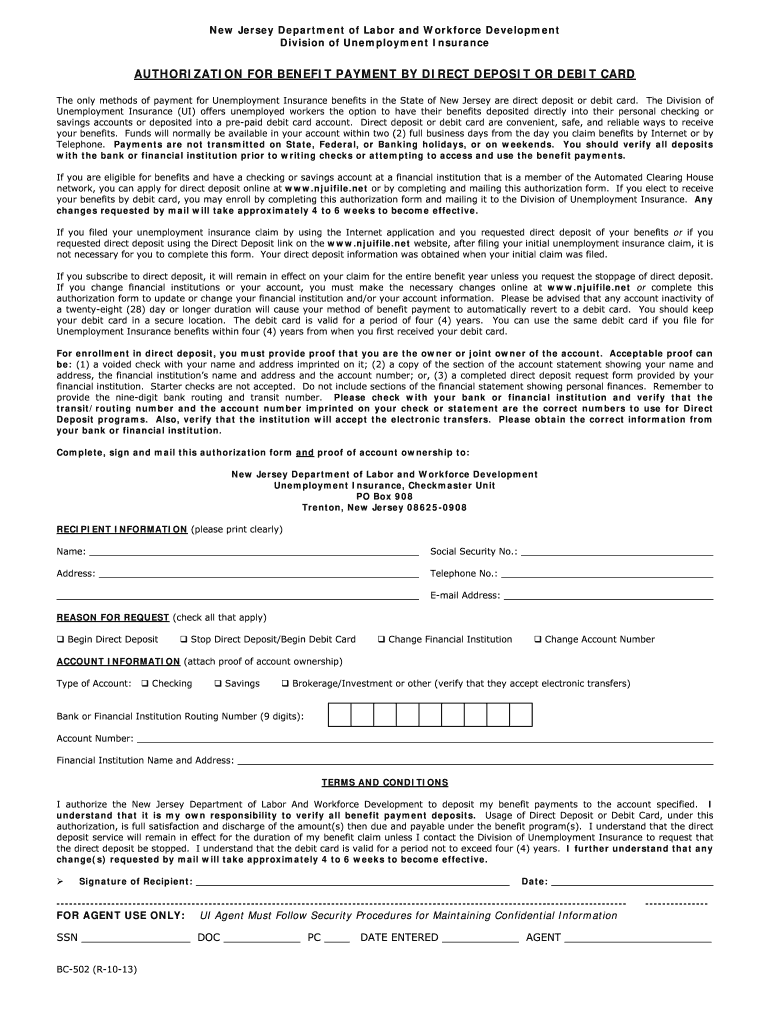
- Click ‘Get Form’ to open the nj online bc 502r 10 13 form in the editor.
- Begin by filling out the 'Recipient Information' section. Clearly print your name, Social Security number, address, telephone number, and email address.
- In the 'Reason for Request' section, check all applicable boxes to indicate whether you want to begin direct deposit, stop direct deposit and begin using a debit card, or change your financial institution or account number.
- Next, provide your 'Account Information.' Specify the type of account (checking or savings), and enter the bank routing number (9 digits) and account number. Ensure you attach proof of account ownership as required.
- Review the 'Terms and Conditions' carefully. Once you understand them, sign and date the form at the bottom.
- Finally, save your completed form and submit it by mailing it to the New Jersey Department of Labor and Workforce Development at the specified address.
Start using our platform today for free to streamline your document editing and submission process!
It's free
See more nj online bc 502r 10 13 form versions
Got questions?
Can I complete and sign my nj online bc 502r 10 13 form online?
Yes, and it’s really easy! DocHub is an online PDF editor with advanced document processing functions that allow you quickly adjust your forms, fill out empty fields and add new ones for other people to fill out, and create electronic signatures in several ways. Import your nj online bc 502r 10 13 form, provide information as required, and decide how you want to eSign your document - by typing your name, drawing your signature, uploading its image, or utilizing a QR code.
Can I edit nj online bc 502r 10 13 form on my phone?
As a comprehensive document editing platform, DocHub is available on mobile devices. Open DocHub in your choice of mobile internet browser and employ our intelligent mobile-friendly toolset to fill out your nj online bc 502r 10 13 form.
Security and compliance
At DocHub, your data security is our priority. We follow HIPAA, SOC2, GDPR, and other standards, so you can work on your documents with confidence.
Learn more


