Ri dem air pollution inventory mass balance reporting forms 2013-2026

Get Form
ri dem air pollution inventory mass balance reporting forms 2013 Preview on Page 1

Here's how it works

01. Edit your form online
Type text, add images, blackout confidential details, add comments, highlights and more.
02. Sign it in a few clicks
Draw your signature, type it, upload its image, or use your mobile device as a signature pad.
03. Share your form with others
Send it via email, link, or fax. You can also download it, export it or print it out.

How to use or fill out ri dem air pollution inventory mass balance reporting forms 2013 with our platform

Form edit decoration
9.5
Ease of Setup
DocHub User Ratings on G2
9.0
Ease of Use
DocHub User Ratings on G2
  1. Click ‘Get Form’ to open it in the editor.
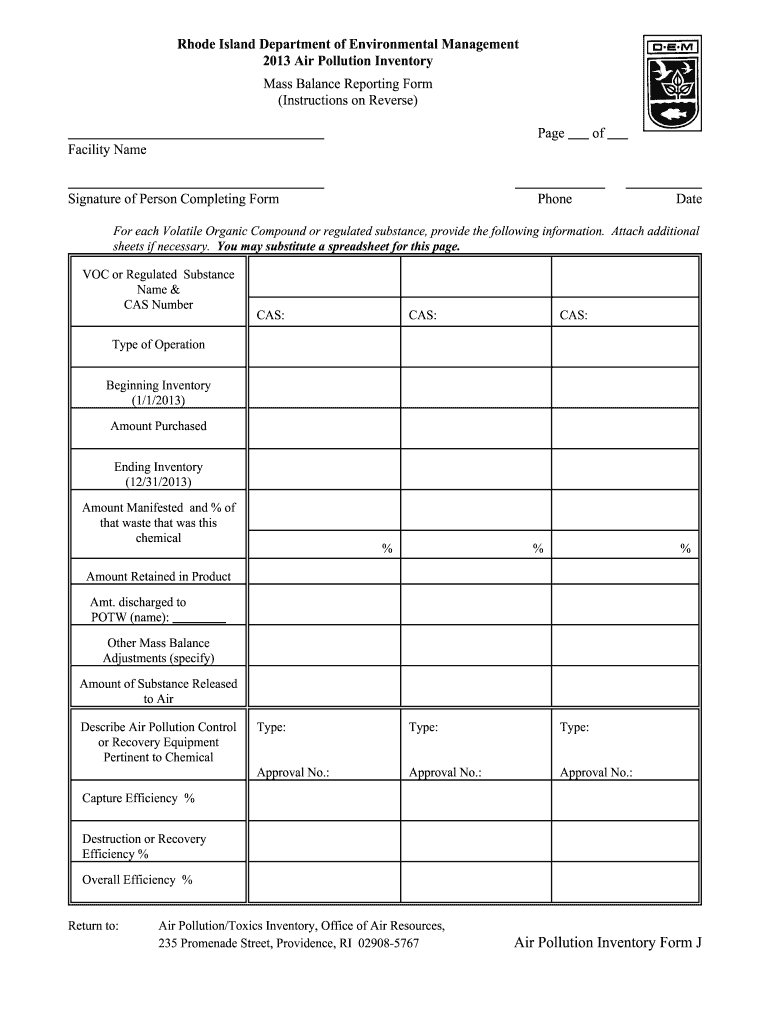
  2. Begin by entering the 'Facility Name' and the 'Signature of Person Completing Form'. Ensure you also provide a contact phone number and the date.
  3. For each Volatile Organic Compound (VOC) or regulated substance, fill in the 'Name & CAS Number'. If necessary, attach additional sheets or substitute a spreadsheet for this section.
  4. In the 'Type of Operation' field, describe how the substance was used, such as degreasing or printing.
  5. Report your 'Beginning Inventory' as of January 1, 2013, followed by the 'Amount Purchased' throughout the year. Use pounds if possible.
  6. Complete the 'Ending Inventory' for December 31, 2013, and indicate the 'Amount Manifested' along with its percentage.
  7. Fill in details regarding any amounts retained in products and those discharged to treatment plants. Specify any other mass balance adjustments needed.
  8. Finally, calculate and report the amount released to air and describe any air pollution control equipment used. Include efficiency percentages where applicable.

Start using our platform today to streamline your form completion process for free!

See more ri dem air pollution inventory mass balance reporting forms 2013 versions

We've got more versions of the ri dem air pollution inventory mass balance reporting forms 2013 form. Select the right ri dem air pollution inventory mass balance reporting forms 2013 version from the list and start editing it straight away!
Versions Form popularity Fillable & printable
2014 4.8 Satisfied (63 Votes)
2013 4.3 Satisfied (49 Votes)
be ready to get more

Complete this form in 5 minutes or less

Get form

Got questions?

We have answers to the most popular questions from our customers. If you can't find an answer to your question, please contact us.
Contact us

Signing documents on a mobile device is quick, easy, and doesn’t require software installation if you have an account with DocHub. Log in from any browser, complete your blank fields with your data, and click on Sign → Create your signature. You can draw your electronic signature the same way you usually do on paper, add its image to your ri dem air pollution inventory mass balance reporting forms 2013, or type in your name and stylize its look. No matter what option you select, your form will be valid.

Document editing with DocHub is equally convenient on desktop and mobile devices. You just need an internet browser to modify your ri dem air pollution inventory mass balance reporting forms 2013 on Android. Open our website and sign in to access the instruments you require. Add your file and introduce your intended changes. After that, you can keep your form in your file storage or send it out immediately.

Security and compliance

At DocHub, your data security is our priority. We follow HIPAA, SOC2, GDPR, and other standards, so you can work on your documents with confidence.

Learn more
ccpa2
pci-dss
gdpr-compliance
hipaa
soc-compliance