




Here's how it works



How to use or fill out dr2415 with our platform

- Click ‘Get Form’ to open the dr2415 in the editor.
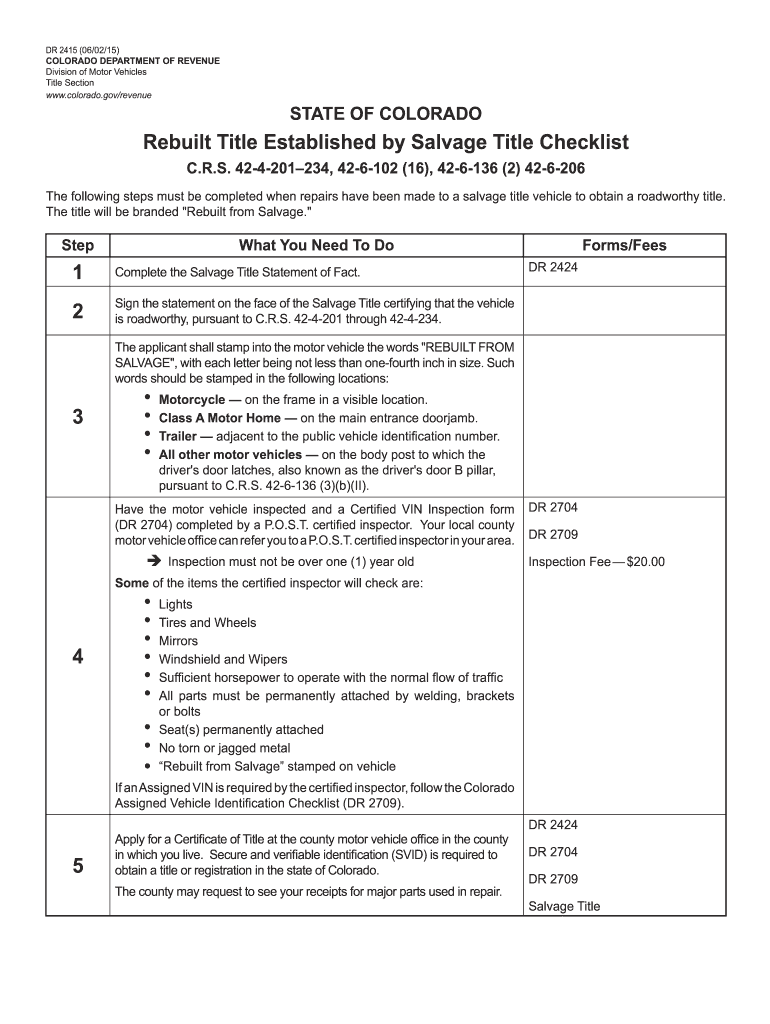
- Begin by completing the Salvage Title Statement of Fact. Ensure all required information is accurately filled out.
- Sign the statement on the face of the Salvage Title, certifying that the vehicle is roadworthy as per C.R.S. regulations.
- Stamp 'REBUILT FROM SALVAGE' into the motor vehicle at specified locations based on vehicle type, ensuring each letter is at least one-fourth inch in size.
- Have your motor vehicle inspected by a P.O.S.T. certified inspector and complete the Certified VIN Inspection form (DR 2704). Make sure this inspection is no older than one year.
- Apply for a Certificate of Title at your local county motor vehicle office, providing secure and verifiable identification (SVID) along with any receipts for major parts used in repairs.
Start using our platform today to streamline your dr2415 form completion for free!
It's free
Got questions?
Can I sign my statement of fact colorado example on a mobile?
Sure, you’ll find numerous apps for this on the web. Nonetheless, if you need to eSign your statement of fact colorado example without installing extra software, DocHub is the best choice you can make. This robust editor works on mobile devices just as on desktops. Open our editor in any internet browser, register or log in to your account, and start processing your paperwork.
How do you edit co statement of fact in Chrome?
If you use Chrome, there are two easy ways to modify your co statement of fact online. First, go to the DocHub site, add your file, and modify it using our toolbar. You may also set up our Chrome extension and modify any document by dragging and dropping it in your browser tab.
Security and compliance
At DocHub, your data security is our priority. We follow HIPAA, SOC2, GDPR, and other standards, so you can work on your documents with confidence.
Learn more


