Type text, add images, blackout confidential details, add comments, highlights and more.
02. Sign it in a few clicks
Draw your signature, type it, upload its image, or use your mobile device as a signature pad.
03. Share your form with others
Send the way of the turtle pdf via email, link, or fax. You can also download it, export it or print it out.
How to use or fill out application commercial turtle with our platform
Ease of Setup
DocHub User Ratings on G2
Ease of Use
DocHub User Ratings on G2
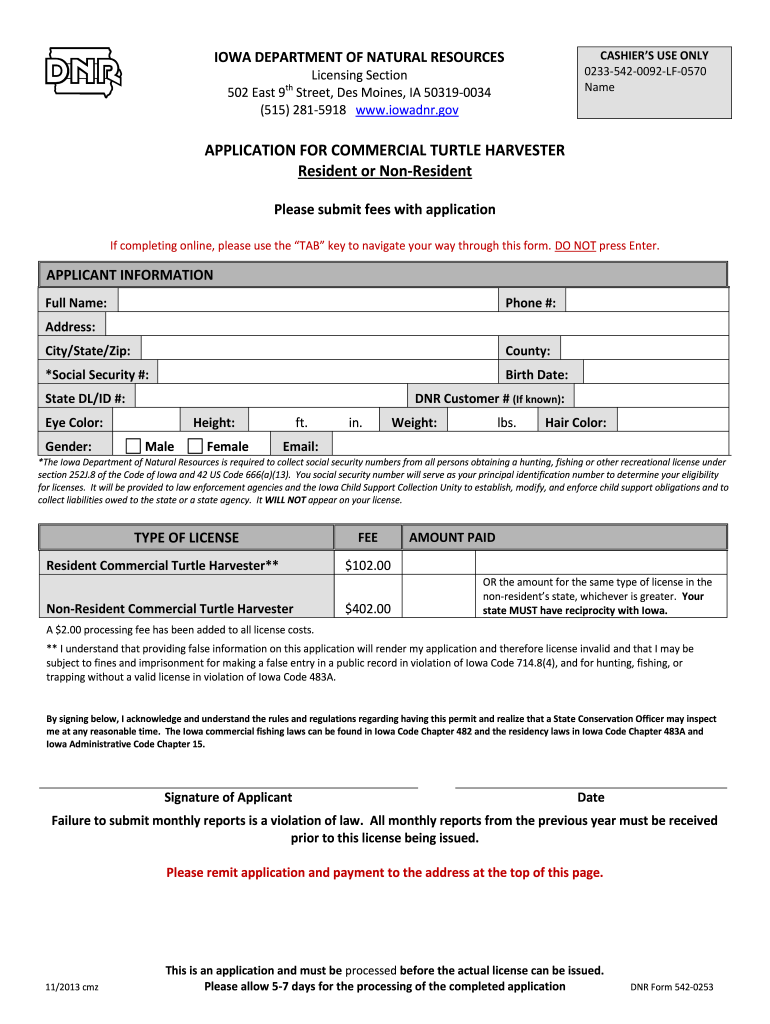
Click ‘Get Form’ to open the application commercial turtle in the editor.
Begin by entering your full name, phone number, and address details including city, state, and zip code in the 'APPLICANT INFORMATION' section.
Provide your county, social security number, birth date, and state driver's license or ID number. If you have a DNR customer number, include that as well.
Fill in your physical characteristics such as eye color, gender (select either Male or Female), height (in feet and inches), weight (in pounds), hair color, and email address.
Select the type of license you are applying for: Resident Commercial Turtle Harvester or Non-Resident Commercial Turtle Harvester. Ensure you understand the fee structure associated with each option.
Review the acknowledgment statement regarding false information and sign at the bottom of the form. Include the date of signing.
Once completed, submit your application along with payment to the specified address at the top of the form.
Start filling out your application commercial turtle today for free using our platform!
Fill out application commercial turtle online It's free
We've got more versions of the application commercial turtle form. Select the right application commercial turtle version from the list and start editing it straight away!
May 25, 2025 The following images have been designated by the AVID community as DocHub, rare or otherwise interesting finds. You can nominate a capture to be featuredRead more
Iowa DNR Application for Commercial Turtle Harvester
APPLICATION FOR COMMERCIAL TURTLE HARVESTER. Resident or Non-Resident. Please submit fees with application. If completing online, please use the TAB key toRead more
(1) Application for a commercial turtle farming permit shall be submitted on forms provided by the department and may be submitted at any time. The permitRead more
Cookie consent notice
This site uses cookies to enhance site navigation and personalize your experience.
By using this site you agree to our use of cookies as described in our Privacy Notice.
You can modify your selections by visiting our Cookie and Advertising Notice.