




Here's how it works



How to use or fill out modotorgmce 2012 form with our platform

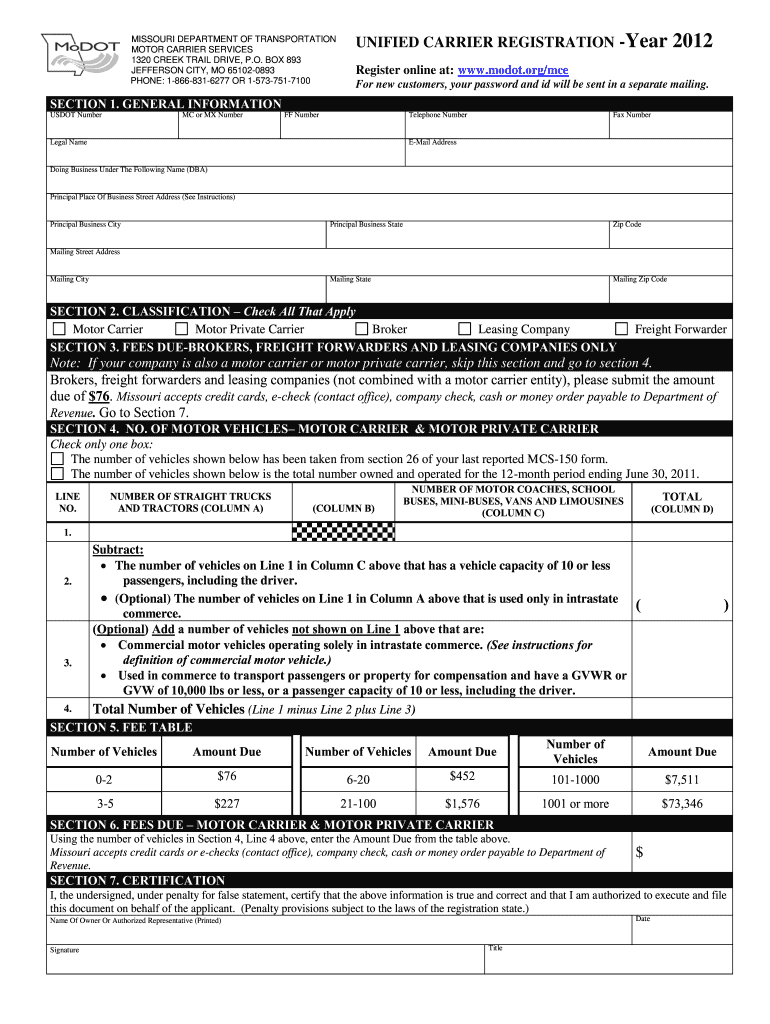
- Click ‘Get Form’ to open the modotorgmce 2012 form in the editor.
- Begin with Section 1: General Information. Fill in your USDOT Number, MC or MX Number, FF Number, and contact details including your legal name, telephone number, and email address.
- In Section 2: Classification, check all applicable boxes for your business type such as Motor Carrier or Broker.
- If applicable, proceed to Section 3: Fees Due for Brokers and Freight Forwarders. Enter the amount due based on your classification.
- For Section 4: No. of Motor Vehicles, indicate the number of vehicles owned and operated. Follow the instructions carefully to ensure accurate reporting.
- Refer to Section 5: Fee Table to determine the total fees based on the number of vehicles reported in Section 4.
- Complete Section 6 by entering the calculated Amount Due from the Fee Table.
- Finally, sign and date Section 7: Certification to confirm that all information is accurate and complete.
Start filling out your modotorgmce 2012 form online for free today!
It's free
See more modotorgmce 2012 form versions
Got questions?
Is it safe to sign my modotorgmce 2012 form electronically?
You need to use only reliable software solutions with strong security compliance to approve your paperwork electronically. DocHub is just the type of service you need! It stores data on Amazon Web Servers and complies with all required security requirements and eSignature regulations, so it’s a trustworthy way to eSign your modotorgmce 2012 form or other documents with this tool.
How to complete modotorgmce 2012 form on the internet free of charge in 2024?
With a swift editing system like DocHub, you do not need anything but a browser and internet connection to modify your modotorgmce 2012 form online easily. Upload your document or find the appropriate form in DocHub’s catalog, open our editor with a single click, and complete it electronically. To revise your forms anytime, register a free account with DocHub.
Security and compliance
At DocHub, your data security is our priority. We follow HIPAA, SOC2, GDPR, and other standards, so you can work on your documents with confidence.
Learn more


