




Here's how it works



How to use or fill out Contribution and Disclosure for Medical Writers - The Oncologist with our platform

- Click ‘Get Form’ to open it in the editor.
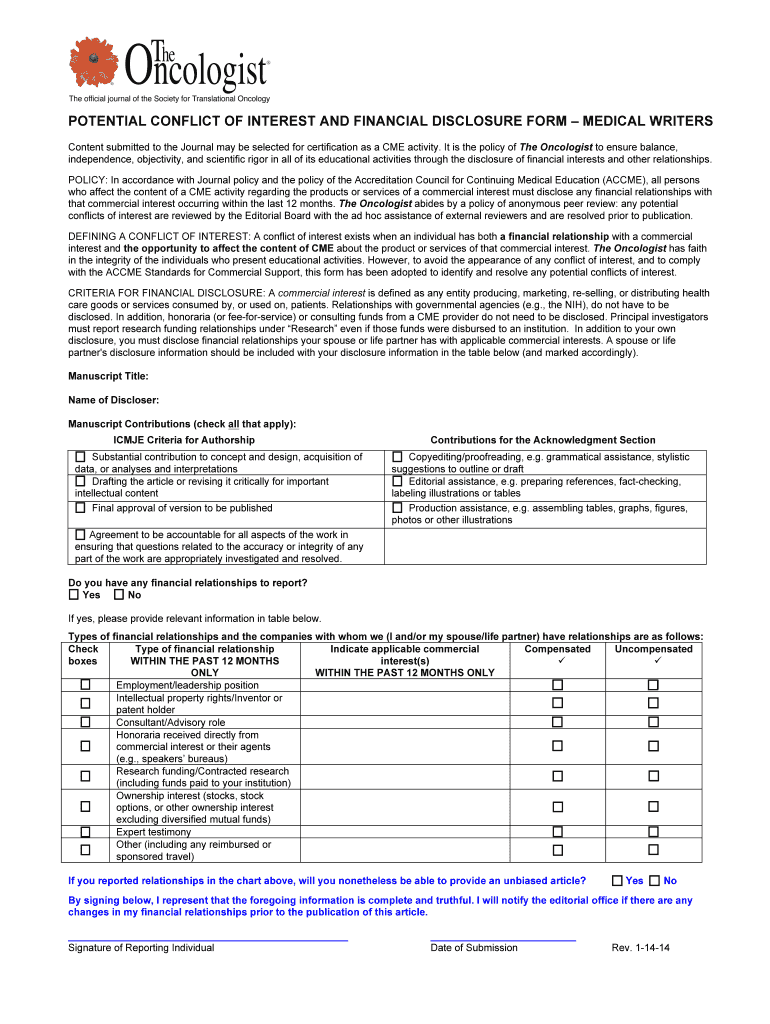
- Begin by entering the 'Manuscript Title' and 'Name of Discloser' at the top of the form. This information is crucial for identifying your submission.
- In the 'Manuscript Contributions' section, check all applicable boxes that reflect your contributions according to ICMJE criteria. Be thorough to ensure accurate representation.
- Proceed to disclose any financial relationships by selecting 'Yes' or 'No'. If you select 'Yes', provide detailed information in the table below regarding your financial relationships within the past 12 months.
- Complete the signature section at the bottom, confirming that all provided information is complete and truthful. Don't forget to date your submission.
Start using our platform today for free to streamline your document editing and ensure a smooth submission process!
It's free
See more Contribution and Disclosure for Medical Writers - The Oncologist versions
| Versions | Form popularity | Fillable & printable |
|---|---|---|
| 2014 | 4.8 Satisfied (126 Votes) |
Got questions?
Can I complete and sign my report title online?
Yes, and it’s really easy! DocHub is an online PDF editor with advanced document processing functions that allow you quickly adjust your paperwork, fill out empty fields and insert new ones for other people to fill out, and create electronic signatures in several ways. Import your report title, provide information as required, and decide how you want to eSign your document - by typing your name, drawing your signature, uploading its picture, or utilizing a QR code.
How do you complete Contribution and Disclosure for Medical Writers - The Oncologist online?
You can complete and sign your Contribution and Disclosure for Medical Writers - The Oncologist online, even on a tight deadline. All you need to access high quality editing instruments on any device is a DocHub account, that you can register in a few moments. When you sign up, add your document or find what you are looking for in our catalog, complete it utilizing the editing instruments you want, and put your electronic signature on it at the end.
Security and compliance
At DocHub, your data security is our priority. We follow HIPAA, SOC2, GDPR, and other standards, so you can work on your documents with confidence.
Learn more


