




Here's how it works



How to use or fill out morris community ymca 2017-2018 kid zone registration form with our platform

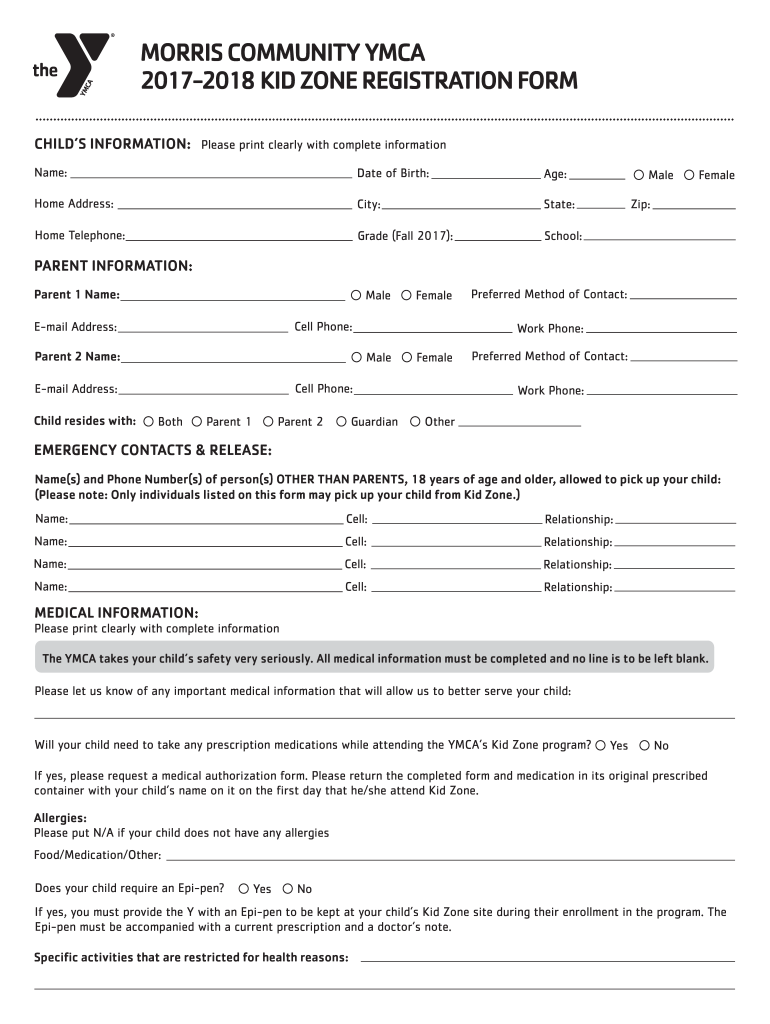
- Click ‘Get Form’ to open the Morris Community YMCA 2017-2018 Kid Zone Registration Form in the editor.
- Begin by filling out the 'Child’s Information' section. Ensure you print clearly and provide complete details such as your child's name, date of birth, age, and home address.
- Next, move to the 'Parent Information' section. Here, input both parents' names, contact numbers, and preferred methods of contact. Make sure to indicate who your child resides with.
- In the 'Emergency Contacts & Release' section, list individuals authorized to pick up your child. Include their names, phone numbers, and relationships to your child.
- Complete the 'Medical Information' section thoroughly. Provide any relevant medical details and indicate if your child requires medication during attendance.
- Review the 'Parent Statement of Understanding' carefully before signing it at the bottom of the form. This confirms your agreement with all policies outlined.
- Finally, select your desired enrollment option under 'Kid Zone Registration' and fill in payment details as required.
Start using our platform today for free to streamline your registration process!
It's free
See more morris community ymca 2017-2018 kid zone registration form versions
Got questions?
Can I complete and sign my morris community ymca 2017-2018 kid zone registration form online?
Yes, and it’s really straightforward! DocHub is a web-based PDF editor with advanced document management functions that allow you promptly edit your documents, fill out empty fields and insert new ones for other people to fill out, and create electronic signatures in several ways. Add your morris community ymca 2017-2018 kid zone registration form, give information as required, and select how you want to eSign your template - by typing your name, drawing your signature, uploading its image, or using a QR code.
What browser do I need to edit morris community ymca 2017-2018 kid zone registration form online?
If you want to edit your morris community ymca 2017-2018 kid zone registration form online quickly, it does not matter what internet browser you employ. DocHub’s straightforward editing instruments are accessible using any internet browser. Simply open the appropriate tab within our editor, add your document, and fill it out without stress.
Security and compliance
At DocHub, your data security is our priority. We follow HIPAA, SOC2, GDPR, and other standards, so you can work on your documents with confidence.
Learn more


