




Here's how it works



How to use or fill out biopsychosocial worksheet with our platform

- Click ‘Get Form’ to open the biopsychosocial worksheet in the editor.
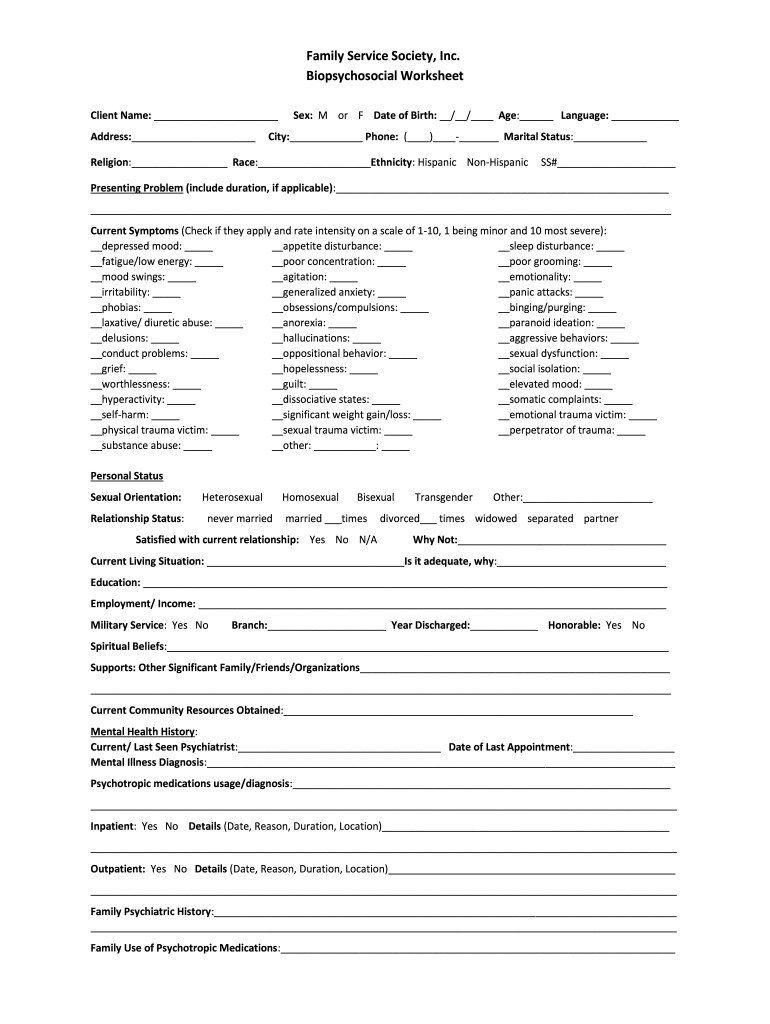
- Begin by entering the client’s name and address at the top of the form. This information is crucial for identifying the individual being assessed.
- Fill in demographic details such as sex, date of birth, age, language, city, phone number, marital status, religion, race, and ethnicity. Accurate demographic data helps in understanding the client's background.
- In the 'Presenting Problem' section, describe any issues faced by the client along with their duration. This provides context for further assessment.
- For 'Current Symptoms', check applicable symptoms and rate their intensity on a scale of 1-10. This quantifies the severity of each symptom for better evaluation.
- Complete sections on personal status, current living situation, education, employment/income, military service history, spiritual beliefs, and support systems. These details offer insight into the client's overall well-being.
- Document mental health history including past psychiatric appointments and diagnoses. This is essential for understanding treatment needs.
- Finally, review all entries for accuracy before saving or sharing your completed worksheet. Our platform allows you to easily export or share your document securely.
Start using our platform today to efficiently complete your biopsychosocial worksheet online for free!
It's free
See more biopsychosocial worksheet versions
| Versions | Form popularity | Fillable & printable |
|---|---|---|
| 2017 | 4.6 Satisfied (51 Votes) |
Got questions?
How do I sign my biopsychosocial worksheet without printing?
Electronic signatures are a perfect alternative to traditional signing, as they save time, effort, and money people spend on printing, scanning, and paper delivery. You can electronically sign your biopsychosocial worksheet using a reliable and powerful online document processing services like DocHub. It complies with main eSignature standards (ESIGN and UETA), so all documents approved there are legally binding and have the same validity as physically signed ones.
Can I edit biopsychosocial worksheet on my phone?
As a comprehensive document modifying platform, DocHub is available on mobile phones. Open DocHub in your choice of mobile browser and employ our smart mobile-friendly toolset to fill out your biopsychosocial worksheet.
Security and compliance
At DocHub, your data security is our priority. We follow HIPAA, SOC2, GDPR, and other standards, so you can work on your documents with confidence.
Learn more


