STAFF COMMUNICATION LOG - portal.alliesnj.org 2026

Get Form
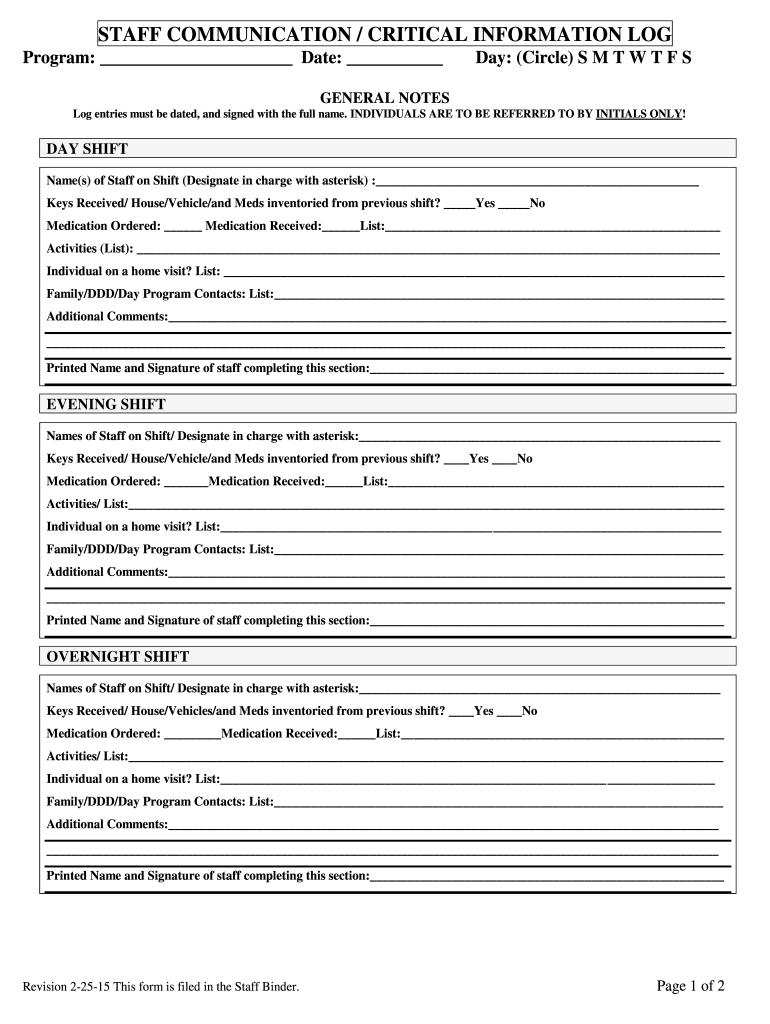
alliesnj org Preview on Page 1

Here's how it works

01. Edit your alliesnj org online
Type text, add images, blackout confidential details, add comments, highlights and more.
02. Sign it in a few clicks
Draw your signature, type it, upload its image, or use your mobile device as a signature pad.
03. Share your form with others
Send employee communication log via email, link, or fax. You can also download it, export it or print it out.

How to use or fill out STAFF COMMUNICATION LOG - portal.alliesnj.org with our platform

Form edit decoration
9.5
Ease of Setup
DocHub User Ratings on G2
9.0
Ease of Use
DocHub User Ratings on G2
  1. Click ‘Get Form’ to open it in the editor.
  2. Begin by entering the program name and date at the top of the form. This sets the context for your log entries.
  3. Circle the appropriate day of the week to indicate when the log is being filled out.
  4. In the 'DAY SHIFT' section, list the names of staff on shift, marking the designated person in charge with an asterisk. Ensure all entries are dated and signed with full names.
  5. Indicate whether keys, house, vehicle, and medications were inventoried from the previous shift by selecting 'Yes' or 'No'.
  6. Document any medications ordered and received, along with a list of activities conducted during the shift.
  7. Record any individuals on home visits and provide contact information for family, DDD, or day program contacts as necessary.
  8. Add any additional comments relevant to that shift before signing off with your printed name and signature.
  9. Repeat similar steps for both 'EVENING SHIFT' and 'OVERNIGHT SHIFT', ensuring all sections are completed thoroughly.
  10. For critical information logs, document unexpected behaviors or emergencies as they arise, including time and associated actions taken.

Start using our platform today to streamline your documentation process for free!

See more STAFF COMMUNICATION LOG - portal.alliesnj.org versions

We've got more versions of the STAFF COMMUNICATION LOG - portal.alliesnj.org form. Select the right STAFF COMMUNICATION LOG - portal.alliesnj.org version from the list and start editing it straight away!
Versions Form popularity Fillable & printable
2015 4.6 Satisfied (21 Votes)
be ready to get more

Complete this form in 5 minutes or less

Get form

Got questions?

We have answers to the most popular questions from our customers. If you can't find an answer to your question, please contact us.
Contact us

Electronic document approval requires a software solution that complies with data security and eSignature standards. DocHub is a great tool for that, because it meets all the aforementioned requirements. Whatever method you like to sign your employee favorite things list printable in DocHub, your electronic signature will be legally binding and court-admissible.

If you edit your logportal with DocHub, you will not need to look for other applications or solutions to eSign it. An electronic signature is part of DocHub’s substantial editing toolset, which enables you to apply changes in your form without jumping between platforms. Simply complete your form, double-check the correctness of your information and put your electronic signature at the end to make it submission-ready within minutes.

Security and compliance

At DocHub, your data security is our priority. We follow HIPAA, SOC2, GDPR, and other standards, so you can work on your documents with confidence.

Learn more
ccpa2
pci-dss
gdpr-compliance
hipaa
soc-compliance
be ready to get more

Complete this form in 5 minutes or less

Get form