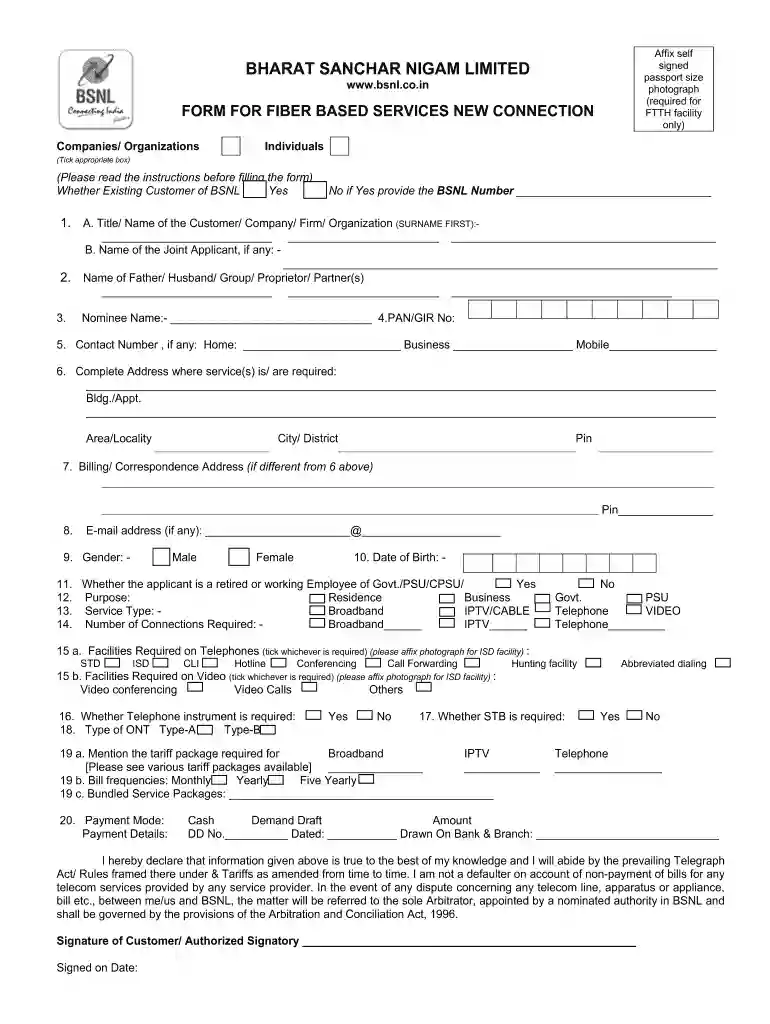
Bsnl fiber new connection form 2026

Get Form
bsnl fiber new connection Preview on Page 1

Here's how it works

01. Edit your bsnl fiber new connection online
Type text, add images, blackout confidential details, add comments, highlights and more.

02. Sign it in a few clicks
Draw your signature, type it, upload its image, or use your mobile device as a signature pad.

03. Share your form with others
Send bsnl application form via email, link, or fax. You can also download it, export it or print it out.

Definition and Meaning of the BSNL Fiber New Connection Form

The BSNL Fiber New Connection Form is an essential document for individuals and businesses looking to apply for Fiber to the Home (FTTH) services provided by Bharat Sanchar Nigam Limited (BSNL). This form serves as an official application to initiate the process of obtaining broadband services through a fiber connection. By completing this form, applicants provide necessary information related to their personal or business details, service preferences, and payment information. Moreover, signing the form helps indicate the applicant's acceptance of BSNL’s terms and conditions regarding service usage.

Key Features of the BSNL Fiber New Connection Form

  • Comprehensive Data Collection: The form typically requires personal identification, address, and contact details to ensure proper service installation.
  • Service Options: Applicants can indicate their preferences regarding speed, installation type, and any additional features requested.
  • Terms and Conditions: It includes provisions that applicants agree to, which outline the responsibilities of both BSNL and the customer.

How to Use the BSNL Fiber New Connection Form

To effectively use the BSNL Fiber New Connection Form, applicants must follow a structured approach that ensures all required information is accurately captured.

Step-by-Step Guide to Using the Form

  1. Acquire the Form: The form can often be downloaded as a PDF or accessed online through the BSNL website.
  2. Fill in Personal Information: Include your name, address, email, and contact number.
  3. Select Service Preferences: Choose the type of fiber connection needed, including upload and download speeds.
  4. Attach Required Documents: Attach a passport-sized photograph and any necessary identification, such as KYC documents.
  5. Review the Form: Ensure all information is correct to avoid any delays in service activation.
  6. Submit the Form: This can typically be done in person at the nearest BSNL office or mailed to the designated address.

Steps to Complete the BSNL Fiber New Connection Form

Completing the BSNL Fiber New Connection Form requires careful attention to detail to ensure it is processed smoothly.

Detailed Completion Instructions

  • Part One: Personal Information: Enter full name, residential address, and contact numbers accurately to facilitate easy communication.
  • Part Two: Service Selection: Indicate the type of connection—whether residential or business—and specify speed preferences.
  • Part Three: Acknowledgment of Terms: Carefully read through the terms and confirmation section, signifying your agreement.
  • Final Checks: After filling out all necessary sections, verify that the form is complete, with all required documents attached.

Common Pitfalls to Avoid

  • Omitting required documents can lead to delays in processing. Ensure everything is included.
  • Incomplete fields may result in form rejection. Double-check for accuracy.

Important Terms Related to the BSNL Fiber New Connection Form

Understanding the key terms associated with the BSNL Fiber New Connection Form can aid applicants in navigating the application process more efficiently.

Relevant Terminology

  • FTTH: Fiber to the Home, referring to the installation of fiber optic cables directly to homes or businesses for high-speed internet access.
  • Subscriber: The individual or entity that signs the form and assumes responsibility for the fiber connection.
  • KYC Documents: Know Your Customer documents required for identity verification, including government-issued ID and address proof.

Required Documents for BSNL Fiber New Connection Form Submission

Applicants must prepare and submit specific documents alongside the BSNL Fiber New Connection Form to ensure the processing of their applications.

List of Required Documents

  • Identity Proof: A government-issued identification card, such as a driver's license or passport.
  • Address Proof: Utility bills or rental agreements can be accepted to verify your residence.
  • Photograph: A recent passport-sized photo is generally necessary for the application.
  • Any Additional Documents: Depending on the service type, additional documents may be required, such as business registration if applying for a commercial connection.

Form Submission Methods for the BSNL Fiber New Connection Form

Understanding the various submission methods for the BSNL Fiber New Connection Form can help ensure an efficient application process.

Submission Options

  • Online Submission: Some applicants can complete and submit the form through BSNL's online portal, which may expedite the process.
  • In-Person Submission: Visit a local BSNL office to submit the completed form physically, ensuring that all required documents are attached.
  • Mail Submission: Alternatively, the form can be mailed to a specified BSNL address, though this may take longer than other methods.

Each submission method has its own timelines and requirements. Online submissions may offer immediate confirmation, while mailed applications may take longer to process.

See more bsnl fiber new connection form versions

We've got more versions of the bsnl fiber new connection form form. Select the right bsnl fiber new connection form version from the list and start editing it straight away!
Versions Form popularity Fillable & printable
2011 4.3 Satisfied (52 Votes)
be ready to get more

Complete this form in 5 minutes or less

Get form

Got questions?

We have answers to the most popular questions from our customers. If you can't find an answer to your question, please contact us.
Contact us
FTTH includes fiber-optic access solutions designed for residential deployments. In FTTH networks, fibers are directly connected to individual homes or multitenant buildings. FTTH includes various flavors of both PONs and PTP Ethernet-based solutions.
Fibre to the Home (FTTH), sometimes known as Fibre to the Premises (FTTP), is a broadband internet connection technology that uses optical fibre to deliver high-speed broadband internet directly to individual buildings such as households, apartment complexes, and businesses.
To activate the service, BSNL FTTH customers need to register through BSNLs official portal at . The registration process requires users to enter their FTTH connection number and registered mobile number for verification, enabling access to the roaming service nationwide.
General guidelines for BSNL mobile internet setting Step1: First time users must send SMS START to number 1925. There will be a reply regarding activation of Mobile Data from BSNL. After this SMS, data will be enabled.
BSNL Broadband Plans (2024): Best BSNL Fiber Unlimited Plans, Price, Validity, Benefits, and More. BSNL Rs 329 Fiber Entry Broadband Plan. BSNL Rs 399 Fiber Rural Home Broadband Plan. BSNL Rs 449 Fiber Basic Neo Broadband Plan. BSNL Rs 499 Bharat Fiber Basic Broadband Plan. BSNL Rs 599 Bharat Fiber Basic Plus Broadband Plan.

Security and compliance

At DocHub, your data security is our priority. We follow HIPAA, SOC2, GDPR, and other standards, so you can work on your documents with confidence.

Learn more
ccpa2
pci-dss
gdpr-compliance
hipaa
soc-compliance
be ready to get more

Complete this form in 5 minutes or less

Get form

People also ask

FTTH (Fiber to the Home) FTTH includes fiber-optic access solutions designed for residential deployments. In FTTH networks, fibers are directly connected to individual homes or multitenant buildings. FTTH includes various flavors of both PONs and PTP Ethernet-based solutions.
Other Main Services For any EnquiryTo Apply BSNL Mobile all India Helpline Number 1503 Number 1800-180-1503 Customer Service Center Download Forms BSNL Broadband and Internet services Helpline Number 1800-4444 Customer Service Center Download Forms BSNL MPLS Help Desk Number 1800-425-1957 Download Forms1 more row

bsnl application form pdf