Lifesecure insurance company greenville sc 2026

Get Form
beneficiary address Preview on Page 1

Here's how it works

01. Edit your beneficiary address online
Type text, add images, blackout confidential details, add comments, highlights and more.

02. Sign it in a few clicks
Draw your signature, type it, upload its image, or use your mobile device as a signature pad.

03. Share your form with others
Send beneficiary certificate via email, link, or fax. You can also download it, export it or print it out.

How to use or fill out LifeSecure Insurance Company Greenville SC with our platform

Form edit decoration
9.5
Ease of Setup
DocHub User Ratings on G2
9.0
Ease of Use
DocHub User Ratings on G2
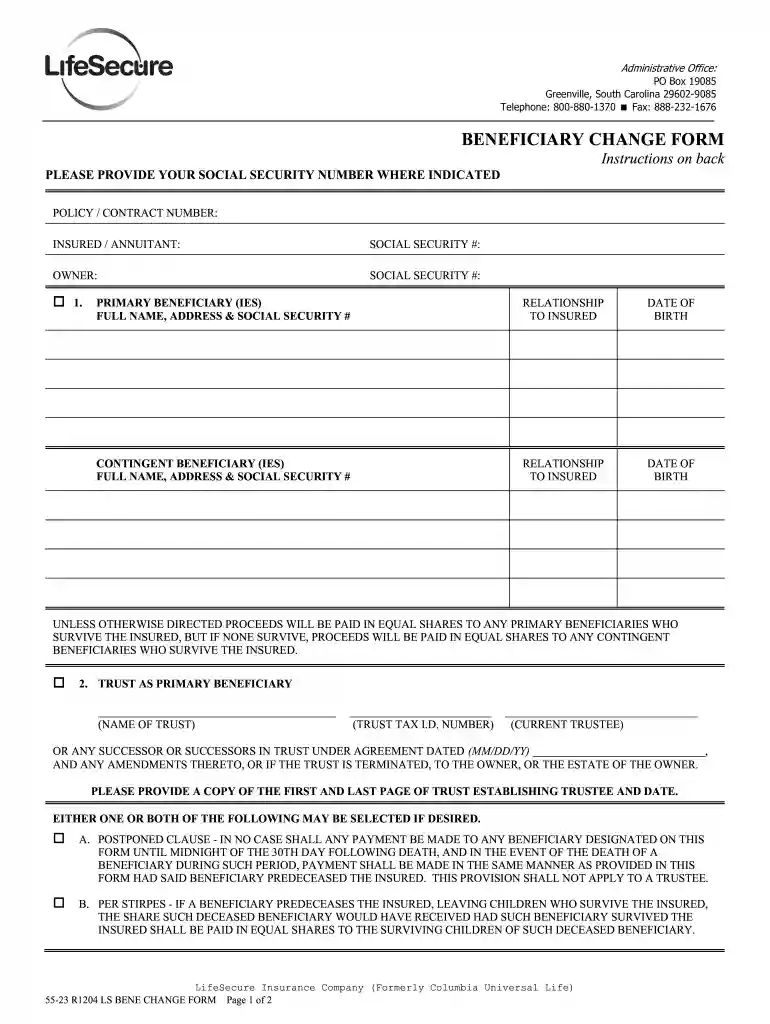
  1. Click ‘Get Form’ to open the LifeSecure Insurance Company Beneficiary Change Form in the editor.
  2. Begin by entering your Policy/Contract Number and the Insured/Annuitant's details, including their Social Security Number.
  3. Fill in the Owner's information, including their Social Security Number. This ensures that all parties are correctly identified.
  4. In Section 1, list the Primary Beneficiaries. Provide their full names, addresses, Social Security Numbers, relationships to the insured, and dates of birth.
  5. If applicable, complete Section 2 for a Trust as a Primary Beneficiary. Include the trust name and tax ID number along with current trustee details.
  6. Select any desired clauses (Postponed Clause or Per Stirpes) by checking the appropriate boxes.
  7. Sign and date the form at the bottom. Ensure that your signature is witnessed by someone who is not a relative or beneficiary.

Start using our platform today to easily fill out your LifeSecure Insurance forms online for free!

See more lifesecure insurance company greenville sc versions

We've got more versions of the lifesecure insurance company greenville sc form. Select the right lifesecure insurance company greenville sc version from the list and start editing it straight away!
Versions Form popularity Fillable & printable
2004 4.8 Satisfied (54 Votes)
1999 4.4 Satisfied (306 Votes)
be ready to get more

Complete this form in 5 minutes or less

Get form

Got questions?

We have answers to the most popular questions from our customers. If you can't find an answer to your question, please contact us.
Contact us
f: 866.582. 7706 Applications and forms can be found on the LifeSecure website in your Agent Portal. Your LifeSecure portal provides a wide variety of resources and tools to help you do business, including access to your book of LifeSecure business and commission information (under VIRTUAL OFFICE).
In April 2011, Athene bought Liberty Life Insurance Co. of Greenville, S.C., from Royal Bank of Canada.
The forms are available by contacting Policyholder Support at 1-888-575-8246. Note: Children must be under age 26. Please cancel my policy as of my current paid to date. Please cancel my policy as of my current paid to date.

Security and compliance

At DocHub, your data security is our priority. We follow HIPAA, SOC2, GDPR, and other standards, so you can work on your documents with confidence.

Learn more
ccpa2
pci-dss
gdpr-compliance
hipaa
soc-compliance
be ready to get more

Complete this form in 5 minutes or less

Get form